
Keyboard Press Events
Keyboard
PressEnterEvents
- Enter
Tab
Home
Delete
Shift+Home+Delete
Esc
CTRL+B
Down
Up
Page_Down
Left
F2
Copy
Paste
Enter
Tab
Home
Delete
Shift+Home+Delete
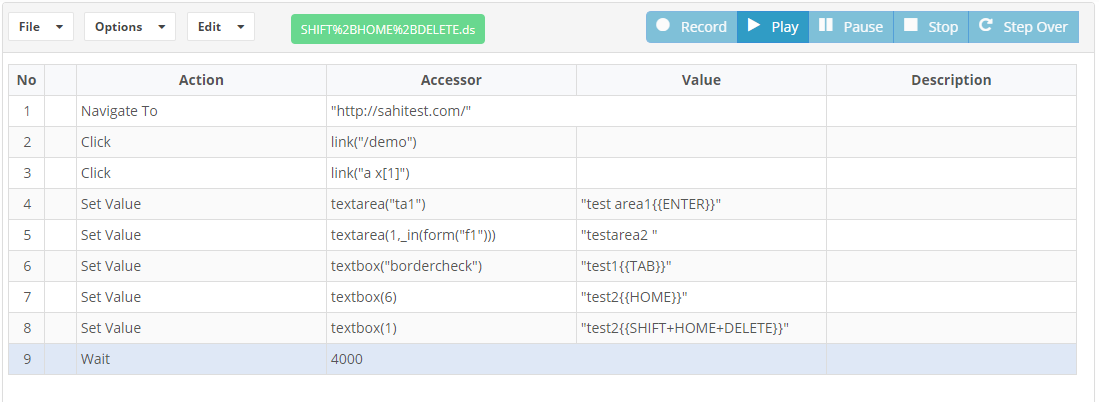
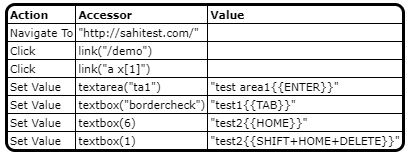
All of the mentioned KeyPress events are supported. All of them are associated with a search box, where you want to enter the keyboard after setting the text in a text field, pressing tab after setting the text in a text field to go to the next element on the page when there is no option on the page to click after setting the value.


Esc
There could be instances where you would want to press the Keyboard Esc for closing the pop up for example.
Test Designer supports pressing Esc from the keyboard.

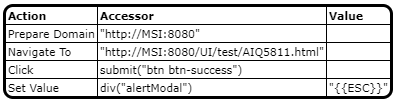
Javascript example:
setSearchRetries(3);
prepareDomain("http://MSI:8080");
click(submit("btn btn-success"));
setValue(div("alertModal"),"{{ESC}}");
- CTRL+B
Down
Up
Page_Down
Left
F2
Copy
Paste
Test Designer supports keyboard events of all the above keyboards, below is the example of the usage.

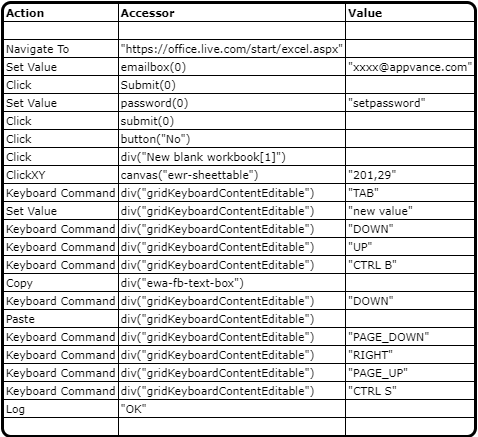
Javascript example:
navigateTo("https://office.live.com/start/excel.aspx");
setValue(emailbox(0),"xxxx@appvance.com");
click(submit(0));
setDescription("provide password in double quotes");
setValue(password(0),);
click(submit(0));
click(div("New blank workbook[1]"));
wait(5000);
setDescription("Clicking some cell");
clickXY(canvas("ewr-sheettable"),"201,29");
assertExists(canvas("ewr-sheettable"));
keyboardCommand(setValue(div("gridKeyboardContentEditable"),"new value");
keyboardCommand(div("gridKeyboardContentEditable"),"DOWN");
keyboardCommand(div("gridKeyboardContentEditable"),"UP");
keyboardCommand(div("gridKeyboardContentEditable"),"CTRL B");
copy(div("ewa-fb-text-box"));
keyboardCommand(div("gridKeyboardContentEditable"),"DOWN");
paste(div("gridKeyboardContentEditable"));
keyboardCommand(div("gridKeyboardContentEditable"),"PAGE_DOWN");
keyboardCommand(div("gridKeyboardContentEditable"),"RIGHT");
keyboardCommand(div("gridKeyboardContentEditable"),"PAGE_UP");
keyboardCommand(div("gridKeyboardContentEditable"),"CTRL S");
keyboardCommand(div("gridKeyboardContentEditable"),"CTRL V");
log("OK");
Last updated: July 28, 2023
If you have any feedback on this topic, please contact us at documentation@appvance.ai