
Best Practices for TestNG and Selenium testing in AIQ
Best
PracticesWhen forusing TestNGAIQ andto Seleniumrun TestingEclipse Java-based tests, it is necessary to consider the following considerations to minimize the problems that might arise during the integration process:
Remove System.exit(0) commands
Verify all Dependencies are present
Verify all resources are present
Verify that your Code is Thread Safe
Remove System.exit(0) commands
System.exit() commands will cause Java Virtual machine to be killed so this will effectively kill the running of an AIQ scenario. So these lines must be deleted from your java project.
Verify all Dependencies are present
Add all dependencies in AIQ resources, including those used from the IDE configured environment (for example used maven dependencies).
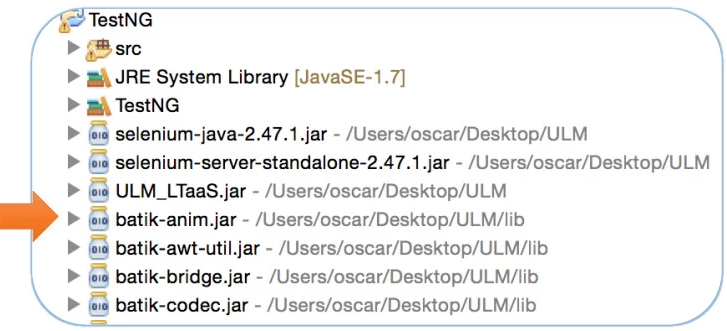
UseAppvance thisscenario pageshould have all the necessary dependencies so the test can be run outside the IDE environment. In Eclipse you can see all .jar files as in figure 1.
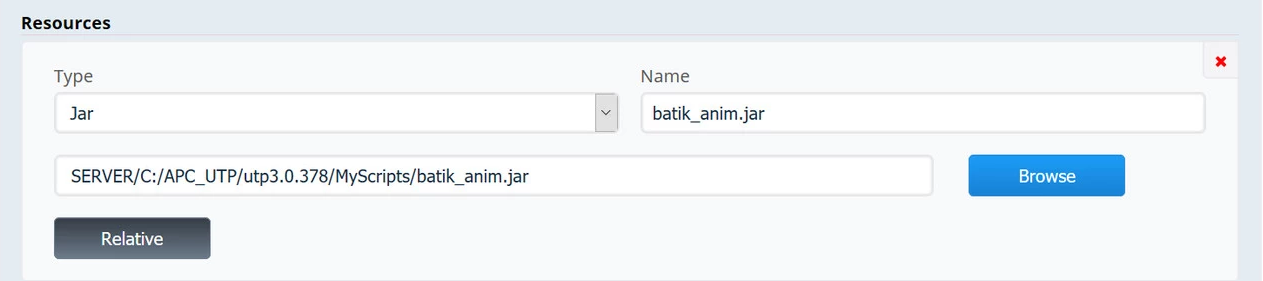
In the AIQ scenario, you need to maintainadd Selenium/TestNGall projectsthe required .jar files as Java type resources, as seen below.
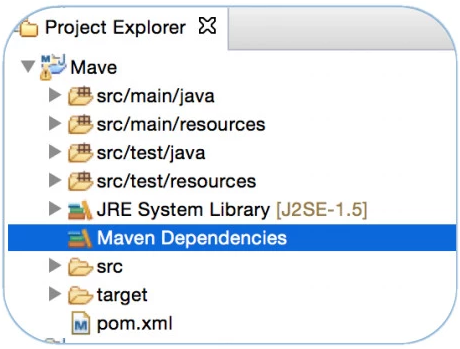
There are dependencies that aremight executedbe throughused AIQ. Keepby the frameworkIDE deterministic,project portable,that is provided by the IDE configuration environment, for example, those present in the Eclipse Maven Dependencies folder when using an Eclipse Maven Project.
If your project is using any of these dependencies present in the Maven Dependencies folder in Eclipse, their respective .jar must be added also to AIQ scenario resources, as type Jar as seen in the above figure.
IMPORTANT: Make sure to convert the resource paths to relative paths before executing your scenario.
Verify all resources are present
Need to make sure that files accessed in your java code are present in AIQ scenario, and easyvery important, verify that they are in the required paths.
In code, file paths should use"/" as path separator as that ensures your paths are compatible with linux/mac/windows nodes.
In code, file paths must NOT use absolute references like D:\myfolder\file.xml, but use relative paths always like ./myfolder/file.xml
For example, if you have an Eclipse project that requires access to diagnose.files like properties, configuration, text, or other resources files, you need to ensure that those files do get exported inside the .jar that will read in AIQ test case definition.
One way to ensure that resource files are exported inside the project .jar, is by putting the required resource files inside the Eclipse src folder.
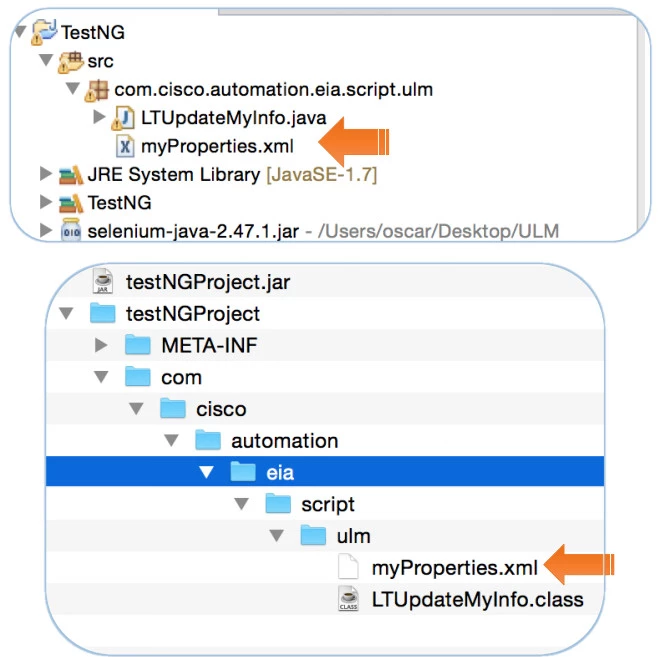
If you have an Eclipse project with a resources folder (and obviously, it is outside the src folder), then that folder will have to be manually added to the .jar exported by Eclipse.
If a resource file is not found during AIQ execution, an error will be listed with an exception like java.lang.NullPointerException, with the offending class and the line number. Use that info to verify in the code the missing resource and the path required.
When
Verify that your Code is Thread Safe
Code that works fine in a single-threaded environment does not necessarily mean that it will perform well in a multi-threaded environment, as in AIQ testing with multiple users.
So you should test your project in AIQ first in functional test with one test case. If it runs smoothly then try it in a performance test with 10 or more users. If errors pop up, a big chance exists that there are concurrency design problems. The error logs point to the code that needs to be checked for concurrency safety.
All threads in Java virtual machines share the same heap and method areas. Because all threads share the same heap, and the heap is where all instance's variables are stored, multiple threads can attempt to use thisthe guidancesame
Aobject'sSelenium/TestNGinstanceprojectvariables concurrently.
Likewise, because all threads share the same method area, and the method area ispackagedwhereforallAIQclassexecution.Testsvariablesneedaredata,stored,environment,multipleorthreadsbrowsercanparameters.FailuresattemptmusttobeusereadabletheinsameAIQclassreportsvariablesandconcurrently.pipelineFor
output.
Recommended
class KeepMyCountertests{
independentprivateandstaticavoidinthiddencounterordering=dependencies.Externalize0;
environmentpublicURLs,staticcredentials,intandgetCount()test{
data.Usereturnexplicitcounter++;waits//andthisstableislocatorsnotratherthread-safe
}
}
The above method is not thread-safe, because the counter++; operation is not atomic, which means it consists of more than fixedone sleeps.
Note:value For new scriptless functional coverage, prefer Scenario Editor where it fitsand the useother case.thread (user) can be increasing the value by one at the same time.
Articles with more on designing for thread safety:
"Fundamentals of Thread Safety in Java" from developer.com
"Design for Thread Safety" from InfoWorld
You need not worry about multithreaded access to local variables, method parameters, and return values because these variables reside on the Java stack. In the JVM, each thread is awarded its own Java stack.
Last updated: SeptemberJune 21,29, 20262023
If you have any feedback on this topic, please contact us at documentation@appvance.ai