
How to Execute jar with dependencies from scenario builder ?
Below article explains how to execute jar with dependencies :
Sample code:
package TestNG;
import java.io.FileInputStream;
import java.io.FileNotFoundException;
import java.io.IOException;
import java.util.concurrent.TimeUnit;
import org.openqa.selenium.By;
import org.openqa.selenium.WebDriver;
import org.openqa.selenium.firefox.FirefoxDriver;
import org.openqa.selenium.support.ui.Select;
import org.testng.annotations.DataProvider;
import org.testng.annotations.Test;
import jxl.Sheet;
import jxl.Workbook;
import jxl.read.biff.BiffException;
public class ExcelData {
    @Test(dataProvider="Login")
	   public  void  testJavajunit(String username,String password)  {
    	System.out.println("username:" +username+","+"password:"+password);
       WebDriver driver = new FirefoxDriver();
		driver.manage().window().maximize();
		driver.manage().timeouts().implicitlyWait(30,TimeUnit.SECONDS);
		driver.get("http://ec2-54-213-57-228.us-west-2.compute.amazonaws.com");
	    driver.findElement(By.xpath(".//*[@id='link-to-login']/a")).click();
	    driver.findElement(By.id("spree_user_email")).clear();
	    driver.findElement(By.id("spree_user_email")).sendKeys(username);
	    driver.findElement(By.id("spree_user_password")).clear();
	    driver.findElement(By.id("spree_user_password")).sendKeys(password);
	    driver.findElement(By.name("commit")).click();
	    System.out.println("window Title:"+driver.getTitle());
	   new Select(driver.findElement(By.id("taxon"))).selectByVisibleText("Categories");
	   driver.findElement(By.linkText("Bags")).click();
	   driver.findElement(By.id("Brands_Conditioned")).click();
	   driver.findElement(By.cssSelector("input.btn.btn-primary")).click();
	    driver.findElement(By.xpath(".//*[@id='nav-bar']/li[2]/a")).click();
	    driver.quit();
	  }
	@DataProvider(name="Login")
	public Object[][] loginData() {
		Object[][] arrayObject = getExcelData("F:\\Spree.xls","spreehar");
		return arrayObject;
	}
	/**
	 * @param File Name
	 * @param Sheet Name
	 * @return
	 */
	public String[][] getExcelData(String fileName, String sheetName) {
		String[][] arrayExcelData = null;
		try {
			FileInputStream fs = new FileInputStream(fileName);
			Workbook wb = Workbook.getWorkbook(fs);
			Sheet sh = wb.getSheet(sheetName);
			int totalNoOfCols = sh.getColumns();
			int totalNoOfRows = sh.getRows();
			arrayExcelData = new String[totalNoOfRows][totalNoOfCols];
			for (int i= 0 ; i < totalNoOfRows; i++) {
				for (int j=0; j < totalNoOfCols; j++) {
					arrayExcelData[i][j] = sh.getCell(j, i).getContents();
				}
			}
		} catch (FileNotFoundException e) {
			e.printStackTrace();
		} catch (IOException e) {
			e.printStackTrace();
			e.printStackTrace();
		} catch (BiffException e) {
			e.printStackTrace();
		}
		return arrayExcelData;
	}
}
Steps to create scenario with jar dependencies
Navigate to scenario builder page Select Functional test type under Info tab Select TestNG script type Browse and add selenium script jar file Enter classname(packagename.classname) Navigate to Resources tab Click Add Resouces , Browse jxl-2.6.jar file
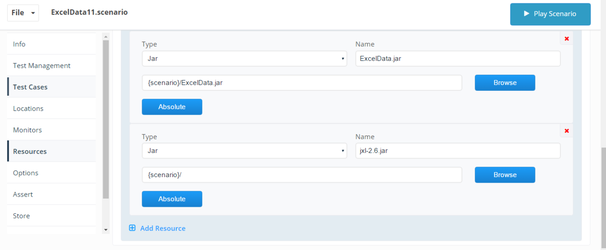
8. Save and Play scenario
Please find attached zip file consists of scenario ,Jxl jar and script jar file.

Last updated: June 26, 2023
If you have any feedback on this topic, please contact us at documentation@appvance.ai