
How to Execute jar with dependencies from scenario builder ?
Below article explains how to execute jar with dependencies :
- Create selenium script that uses excel file to read data.
- To run this script ,jxl-2.6.jar library file is needed.
Sample code:
package TestNG;
import java.io.FileInputStream;
import java.io.FileNotFoundException;
import java.io.IOException;
import java.util.concurrent.TimeUnit;
import org.openqa.selenium.By;
import org.openqa.selenium.WebDriver;
import org.openqa.selenium.firefox.FirefoxDriver;
import org.openqa.selenium.support.ui.Select;
import org.testng.annotations.DataProvider;
import org.testng.annotations.Test;
import jxl.Sheet;
import jxl.Workbook;
import jxl.read.biff.BiffException;
public class ExcelData {
    @Test(dataProvider="Login")
	   public  void  testJavajunit(String username,String password)  {
    	System.out.println("username:" +username+","+"password:"+password);
       WebDriver driver = new FirefoxDriver();
		driver.manage().window().maximize();
		driver.manage().timeouts().implicitlyWait(30,TimeUnit.SECONDS);
		driver.get("http://ec2-54-213-57-228.us-west-2.compute.amazonaws.com");
	    driver.findElement(By.xpath(".//*[@id='link-to-login']/a")).click();
	    driver.findElement(By.id("spree_user_email")).clear();
	    driver.findElement(By.id("spree_user_email")).sendKeys(username);
	    driver.findElement(By.id("spree_user_password")).clear();
	    driver.findElement(By.id("spree_user_password")).sendKeys(password);
	    driver.findElement(By.name("commit")).click();
	    System.out.println("window Title:"+driver.getTitle());
	   new Select(driver.findElement(By.id("taxon"))).selectByVisibleText("Categories");
	   driver.findElement(By.linkText("Bags")).click();
	   driver.findElement(By.id("Brands_Conditioned")).click();
	   driver.findElement(By.cssSelector("input.btn.btn-primary")).click();
	    driver.findElement(By.xpath(".//*[@id='nav-bar']/li[2]/a")).click();
	    driver.quit();
	  }
	@DataProvider(name="Login")
	public Object[][] loginData() {
		Object[][] arrayObject = getExcelData("F:\\Spree.xls","spreehar");
		return arrayObject;
	}
	/**
	 * @param File Name
	 * @param Sheet Name
	 * @return
	 */
	public String[][] getExcelData(String fileName, String sheetName) {
		String[][] arrayExcelData = null;
		try {
			FileInputStream fs = new FileInputStream(fileName);
			Workbook wb = Workbook.getWorkbook(fs);
			Sheet sh = wb.getSheet(sheetName);
			int totalNoOfCols = sh.getColumns();
			int totalNoOfRows = sh.getRows();
			arrayExcelData = new String[totalNoOfRows][totalNoOfCols];
			for (int i= 0 ; i < totalNoOfRows; i++) {
				for (int j=0; j < totalNoOfCols; j++) {
					arrayExcelData[i][j] = sh.getCell(j, i).getContents();
				}
			}
		} catch (FileNotFoundException e) {
			e.printStackTrace();
		} catch (IOException e) {
			e.printStackTrace();
			e.printStackTrace();
		} catch (BiffException e) {
			e.printStackTrace();
		}
		return arrayExcelData;
	}
}
Steps to create scenario with jar dependencies
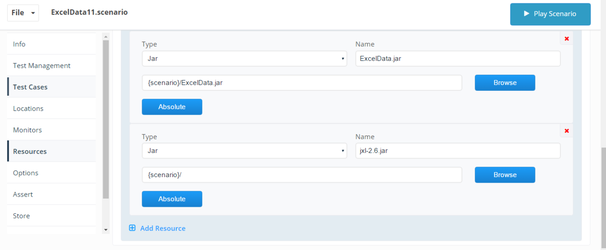
8. Save and Play scenario
Please find attached zip file consists of scenario ,Jxl jar and script jar file.

Last updated: June 26, 2023
If you have any feedback on this topic, please contact us at documentation@appvance.ai