
How to Execute jar with dependencies from scenario builder ?
Run
Below aarticle JARexplains how to execute jar with Dependenciesdependencies from:
ThisSample pagecode:
packageobsoleteTestNG;“ScenarioimportBuilder”java.io.FileInputStream;wordingimport java.io.FileNotFoundException; import java.io.IOException; import java.util.concurrent.TimeUnit; import org.openqa.selenium.By; import org.openqa.selenium.WebDriver; import org.openqa.selenium.firefox.FirefoxDriver; import org.openqa.selenium.support.ui.Select; import org.testng.annotations.DataProvider; import org.testng.annotations.Test; import jxl.Sheet; import jxl.Workbook; import jxl.read.biff.BiffException; public class ExcelData { @Test(dataProvider="Login") public void testJavajunit(String username,String password) { System.out.println("username:" +username+","+"password:"+password); WebDriver driver = new FirefoxDriver(); driver.manage().window().maximize(); driver.manage().timeouts().implicitlyWait(30,TimeUnit.SECONDS); driver.get("http://ec2-54-213-57-228.us-west-2.compute.amazonaws.com"); driver.findElement(By.xpath(".//*[@id='link-to-login']/a")).click(); driver.findElement(By.id("spree_user_email")).clear(); driver.findElement(By.id("spree_user_email")).sendKeys(username); driver.findElement(By.id("spree_user_password")).clear(); driver.findElement(By.id("spree_user_password")).sendKeys(password); driver.findElement(By.name("commit")).click(); System.out.println("window Title:"+driver.getTitle()); new Select(driver.findElement(By.id("taxon"))).selectByVisibleText("Categories"); driver.findElement(By.linkText("Bags")).click(); driver.findElement(By.id("Brands_Conditioned")).click(); driver.findElement(By.cssSelector("input.btn.btn-primary")).click(); driver.findElement(By.xpath(".//*[@id='nav-bar']/li[2]/a")).click(); driver.quit(); } @DataProvider(name="Login") public Object[][] loginData() { Object[][] arrayObject = getExcelData("F:\\Spree.xls","spreehar"); return arrayObject; } /** * @param File Name * @param Sheet Name * @return */ public String[][] getExcelData(String fileName, String sheetName) { String[][] arrayExcelData = null; try { FileInputStream fs = new FileInputStream(fileName); Workbook wb = Workbook.getWorkbook(fs); Sheet sh = wb.getSheet(sheetName); int totalNoOfCols = sh.getColumns(); int totalNoOfRows = sh.getRows(); arrayExcelData = new String[totalNoOfRows][totalNoOfCols]; for (int i= 0 ; i < totalNoOfRows; i++) { for (int j=0; j < totalNoOfCols; j++) { arrayExcelData[i][j] = sh.getCell(j, i).getContents(); } } } catch (FileNotFoundException e) { e.printStackTrace(); } catch (IOException e) { e.printStackTrace(); e.printStackTrace(); } catch (BiffException e) { e.printStackTrace(); } return arrayExcelData; } }
Steps to create scenario with currentjar Scenariodependencies
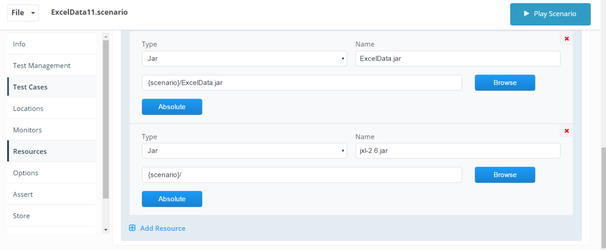
8. Save and Play scenario
Please find attached zip file consists of scenario ,Jxl jar and script jar file.

Last updated: June 26, 2023
If you have any feedback on this guidancetopic, onlyplease whencontact aus Javaat artifact must be executed as part of an existing AIQ workflow.documentation@appvance.ai
Before execution
Package the JAR with required dependencies or provide a documented dependency path.Confirm the Java version supported by the execution host.Keep credentials and environment-specific values outside the JAR and documentation.Record the artifact version used by the AIQ execution.
Validation workflow
Run the JAR in a controlled non-production environment.Check exit code, stdout, stderr, and generated files.Run a small AIQ validation execution before scheduling or scaling.Attach troubleshooting details to the related maintenance ticket if execution fails.
Last updated: September 8, 2026