
Run Data-Enabled TestNG Scenarios
Below
Run article explains about Data Enabling usingData-Enabled TestNG DataScenarios
Use ItTestNG coversdata belowproviders mentionedfor topics:maintained Java/TestNG assets that still run through AIQ. For current Scenario Editor tests, prefer DPLs or approved AIQ test data sources when they can meet the same need.
Recommended setup
- Keep
Howthe data provider deterministic and easy toCreatereset.- Use
aapprovedTestNGnon-productionClasstestindata. - Separate
Eclipse?
environment*configurationHowfromusetestTestNGdata. - Log
classenoughjar filecontext torundiagnoseFunctional scenario in Appvance?
[@DataProvider:
Validation Marksworkflow
Sample code to read data from Xls file:
packageTestNG;
importjava.io.FileInputStream;
importjava.io.FileNotFoundException;
importjava.io.IOException;
importjava.util.Random;
importjxl.Sheet;
importjxl.Workbook;
importjxl.read.biff.BiffException;
public class RandamData {
public static void main(String args[])
{
getExcelData("F:Spree.xls","Sheet1");
}
public String[][] getExcelData(String fileName, String sheetName) {
String[][] arrayExcelData = null;
try {
FileInputStreamfs = newFileInputStream(fileName);
Workbook wb = Workbook.getWorkbook(fs);
Sheet sh = wb.getSheet(sheetName);
inttotalNoOfCols = sh.getColumns();
inttotalNoOfRows = sh.getRows();
arrayExcelData = new String[totalNoOfRows][totalNoOfCols];
for (inti= 0 ; i<totalNoOfRows; i++) {
for (intj=0; j<totalNoOfCols; j++) {
arrayExcelData[i][j] = sh.getCell(j,i).getContents();
} }
} catch (FileNotFoundExceptione) {
e.printStackTrace();
} catch (IOExceptione) {
e.printStackTrace();
} catch (BiffExceptione) {
e.printStackTrace();
} return arrayExcelData;
}
To use in TestNG:
@DataProvider(name="Login")
public Object[][] loginData() {
Object[][] arrayObject=getExcelData("F:Sample.xls","Sheetname");
return arrayObject;
}
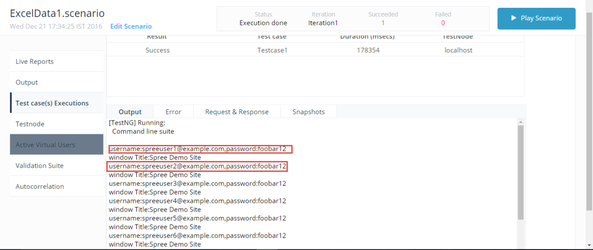
Note: For example refer attached Java file(ExcelData.java) with TestNGclass and annotations that uses Xls data to login .
-Now create a Jar file for above TestNG class file to run script in Appvance.
How useTestNG class jar file to run Functional scenario in Appvance:
-Open a Appvance and click Scenario builder from start screen.-Select a Functional Test Test Type in scenario builder.-Create a Scenario for TestNG by selecting TestNG test type under Test case panel.-Browse and add Jar file that contains TestNG code-Enter
- Run the TestNG
classsuitenamelocallyasor"packagename.classname".-NavigateintoCIresourceswithpanel,aclicksmallAdddataresources.-Selectset. - Confirm
resourcedependencyType as Jarpackaging andaddJavajxl-2.6.jarversionfile.-Savecompatibility. - Execute
thefromScenarioAIQ with a controlled data sample. - Review output for data, classpath, and
clickenvironmentPlayfailuresbutton.before scaling.
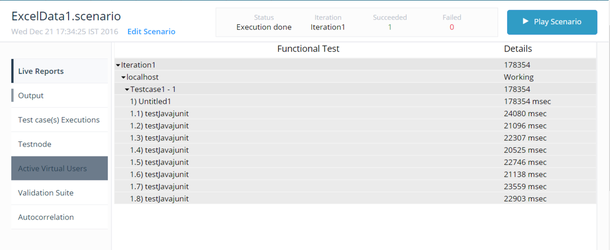
Note: Refer attached ExcelData.jar and Exceldata1.scenario file
Output:
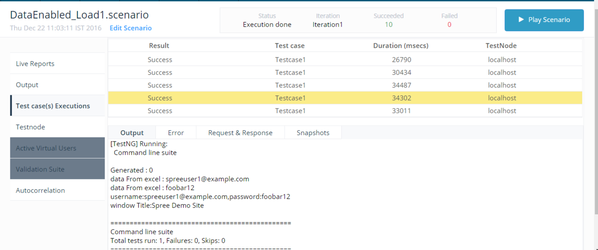
To run a Load test using TestNG : -Use a random number in a TestNG script to read a data from Excel. Sample code:
@DataProvider(name="Login")
	public Object[][] loginData() {
		Object[][] arrayObject=null;
		for(int i=0;i<1;){
			for(int j=0;j<1;j++){
		arrayObject = getExcelData("F:\\Spree.xls","sheetname");
		}
		break;
		}
		return arrayObject;
	}
public static String[][] getExcelData(String fileName, String sheetName) {
	String[][] arrayExcelData = null;
	try {
		FileInputStream fs = new FileInputStream(fileName);
		Workbook wb = Workbook.getWorkbook(fs);
		Sheet sh = wb.getSheet(sheetName);
		int totalNoOfRows = sh.getRows();
		int totalNoOfCols = sh.getColumns();
		//System.out.println("No. of rows: " + totalNoOfRows);
		//System.out.println("No. of columns: " + totalNoOfCols);
		//To generate Random Number
		arrayExcelData = new String[totalNoOfRows][totalNoOfCols];
		Random randomGenerator = new Random();
		int randomInt = randomGenerator.nextInt(totalNoOfRows);
		System.out.println("Generated : " + randomInt);
		arrayExcelData = new String[1][totalNoOfCols];
		for(int i=0;i<totalNoOfRows;){
			for(int j=0;j<totalNoOfCols;j++){
		    arrayExcelData[i][j]=sh.getCell(j,randomInt ).getContents();
	        System.out.println("data From excel : " + arrayExcelData[i][j]);
			}
			break;
		}
	} catch (FileNotFoundException e) {
		e.printStackTrace();
	} catch (IOException e) {
		e.printStackTrace();
		e.printStackTrace();
	} catch (BiffException e) {
		e.printStackTrace();
	}
	return arrayExcelData;
}
}
Note: For example refer attached Random.jar file and DataEnabled_Load1.scenario file.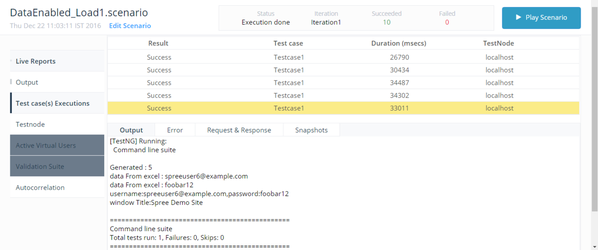
For Example, refer the attached TestNG.Zip file that contains: 1) Java file(TestNG class) 2) Jar files(Used to create scenario in Appvance). 3) Scenario files.
Last updated: JuneSeptember 26,8, 20232026
If you have any feedback on this topic, please contact us at documentation@appvance.ai