
How to run Data Enabled scenario using TestNG Data Provider
Run
Below Data-Enabledarticle explains about Data Enabling using TestNG ScenariosData
UseProvider.
It covers below mentioned topics:
* How use TestNG class jar file to run Functional scenario in Appvance? Run Load test using TestNG class(with DataProvider) in Appvance.
How to Create a TestNG Class in Eclipse?
Pre-requisite: *Download jxl-2.6.jar file (http://www.java2s.com/Code/Jar/j/Downloadjxljar.htm)
*To install TestNG in Eclipse: http://toolsqa.com/selenium-webdriver/install-testng/ Create a new package in Eclipse Right Click package Name Select Build PathConfigure Build path -Select Libraries tab Click Add External Jars -Browse and add downloaded jxl-2.6.jar file. Create a TestNG class with TestNG annotations (DataProvider to read data
[@DataProvider: Marks a method as supplying data for maintaineda Java/TestNGtest assetsmethod. The annotated method must return an Object[ ][ ], where each Object[ ] can be assigned the parameter list of the test method.The @Test method that stillwants to receive data from this DataProvider needs to use a dataProvider name equals to the name of this annotation.]
Sample code to read data from Xls file:
packageTestNG;
importjava.io.FileInputStream;
importjava.io.FileNotFoundException;
importjava.io.IOException;
importjava.util.Random;
importjxl.Sheet;
importjxl.Workbook;
importjxl.read.biff.BiffException;
public class RandamData {
public static void main(String args[])
{
getExcelData("F:Spree.xls","Sheet1");
}
public String[][] getExcelData(String fileName, String sheetName) {
String[][] arrayExcelData = null;
try {
FileInputStreamfs = newFileInputStream(fileName);
Workbook wb = Workbook.getWorkbook(fs);
Sheet sh = wb.getSheet(sheetName);
inttotalNoOfCols = sh.getColumns();
inttotalNoOfRows = sh.getRows();
arrayExcelData = new String[totalNoOfRows][totalNoOfCols];
for (inti= 0 ; i<totalNoOfRows; i++) {
for (intj=0; j<totalNoOfCols; j++) {
arrayExcelData[i][j] = sh.getCell(j,i).getContents();
} }
} catch (FileNotFoundExceptione) {
e.printStackTrace();
} catch (IOExceptione) {
e.printStackTrace();
} catch (BiffExceptione) {
e.printStackTrace();
} return arrayExcelData;
}
To use in TestNG:
@DataProvider(name="Login")
public Object[][] loginData() {
Object[][] arrayObject=getExcelData("F:Sample.xls","Sheetname");
return arrayObject;
}
Note: For example refer attached Java file(ExcelData.java) with TestNGclass and annotations that uses Xls data to login .
-Now create a Jar file for above TestNG class file to run throughscript AIQ.in ForAppvance.
How useTestNG class jar file to run Functional scenario in Appvance:
-Open a Appvance and click Scenario Editorbuilder tests,from preferstart DPLsscreen.
-Select ora approvedFunctional AIQTest Test Type in scenario builder.
-Create a Scenario for TestNG by selecting TestNG test datatype sourcesunder whenTest theycase can meet the same need.
Recommended setup
Keep the data provider deterministicpanel.
-Browse andeasyaddtoJarreset.Usefileapprovedthatnon-productioncontainstestTestNGdata.Separate environment configuration from test data.Log enough context to diagnose which data row failed without exposing secrets.
Validation workflow
Runcode
-Enter the TestNGsuiteclasslocallynameoras "packagename.classname".
-Navigate to resources panel, click Add resources.
-Select resource Type as Jar and add jxl-2.6.jar file.
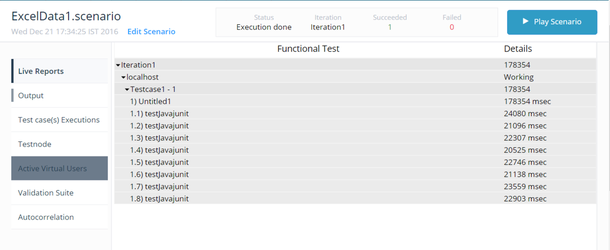
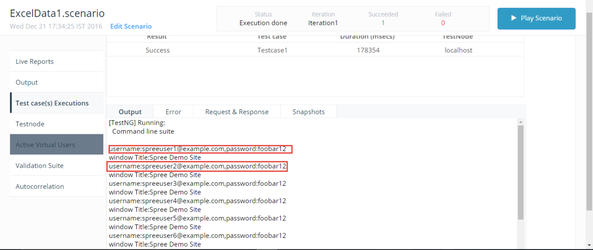
-Save the Scenario and click Play button.Note: Refer attached ExcelData.jar and Exceldata1.scenario file
Output:
To run a Load test using TestNG :
-Use a random number inCIawithTestNG script to read asmalldataset.ConfirmfromdependencyExcel.
packagingSample code:@DataProvider(name="Login") public Object[][] loginData() { Object[][] arrayObject=null; for(int i=0;i<1;){ for(int j=0;j<1;j++){ arrayObject = getExcelData("F:\\Spree.xls","sheetname"); } break; } return arrayObject; } public static String[][] getExcelData(String fileName, String sheetName) { String[][] arrayExcelData = null; try { FileInputStream fs = new FileInputStream(fileName); Workbook wb = Workbook.getWorkbook(fs); Sheet sh = wb.getSheet(sheetName); int totalNoOfRows = sh.getRows(); int totalNoOfCols = sh.getColumns(); //System.out.println("No. of rows: " + totalNoOfRows); //System.out.println("No. of columns: " + totalNoOfCols); //To generate Random Number arrayExcelData = new String[totalNoOfRows][totalNoOfCols]; Random randomGenerator = new Random(); int randomInt = randomGenerator.nextInt(totalNoOfRows); System.out.println("Generated : " + randomInt); arrayExcelData = new String[1][totalNoOfCols]; for(int i=0;i<totalNoOfRows;){ for(int j=0;j<totalNoOfCols;j++){ arrayExcelData[i][j]=sh.getCell(j,randomInt ).getContents(); System.out.println("data From excel : " + arrayExcelData[i][j]); } break; } } catch (FileNotFoundException e) { e.printStackTrace(); } catch (IOException e) { e.printStackTrace(); e.printStackTrace(); } catch (BiffException e) { e.printStackTrace(); } return arrayExcelData; } }Note: For example refer attached Random.jar file and DataEnabled_Load1.scenario file.
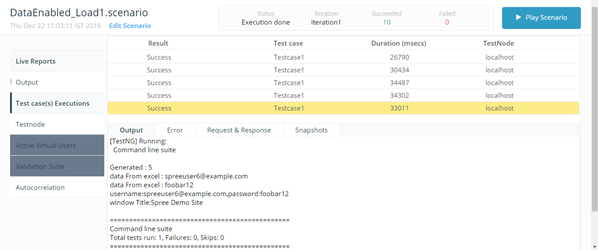
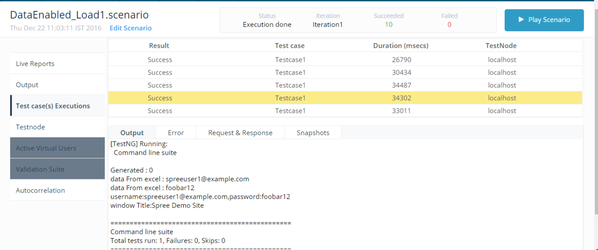
For Example, refer the attached TestNG.Zip file that contains:
1) Javaversionfile(TestNGcompatibility.Executeclass)
from2)AIQJarwithfiles(Usedatocontrolledcreatedatascenariosample.ReviewinoutputAppvance).
for3)data,Scenarioclasspath, and environment failures before scaling.
Last updated: SeptemberJune 8,26, 20262023
If you have any feedback on this topic, please contact us at documentation@appvance.ai