
Run Selenium Java Page Object Projects in AIQ
1.Create
Run POMSelenium model selenium java project in Eclipse
Example:
Test scenario: Go to Guru99 Demo Site and deposit amount to account.
Testcase:
Step 1) Go to Guru99 Demo Site
Step 2) In home page check text "Guru99 Bank" is present
Step 3) Login into application
Step 4) Verify that the Home page contains text as "Manger Id : demo"
Step 5) Click Deposit link and deposit amount to an account (Read data from excel for amount and description field)
Step 6) Logout of application
Here are we are dealing with 3 pages
Accordingly create 3 POM classes
package PageFactory;
import org.openqa.selenium.WebDriver;
import org.openqa.selenium.WebElement;
import org.openqa.selenium.support.FindBy;
import org.openqa.selenium.support.PageFactory;
public class Guru99Login {
	/**
	 * All WebElements are identified by @FindBy annotation
	 */
	WebDriver driver;
	@FindBy(name="uid")
	WebElement user99GuruName;
	@FindBy(name="password")
	WebElement password99Guru;
	@FindBy(className="barone")
	WebElement titleText;
	@FindBy(name="btnLogin")
	WebElement login;
	public Guru99Login(WebDriver driver){
		this.driver = driver;
		//This initElements method will create  all WebElements
		PageFactory.initElements(driver, this);
	}
	//Set user name in textbox
	public void setUserName(String strUserName){
		user99GuruName.sendKeys(strUserName);
	}
	//Set password in password textbox
	public void setPassword(String strPassword){
	password99Guru.sendKeys(strPassword);
	}
	//Click login button
	public void clickLogin(){
			login.click();
	}
	//Get the title of Login Page
	public String getLoginTitle(){
	 return	titleText.getText();
	}
	/**
	 * This POM method will be exposed in test case to login in the application
	 * @param strUserName
	 * @param strPasword
	 * @return
	 */
public void loginToGuru99(String strUserName,String strPasword){
		//Fill user name
		this.setUserName(strUserName);
		//Fill password
		this.setPassword(strPasword);
		//Click Login button
		this.clickLogin();
	}
}
2. Home Page (shown once you login)
package PageFactory;
import org.openqa.selenium.WebDriver;
import org.openqa.selenium.WebElement;
import org.openqa.selenium.support.FindBy;
import org.openqa.selenium.support.How;
import org.openqa.selenium.support.PageFactory;
public class Guru99HomePage {
	WebDriver driver;
	@FindBy(how = How.XPATH,using ="//table//tr[@class='heading3']")
	WebElement homePageUserName;
	public Guru99HomePage(WebDriver driver){
		this.driver = driver;
		//This initElements method will create  all WebElements
		PageFactory.initElements(driver, this);
	}
	//Get the User name from Home Page
		public String getHomePageDashboardUserName(){
		 return	homePageUserName.getText();
		}
}
3. Desposit page
package PageFactory;
import java.io.FilePermission;
import java.util.concurrent.TimeUnit;
import org.openqa.selenium.By;
import org.openqa.selenium.WebDriver;
import org.openqa.selenium.WebElement;
import org.openqa.selenium.support.PageFactory;
import utility.Excel;
public class Guru99DepositPage {
	private static WebDriver driver;
		private static WebElement element=null;
	public Guru99DepositPage(WebDriver driver){
		Guru99DepositPage.driver = driver;
		//This initElements method will create  all WebElements
		PageFactory.initElements(driver, this);
	}
//To input account number
	public static WebElement AccountNo(WebDriver driver)
	{
		element= driver.findElement(By.name("accountno"));
		 return element;
	}
//To click Deposit link
	public static WebElement click_Deposit_Link(WebDriver driver)
	{
		element= driver.findElement(By.linkText("Deposit"));
		 return element;
	}
//To input amount
	public static WebElement txtbx_amount(WebDriver driver){
	 element= driver.findElement(By.xpath("html/body/table/tbody/tr/td/table/tbody/tr[7]/td[2]/input"));
	 return element;
	}
//To input desc
	public static WebElement txtbx_description(WebDriver driver){
	element= driver.findElement(By.name("desc"));
		 return element;
		}
 //To click submit button
     public static WebElement clickSubmit(WebDriver driver){
		element= driver.findElement(By.name("AccSubmit"));
		 return element;
	}
	public static void AmountDeposit(WebDriver driver) throws Exception{
		click_Deposit_Link(driver).click();
		AccountNo(driver).sendKeys("22557");
		//This is to get the values from Excel sheet, passing parameters (Row num & Col num)to getCellData method
	    String[] amount=Excel.getExcelData_amount("F:\\Eclipse\\POMExample\\src\\testData","Guru99.xls","Guru99");
	    txtbx_amount(driver).sendKeys(amount);
        driver.manage().timeouts().implicitlyWait(10,TimeUnit.SECONDS);
    	String[] desc = Excel.getExcelData_desc("F:\\Eclipse\\POMExample\\src\\testData","Guru99.xls","Guru99");
        txtbx_description(driver).sendKeys(desc);
        clickSubmit(driver).click();
    }
		}
To log out below is code:
package PageFactory;
import org.openqa.selenium.WebDriver;
import org.openqa.selenium.WebElement;
import org.openqa.selenium.support.FindBy;
import org.openqa.selenium.support.How;
import org.openqa.selenium.support.PageFactory;
public class Guru99Logout {
   WebDriver driver;
	@FindBy(how = How.LINK_TEXT,using="Log out")
	WebElement Logout;
	public Guru99Logout(WebDriver driver){
		this.driver = driver;
		//This initElements method will create  all WebElements
		PageFactory.initElements(driver, this);
	}
public void logout_btn(){
	Logout.click();
}
}
Create a Testcase to execute above mentioned steps:
package test;
import java.util.concurrent.TimeUnit;
import org.openqa.selenium.WebDriver;
import org.openqa.selenium.firefox.FirefoxDriver;
import org.testng.Assert;
import org.testng.annotations.BeforeTest;
import com.appvance.enterprise.tool.APCStepListener;
import org.testng.annotations.Test;
import PageFactory.Guru99DepositPage;
import PageFactory.Guru99HomePage;
import PageFactory.Guru99Login;
import PageFactory.Guru99Login_Data;
import PageFactory.Guru99Logout;
public class Test99GuruLoginWithPageFactory {
	WebDriver driver;
	Guru99Login objLogin;
	Guru99HomePage objHomePage;
	Guru99DepositPage objDepositPage;
	Guru99Login_Data objLogin_Data;
	Guru99Logout objLogout;
	@BeforeTest
	public void setup(){
		//APCStepListener.startStep("Navigate to guru99");
		driver = new FirefoxDriver();
		driver.manage().timeouts().implicitlyWait(10, TimeUnit.SECONDS);
		driver.get("http://demo.guru99.com/V4/");
	}
	/**
	 * This test go to http://demo.guru99.com/V4/
	 * Verify login page title as guru99 bank
	 * Login to application
	 * Verify the home page using Dashboard message
	 * @throws Exception
	 */
	@Test(priority=0)
	public void test_Home_Page_Appear_Correct() throws Exception{
		//Create Login Page object
	objLogin = new Guru99Login(driver);
	//Verify login page title
	String loginPageTitle = objLogin.getLoginTitle();
	System.out.println(loginPageTitle);
	Assert.assertTrue(loginPageTitle.toLowerCase().contains("guru99 bank"));
    //login to application
	APCStepListener.startStep("Login to application");
	 objLogin.loginToGuru99("mngr62170","nYbager");
	// go the next page
	objHomePage = new Guru99HomePage(driver);
   //Verify home page
	String homepageUsername= objHomePage.getHomePageDashboardUserName();
	System.out.println(homepageUsername);
	Assert.assertTrue(homepageUsername.toLowerCase().contains("manger id : mngr"));
	System.out.println();
	//Click Deposit link
	APCStepListener.startStep("Click Deposit link and deposit amount");
    objDepositPage = new Guru99DepositPage(driver);
	Guru99DepositPage.AmountDeposit(driver);
	//Click Logout
	APCStepListener.startStep("Logout");
	objLogout= new Guru99Logout(driver);
	objLogout.logout_btn();
	driver.close();
	}
}
2. Export complete project into jar file
Please refer below two articles to understand how to use Dependencies resources in Appvance :
Best Practices for TestNG and Selenium testingProjects in AIQ
RunningUse this page for maintained Selenium TestNGJava ScriptsPage inObject UTP
Model
3.need LogAIQ intoexecution. AppvanceTreat these projects as specialized or legacy assets and selectprefer FunctionalScenario scenarioEditor testfor typenew functional coverage when possible.
4.
Maintenance Gochecklist
- Keep
testcasespage objects aligned with the current application UI. - Use stable locators and
selectexplicitTestNGwaitstestinsteadtype.ofBrowsefixed sleeps. - Pin dependency, browser, driver, and
addJavaaboveversionscreatedthrough the approved build process. - Keep environment configuration and secrets outside the source code.
AIQ validation
- Build the project
jar file5. Enterthrough theclassapprovednameCI(asprocess. - Run
packagename.classnameaEX:focusedtest.Test99GuruLoginWithPageFactoryAIQ)execution,withclassathatsmallcontainsdatatestcaseset. - Review
tooutputexecute.fordriver,
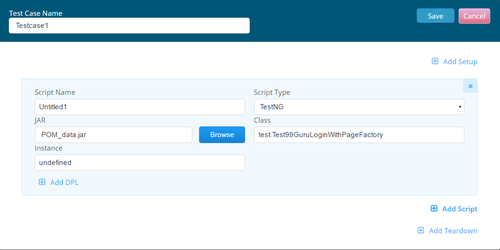
Note: User can add multiple testcases using same jar file , just by specifying the class name of testcase that need to be run.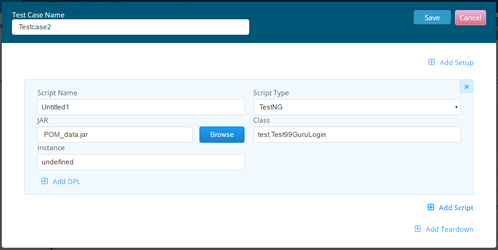
6. Go to Resources sectiondata, andaddenvironmentdependencyfailures. - Record
resourcesartifactfile , in the above example jxl jar file is dependency resource .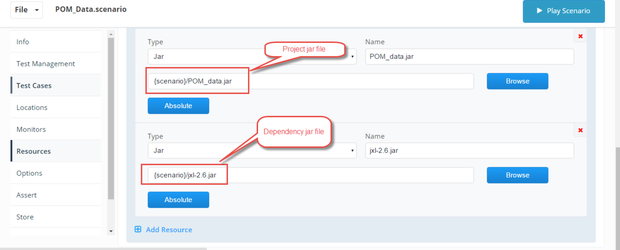
ID for traceability.7. Saveversion andplayexecutionscenario.
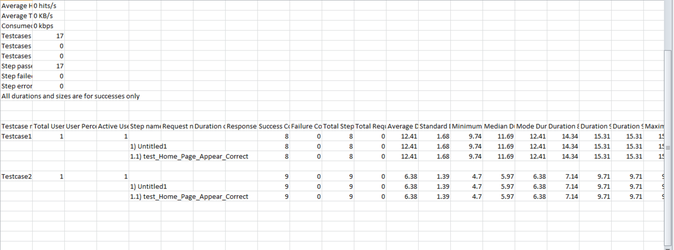
8.Output:
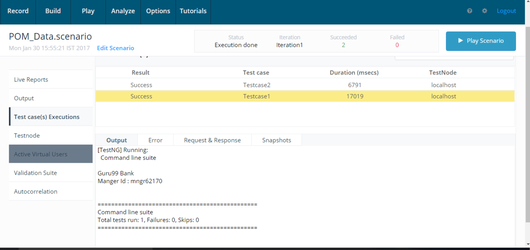
Please use below files to run above scenario:
Report:
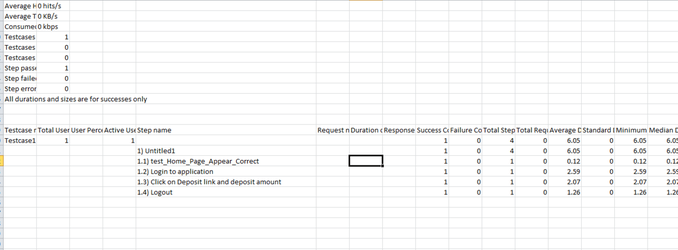
User can also use APC step Listener in selenium-java scripts , Please find below files to run Scenario with APC Step Listener:
Report:
Last updated: JuneSeptember 26,8, 20232026
If you have any feedback on this topic, please contact us at documentation@appvance.ai