
Microsoft Graph - How to Send, Read, Reply, and Delete email
We required the below settings for the outlook service account
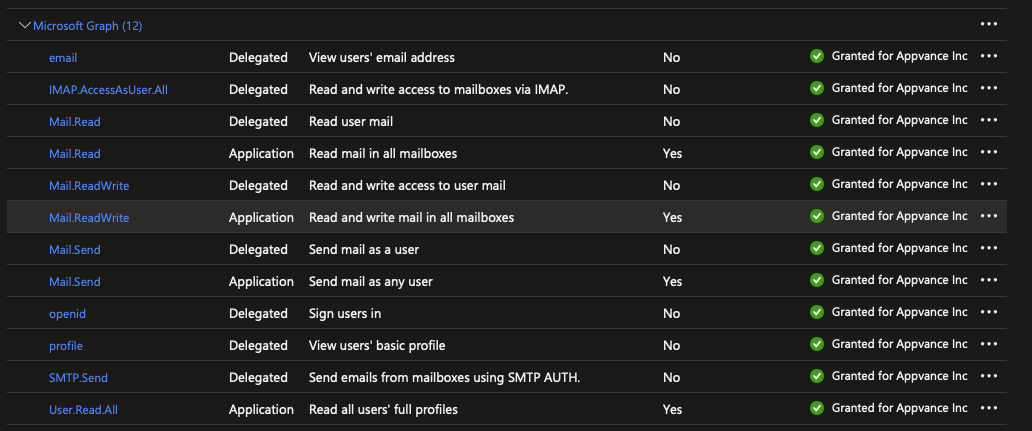
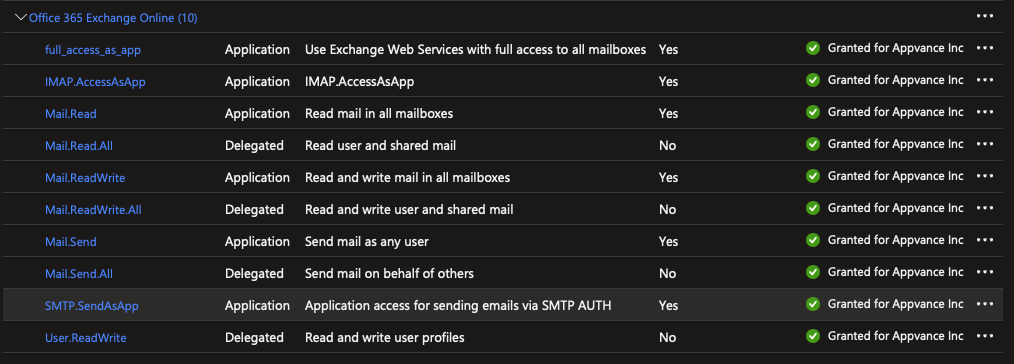
GraphService
After you register your app and get authentication tokens for a user or service, you can make requests to the Microsoft Graph API.
createOAuthMailClient(String:email, String:clientId, String:secretKey, String:tenantId) → GraphService
Create an instance of the class GraphService to send, read, reply, and delete messages.
var graphService = createOAuthMailClient("email", "clientId", "secretKey", "tenantId");
The secretKey IS NOT the secret ID, but the actual secret string value you created when generating the secret.
sendMessage(GraphMessage:gMsg) → Boolean
Send the email.
var msg = graphService.createMailMessage("Email subject", "Email body");
msg.addTo(["appvancetest@appvance.com"]);
var sent = graphService.sendMessage(msg);replyMessage(String:mainMessageId, String:comment) → Boolean
Reply to an email.
var mainMessage = graphService.getMessage("KJimenez@appvance.com", "Email subject");
var comment = "This is a reply message!";
var sent = graphService.replyMessage(mainMessage.id, comment);
if (sent) {
    log("Reply sent.");
} else {
    throw new Error('An error occurred while sending the email.');
}deleteMessage(String:id) → Boolean
Delete a specific email.
var message = graphService.getMessage("id");
graphService.deleteMessage(message.id);
getAllMessages() → List<Message>
Get all the messages from the Inbox folder.
var messageList = graphService.getAllMessages();
var count = messageList.size();
for (var i = 0; i < count; i++) {
    log("From: " + messageList.get(i).from.emailAddress.address);
    log("Subject: " + messageList.get(i).subject);
    log("Body: " + messageList.get(i).body.content);
    log("");
}
getAllMessagesFromFolder(String:folderName) → List<Message>
Get all the messages from a specific folder.
var messageList = graphService.getAllMessagesFromFolder("Drafts");
var count = messageList.size();
for (var i = 0; i < count; i++) {
    log("From: " + messageList.get(i).from.emailAddress.address);
    log("Subject: " + messageList.get(i).subject);
    log("Body: " + messageList.get(i).body.content);
    log("");
}
getCountUnreadMessages() → Interger
Return the count of the unread messages in the Inbox folder.
var unreadCount = graphService.getCountUnreadMessages();
log("Count of unread messages: " + unreadCount);
getCountUnreadMessagesFromFolder(String:folder) → Integer
Return the count of the unread messages in the folder specified.
var unreadCount = graphService.getCountUnreadMessagesFromFolder("Archived");
log("Count of unread messages: " + unreadCount);
getCountTotalMessages() → Interger
Return the count of all the messages in the Inbox folder.
var totalCount = graphService.getCountTotalMessages();
log("Count of unread messages: " + totalCount);
getCountTotalMessagesFromFolder(String:folder) → Integer
Return the count of all the messages in the folder specified.
var totalCount = graphService.getCountTotalMessagesFromFolder("Archived");
log("Count of unread messages: " + totalCount);
getUnreadMessages() → List<Message>
Return the unread messages to the Inbox folder.
var unreadList = graphService.getUnreadMessages();
var unreadCount = unreadList.size();
if (unreadCount > 0) {
    for (var i = 0; i < unreadCount; i++) {
        log("Id: " + unreadList.get(i).id);
        log("From: " + unreadList.get(i).from.emailAddress.address);
        log("Subject: " + unreadList.get(i).subject);
        log("Body: " + unreadList.get(i).body.content);
        log("");
    }
} else {
    log("There's no unread messages.");
}
getUnreadMessagesFromFolder(String:folder) → List<Message>
Return the unread messages to the folder specified.
var unreadList = graphService.getUnreadMessagesFromFolder("Archived");
var unreadCount = unreadList.size();
if (unreadCount > 0) {
    for (var i = 0; i < unreadCount; i++) {
        log("Id: " + unreadList.get(i).id);
        log("From: " + unreadList.get(i).from.emailAddress.address);
        log("Subject: " + unreadList.get(i).subject);
        log("Body: " + unreadList.get(i).body.content);
        log("");
    }
} else {
    log("There's no unread messages.");
}
getMessage(String:id) → Message
Search a message by ID and return all the details of this.
var message = graphService.getMessage("id");
if(message != null){
  log("Id: " + message.id);
  log("From: " + message.from.emailAddress.address);
  log("Subject: " + message.subject);
  log("Body: " + message.body.content);
} else {
  log("Email not found.");
}
getMessage(String:from, String:subject) → Message
Search a message by From recipient and subject, then return all the details of this.
var message = graphService.getMessage("email","subject");
if(message != null){
  log("Id: " + message.id);
  log("From: " + message.from.emailAddress.address);
  log("Subject: " + message.subject);
  log("Body: " + message.body.content);
} else {
  log("Email not found.");
}
GraphMessage
Object GraphMessage will store the information such as the Subject and the Body of the email.
This Object will expose methods to retrieve the information of the email, the methods exposed to be used in the service suite are the following:
createMailMessage(String:subject, String:bodyContent) → GraphMessage
Create an instance of the class GraphMessage to set create a message.
var msg = graphService.createMailMessage("Subject", "Body");setSubject(String:subject)
Add or change the subject of a message.
var msg = graphService.createMailMessage("Subject", "Body");
msg.setSubject("New subject");
setImportance(String:importance)
Add or change the importance of a message. Make sure is one the following: low, normal, or high;
var msg = graphService.createMailMessage("Subject", "Body");
msg.setImportance("normal");
addTo(String[]:destinations)
Add all the addresses in the To field of the message.
msg.addTo(["email"]);
//or
msg.addTo(["email1", "email2", "email3"]);
addCC(String[]:copies)
Add all the addresses in the Cc field of the message.
msg.addCC(["email"]);
//or
msg.addCC(["email1", "email2", "email3"]);
addBCC(String[]:blindCopies)
Add all the addresses in the Bcc field of the message.
msg.addBCC(["email"]);
//or
msg.addBCC(["email1", "email2", "email3"]);
addAttachment(String:filename, byte[]:data)
Add all the addresses in the Bcc field of the message.
var msg = graphService.createMailMessage("Subject", "Body");
msg.addAttachment("testImage.jpeg", readBytes("{ds}/test.jpeg"));
The sample Script is attached.
Last updated: January 21, 2025
If you have any feedback on this topic, please contact us at documentation@appvance.ai