
Microsoft Graph: Send, Read, Reply, and Delete Email in Service Suite
Microsoft Graph: Send, Read, Reply, and Delete Email in Service Suite
WeUse requiredthis article when a Service Suite workflow needs to validate Microsoft Graph email operations in an approved test mailbox. Do not run destructive email actions against real customer or employee mailboxes unless the belowcustomer settingshas explicitly approved the test.
Configuration checklist
- Use a dedicated test mailbox and a Microsoft Entra ID app registration approved for the
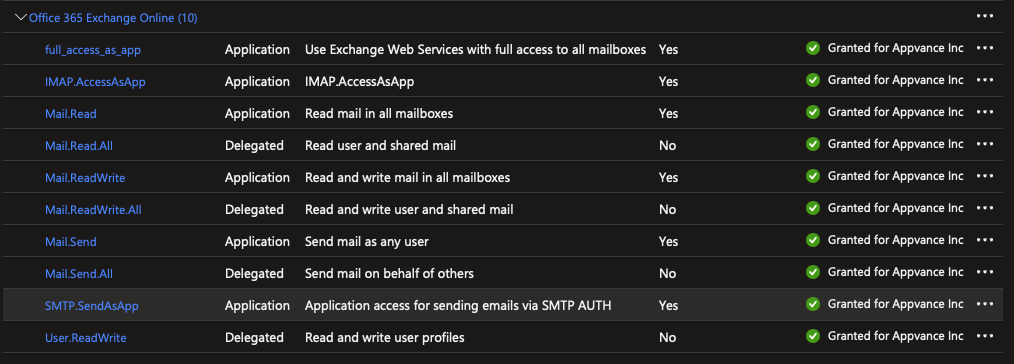
outlookworkflow. - Grant
service account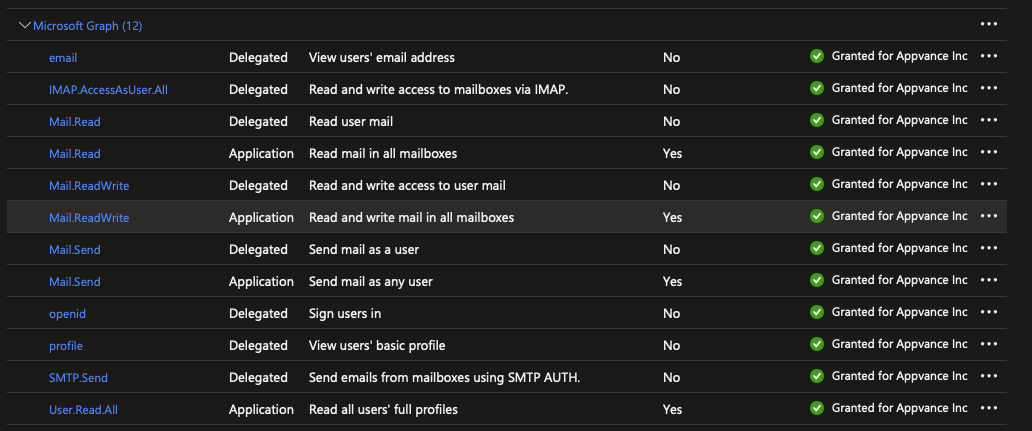
GraphService
permissionsAfter you register your app and get authentication tokens for a user or service, you can make requests toonly theMicrosoftGraphAPI.createOAuthMailClient(String:email,requiredString:clientId, String:secretKey, String:tenantId) → GraphService
operations.Create an instance of the class GraphService tofor send, read, reply,andor deletemessages. - Store clientsecrets,store.certificates,secretapproved
anvarorgraphServicetokens=increateOAuthMailClient("email",secured"clientId",variables"secretKey",or"tenantId"); - Use
subjects,
Thecorrelation secretKeyIDs, ISor NOTmessage metadata so the secretworkflow finds the correct email.
Validation workflow
- Confirm token acquisition and Graph endpoint access with the test mailbox.
- Send or locate a controlled test message.
- Validate the response status, message ID,
butsubject, recipient, and body fields needed by theactualtest. - Reply
secretorstringdeletevalueonlyyouthe controlled message createdwhen generatingfor thesecret.testsendMessage(GraphMessage:gMsg)run. - Review
→ BooleanSend the email.var msg = graphService.createMailMessage("Email subject", "Email body");msg.addTo(["appvancetest@appvance.com"]);var sent = graphService.sendMessage(msg);replyMessage(String:mainMessageId, String:comment) → Boolean
secretsReplylogs toanconfirmemail.var mainMessage = graphService.getMessage("KJimenez@appvance.com", "Email subject");var comment = "This is a reply message!";var sent = graphService.replyMessage(mainMessage.id, comment);if (sent) {log("Reply sent.");} else {throw new Error('An error occurred while sending the email.');}deleteMessage(String:id) → BooleanDelete a specific email.varand message=contentgraphService.getMessage("id");graphService.deleteMessage(message.id);getAllMessages() → List<Message>Get all the messages from the Inbox folder.var messageList = graphService.getAllMessages();var count = messageList.size();for (var i = 0; i < count; i++) {log("From: " + messageList.get(i).from.emailAddress.address);log("Subject: " + messageList.get(i).subject);log("Body: " + messageList.get(i).body.content);log("");}getAllMessagesFromFolder(String:folderName) → List<Message>Get all the messages from a specific folder.var messageList = graphService.getAllMessagesFromFolder("Drafts");var count = messageList.size();for (var i = 0; i < count; i++) {log("From: " + messageList.get(i).from.emailAddress.address);log("Subject: " + messageList.get(i).subject);log("Body: " + messageList.get(i).body.content);log("");}getCountUnreadMessages() → IntergerReturn the count of the unread messages in the Inbox folder.var unreadCount = graphService.getCountUnreadMessages();log("Count of unread messages: " + unreadCount);getCountUnreadMessagesFromFolder(String:folder) → IntegerReturn the count of the unread messages in the folder specified.var unreadCount = graphService.getCountUnreadMessagesFromFolder("Archived");log("Count of unread messages: " + unreadCount);getCountTotalMessages() → IntergerReturn the count of all the messages in the Inbox folder.var totalCount = graphService.getCountTotalMessages();log("Count of unread messages: " + totalCount);getCountTotalMessagesFromFolder(String:folder) → IntegerReturn the count of all the messages in the folder specified.var totalCount = graphService.getCountTotalMessagesFromFolder("Archived");log("Count of unread messages: " + totalCount);getUnreadMessages() → List<Message>Return the unread messages to the Inbox folder.var unreadList = graphService.getUnreadMessages();var unreadCount = unreadList.size();if (unreadCount > 0) {for (var i = 0; i < unreadCount; i++) {log("Id: " + unreadList.get(i).id);log("From: " + unreadList.get(i).from.emailAddress.address);log("Subject: " + unreadList.get(i).subject);log("Body: " + unreadList.get(i).body.content);log("");}} else {log("There's no unread messages.");}getUnreadMessagesFromFolder(String:folder) → List<Message>Return the unread messages to the folder specified.var unreadList = graphService.getUnreadMessagesFromFolder("Archived");var unreadCount = unreadList.size();if (unreadCount > 0) {for (var i = 0; i < unreadCount; i++) {log("Id: " + unreadList.get(i).id);log("From: " + unreadList.get(i).from.emailAddress.address);log("Subject: " + unreadList.get(i).subject);log("Body: " + unreadList.get(i).body.content);log("");}} else {log("There's no unread messages.");}getMessage(String:id) → MessageSearch a message by ID and return all the details of this.
exposedvar message = graphService.getMessage("id");if(message != null){log("Id: " + message.id);log("From: " + message.from.emailAddress.address);log("Subject: " + message.subject);log("Body: " + message.body.content);} else {log("Emailare notfound.");}
unnecessarily.getMessage(String:from, String:subject) → Message
Search a message by From recipient and subject, then return all the details of this.
var message = graphService.getMessage("email","subject");
if(message != null){
  log("Id: " + message.id);
  log("From: " + message.from.emailAddress.address);
  log("Subject: " + message.subject);
  log("Body: " + message.body.content);
} else {
  log("Email not found.");
}
GraphMessage
Object GraphMessage will store the information such as the Subject and the Body of the email.
This Object will expose methods to retrieve the information of the email, the methods exposed to be used in the service suite are the following:
createMailMessage(String:subject, String:bodyContent) → GraphMessage
Create an instance of the class GraphMessage to set create a message.
var msg = graphService.createMailMessage("Subject", "Body");setSubject(String:subject)
Add or change the subject of a message.
var msg = graphService.createMailMessage("Subject", "Body");
msg.setSubject("New subject");
setImportance(String:importance)
Add or change the importance of a message. Make sure is one the following: low, normal, or high;
var msg = graphService.createMailMessage("Subject", "Body");
msg.setImportance("normal");
addTo(String[]:destinations)
Add all the addresses in the To field of the message.
msg.addTo(["email"]);
//or
msg.addTo(["email1", "email2", "email3"]);
addCC(String[]:copies)
Add all the addresses in the Cc field of the message.
msg.addCC(["email"]);
//or
msg.addCC(["email1", "email2", "email3"]);
addBCC(String[]:blindCopies)
Add all the addresses in the Bcc field of the message.
msg.addBCC(["email"]);
//or
msg.addBCC(["email1", "email2", "email3"]);
addAttachment(String:filename, byte[]:data)
Add all the addresses in the Bcc field of the message.
var msg = graphService.createMailMessage("Subject", "Body");
msg.addAttachment("testImage.jpeg", readBytes("{ds}/test.jpeg"));
The sample Script is attached.
Last updated: JanuaryOctober 21,8, 20252026
If you have any feedback on this topic, please contact us at documentation@appvance.ai