
Microsoft Graph - How to Send, Read, Reply, and Delete email
Microsoft
We Graph:required Send,the Read,below Reply,settings for the outlook service account
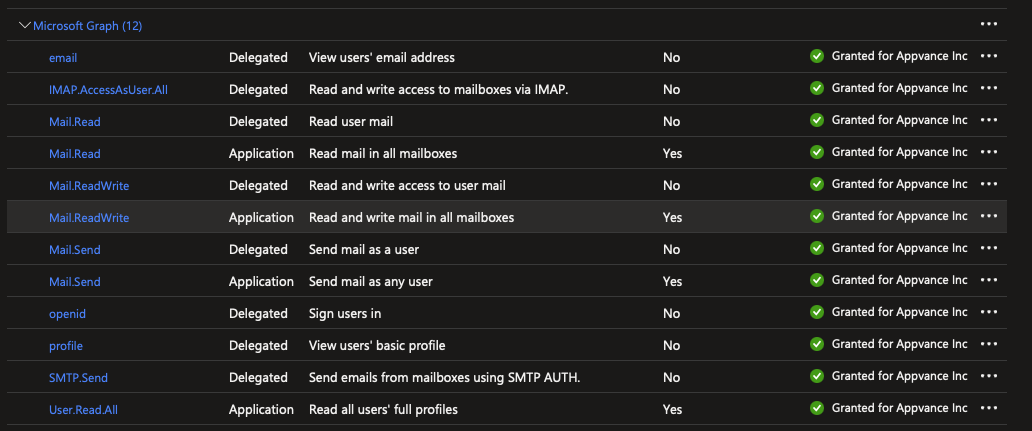
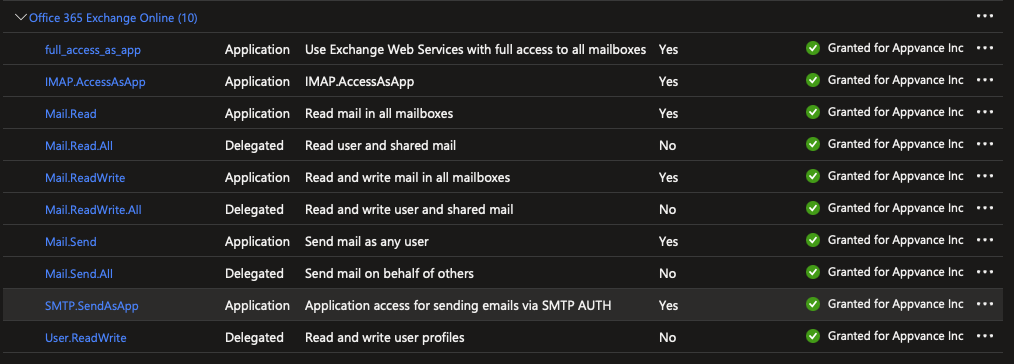
GraphService
After you register your app and Deleteget Emailauthentication intokens Service Suite
Use this article whenfor a Serviceuser Suiteor workflowservice, needsyou can make requests to validatethe Microsoft Graph emailAPI.
createOAuthMailClient(String:email, inString:clientId, String:secretKey, String:tenantId) → GraphService
Create an approvedinstance test mailbox. Do not run destructive email actions against real customer or employee mailboxes unlessof the customerclass hasGraphService explicitly approved the test.
Configuration checklist
Use a dedicated test mailbox and a Microsoft Entra ID app registration approved for the workflow.Grant only the Graph permissions required forto send, read, reply,orand deleteoperations.Storemessages.clientsecrets,certificates,var graphService = createOAuthMailClient("email", "clientId", "secretKey", "tenantId");The secretKey IS NOT the secret ID, but the actual secret string value you created when generating the secret.
sendMessage(GraphMessage:gMsg) → Boolean
Send the email.
var msg = graphService.createMailMessage("Email subject", "Email body");
msg.addTo(["appvancetest@appvance.com"]);
var sent = graphService.sendMessage(msg);
replyMessage(
String:mainMessageId, String:comment) → BooleanReply to an email.
var mainMessage = graphService.getMessage("KJimenez@appvance.com", "Email subject");
var comment = "This is a reply message!";
var sent = graphService.replyMessage(mainMessage.id, comment);
if (sent) {
    log("Reply sent.");
} else {
    throw new Error('An error occurred while sending the email.');
}deleteMessage(String:id) → BooleanDelete a specific email.
var message = graphService.getMessage("id");
graphService.deleteMessage(message.id);
getAllMessages() → List<Message>
Get all the messages from the Inbox folder.
var messageList = graphService.getAllMessages();
var count = messageList.size();
for (var i = 0; i < count; i++) {
    log("From: " + messageList.get(i).from.emailAddress.address);
    log("Subject: " + messageList.get(i).subject);
    log("Body: " + messageList.get(i).body.content);
    log("");
}
getAllMessagesFromFolder(String:folderName) → List<Message>
Get all the messages from a specific folder.
var messageList = graphService.getAllMessagesFromFolder("Drafts");
var count = messageList.size();
for (var i = 0; i < count; i++) {
    log("From: " + messageList.get(i).from.emailAddress.address);
    log("Subject: " + messageList.get(i).subject);
    log("Body: " + messageList.get(i).body.content);
    log("");
}
getCountUnreadMessages() → Interger
Return the count of the unread messages in the Inbox folder.
var unreadCount = graphService.getCountUnreadMessages();
log("Count of unread messages: " + unreadCount);
getCountUnreadMessagesFromFolder(String:folder) → Integer
Return the count of the unread messages in the folder specified.
var unreadCount = graphService.getCountUnreadMessagesFromFolder("Archived");
log("Count of unread messages: " + unreadCount);
getCountTotalMessages() → Interger
Return the count of all the messages in the Inbox folder.
var totalCount = graphService.getCountTotalMessages();
log("Count of unread messages: " + totalCount);
getCountTotalMessagesFromFolder(String:folder) → Integer
Return the count of all the messages in the folder specified.
var totalCount = graphService.getCountTotalMessagesFromFolder("Archived");
log("Count of unread messages: " + totalCount);
getUnreadMessages() → List<Message>
Return the unread messages to the Inbox folder.
var unreadList = graphService.getUnreadMessages();
var unreadCount = unreadList.size();
if (unreadCount > 0) {
    for (var i = 0; i < unreadCount; i++) {
        log("Id: " + unreadList.get(i).id);
        log("From: " + unreadList.get(i).from.emailAddress.address);
        log("Subject: " + unreadList.get(i).subject);
        log("Body: " + unreadList.get(i).body.content);
        log("");
    }
} else {
    log("There's no unread messages.");
}
getUnreadMessagesFromFolder(String:folder) → List<Message>
Return the unread messages to the folder specified.
var unreadList = graphService.getUnreadMessagesFromFolder("Archived");
var unreadCount = unreadList.size();
if (unreadCount > 0) {
    for (var i = 0; i < unreadCount; i++) {
        log("Id: " + unreadList.get(i).id);
        log("From: " + unreadList.get(i).from.emailAddress.address);
        log("Subject: " + unreadList.get(i).subject);
        log("Body: " + unreadList.get(i).body.content);
        log("");
    }
} else {
    log("There's no unread messages.");
}
getMessage(String:id) → Message
Search a message by ID and return all the details of this.
var message = graphService.getMessage("id");
if(message != null){
  log("Id: " + message.id);
  log("From: " + message.from.emailAddress.address);
  log("Subject: " + message.subject);
  log("Body: " + message.body.content);
} else {
  log("Email not found.");
}
getMessage(String:from, String:subject) → Message
Search a message by From recipient and subject, then return all the details of this.
var message = graphService.getMessage("email","subject");
if(message != null){
  log("Id: " + message.id);
  log("From: " + message.from.emailAddress.address);
  log("Subject: " + message.subject);
  log("Body: " + message.body.content);
} else {
  log("Email not found.");
}
GraphMessage
Object GraphMessage will store the information such as the Subject and the Body of the email.
This Object will expose methods to retrieve the information of the email, the methods exposed to be used in the service suite are the following:
createMailMessage(String:subject, String:bodyContent) → GraphMessage
Create an instance of the class GraphMessage to set create a message.
var msg = graphService.createMailMessage("Subject", "Body");setSubject(String:subject)
Add or
tokenschange the subject of a message.var msg = graphService.createMailMessage("Subject", "Body");
msg.setSubject("New subject");setImportance(String:importance)
Add or change the importance of a message. Make sure is one the following:
low,normal, orhigh;var msg = graphService.createMailMessage("Subject", "Body");
msg.setImportance("normal");addTo(String[]:destinations)
Add all the addresses in
securedthevariablesToorfieldan approved secret store.Use test subjects, correlation IDs, or message metadata soof theworkflowmessage.findsmsg.addTo(["email"]);
//or
msg.addTo(["email1", "email2", "email3"]);addCC(String[]:copies)
Add all the
correctaddressesemail.Separate read-only validation from delete or cleanup steps.
Validation workflow
Confirm token acquisition and Graph endpoint access within thetestCcmailbox.Sendfieldor locate a controlled test message.Validateof theresponsemessage.status,messageID,subject,msg.addCC(["email"]);
//or
msg.addCC(["email1",recipient,"email2",and"email3"]);bodyfieldsneededbyaddBCC(String[]:blindCopies)
Add all the
test.Replyaddressesor delete onlyin thecontrolledBccmessagefieldcreated forof thetestmessage.run.Reviewlogstoconfirmmsg.addBCC(["email"]);
//or
msg.addBCC(["email1",secrets"email2",and"email3"]);messagecontentarenotexposedaddAttachment(String:filename,
unnecessarily.
Add all the addresses in the Bcc field of the message.
var msg = graphService.createMailMessage("Subject", "Body");
msg.addAttachment("testImage.jpeg", readBytes("{ds}/test.jpeg"));
The sample Script is attached.
Last updated: OctoberJanuary 8,21, 20262025
If you have any feedback on this topic, please contact us at documentation@appvance.ai