
Run Approved OS Commands from Service Suite
InLast reviewed: September 30, 2026
Use this article only when a Service Suite thescenario execAPIrun willan helpapproved you in executing commands that you want to execute using aoperating-system command prompt.
You can store the commands to be executedAIQ in a locker,controlled execution environment.
What changed in this article
- Reframed command-prompt execution as a controlled Service Suite capability instead of a general command-running shortcut.
- Added security checks for command allowlisting, execution host, working directory, quoting, secrets handling, stdout/stderr review, timeout behavior, and
thenleast-privilegewhilepermissions. - Removed
executingunsafe sample-command emphasis and replaced it with validation guidance that avoids encouraging arbitrary local command execution.
Validation workflow
- Confirm the
execyouiscanapprovedretrievefor thecommandstargetfromAIQ environment and cannot expose credentials or modify unintended files. - Validate the
lockerworking directory, arguments, permissions, expected output, timeout, andthenfailurecallbehaviorthemin a non-production run. - Review stdout, stderr, exit status, and Service Suite logs before using the
execAPI.Sample Code and Execution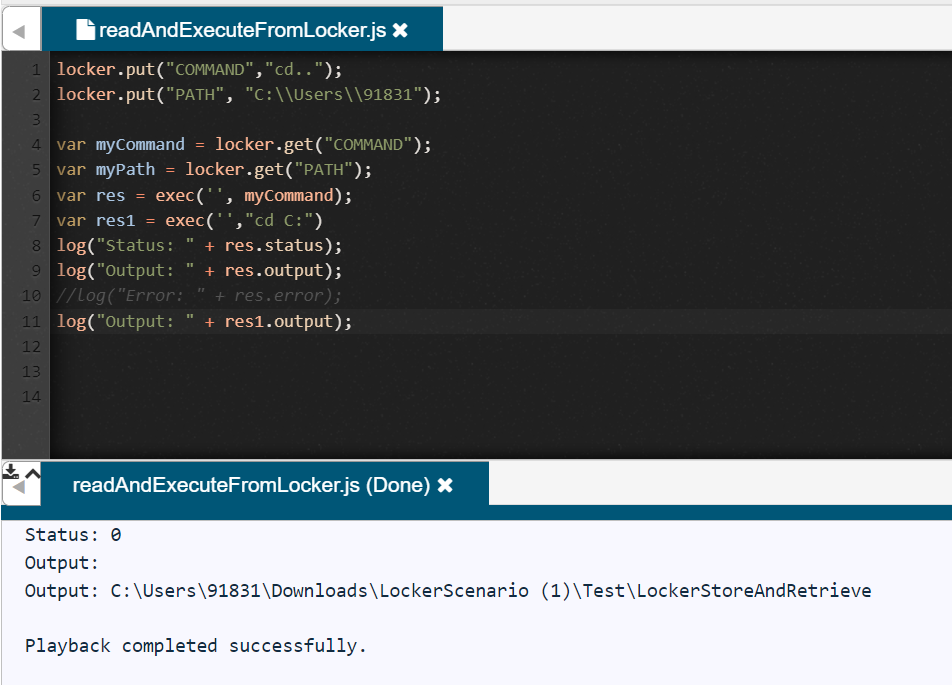
Sample Code1 2 3 4 5 6 7 8 9 10locker.put("COMMAND","cd..");locker.put("PATH","C:\Users\91831");varMyCommand = locker.get("COMMAND");varMyPath = locker.get("PATH");varres = exec('',"cd C:")log("Status: "+ res.status);log("Output: "+ res.output);//Log("Error: " + res.error);log("Output: "+ res1.output);
scheduled or shared workflow.In line 1 you are saving thecommandto be executedin avariable.
InReview linenote: 6This youpage areis invokingnow intentionally cautious because OS command execution can affect the command.execution host.
Last updated: AugustSeptember 10,30, 20232026
If you have any feedback on this topic, please contact us at documentation@appvance.ai.