
Capture Text from a Captcha Image
Validate
You CAPTCHAcan Textcreate Capturea Network Library (.netx) file to capture a Captcha request from a webpage and store the content of that response. This will allow you to log into a webpage that has a Captcha challenge.
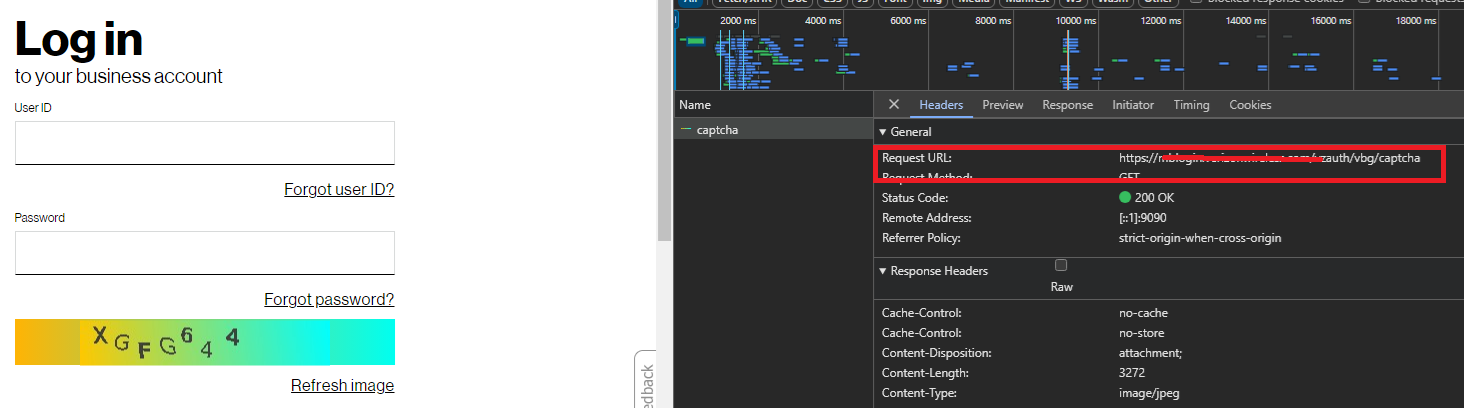
Process
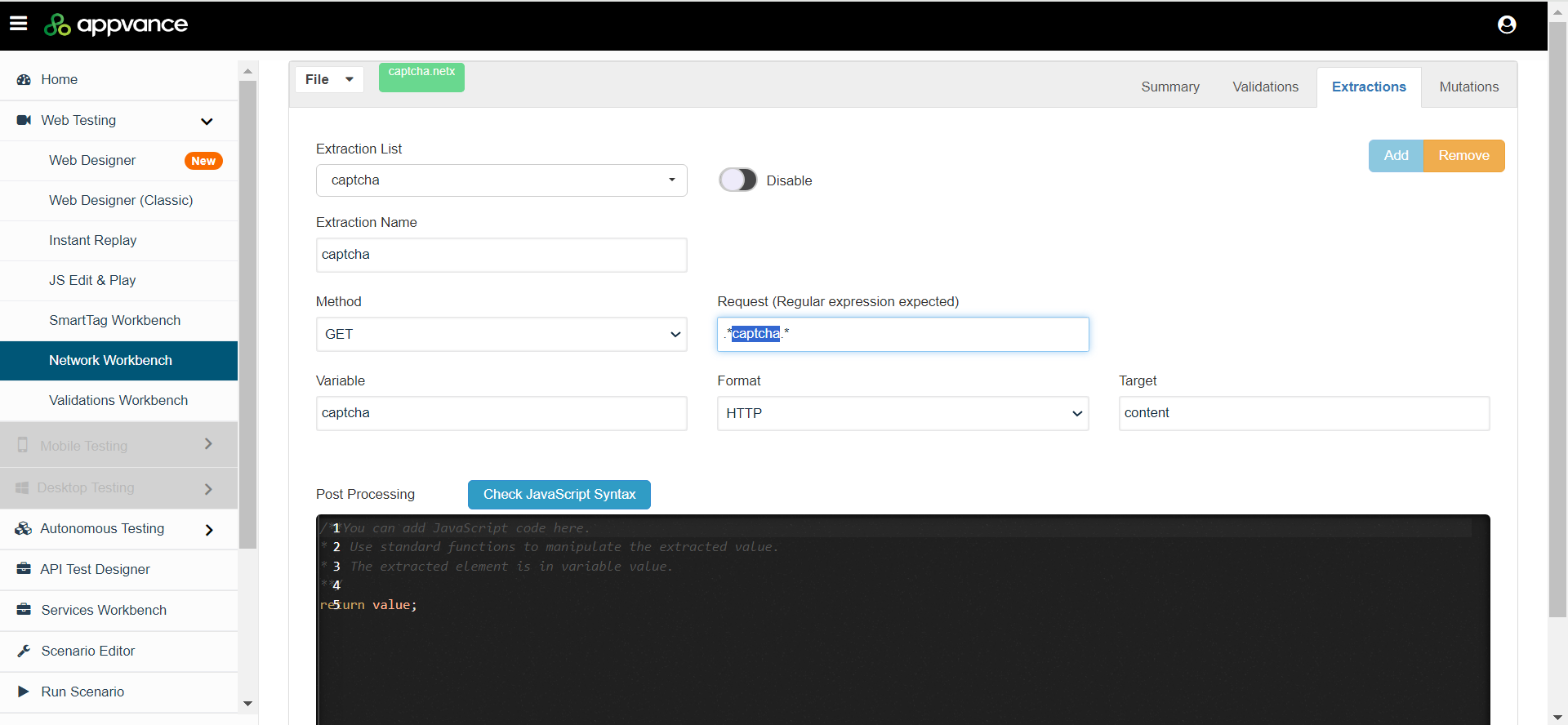
In AIQ navigate to Web Testing > Network Workbench > Extractions (tab).
Click Create Action to create a new extraction with the following parameters:
*captcha.*)
<![CDATA[
]]>Variable: Specify the variable name. For example: "captcha".
<![CDATA[
]]>Format: Select HTTP as the format.
<![CDATA[
]]>Target: Extract the full content of the page as the Target.
After creating the .netx file, create the anticaptcha.js file (see Sample Files below). This will encode the Captcha image received by the .netx file and use the API endpoints of the anticaptcha service using client account key(apiKey) - createTask and getTaskResult to extract the data from Captcha image.
anticaptcha=(byteImage, apiKey)=>{
  base64Capcha = encodeBase64(byteImage);
  antiCapchaMessage = {
      "clientKey":apiKey,
      "task":
          {
              "type":"ImageToTextTask",
              "body":base64Capcha,
              "phrase":false,
              "case":false,
              "numeric":0,
              "math":false,
              "minLength":0,
              "maxLength":0,
              "languagePool":"en"          },
      "softId": 0
  }
  log("********************************");
  log(antiCapchaMessage);
  taskId = JSON.parse(post("https://api.anti-captcha.com/createTask",antiCapchaMessage).toStringContent()).taskId;
  taskResultMessage = {
      "clientKey":apiKey,
      "taskId":taskId
  }
    log(JSON.stringify(taskResultMessage));
  for (;;){
    var result = JSON.parse(post("https://api.anti-captcha.com/getTaskResult",taskResultMessage).toStringContent());
    log(result);
    if (result.status === "ready"){
      return result.solution.text;
    }
    wait(1000);
  }
}


var result = anticaptcha(locker.get("captchaImg"),locker.get("clientKey"))
locker.put("captchaSolution",result);
After creating the above two files, you can create the test script (.ds file) by recording the corresponding webpage with the Captcha, using both files as part of the test script.
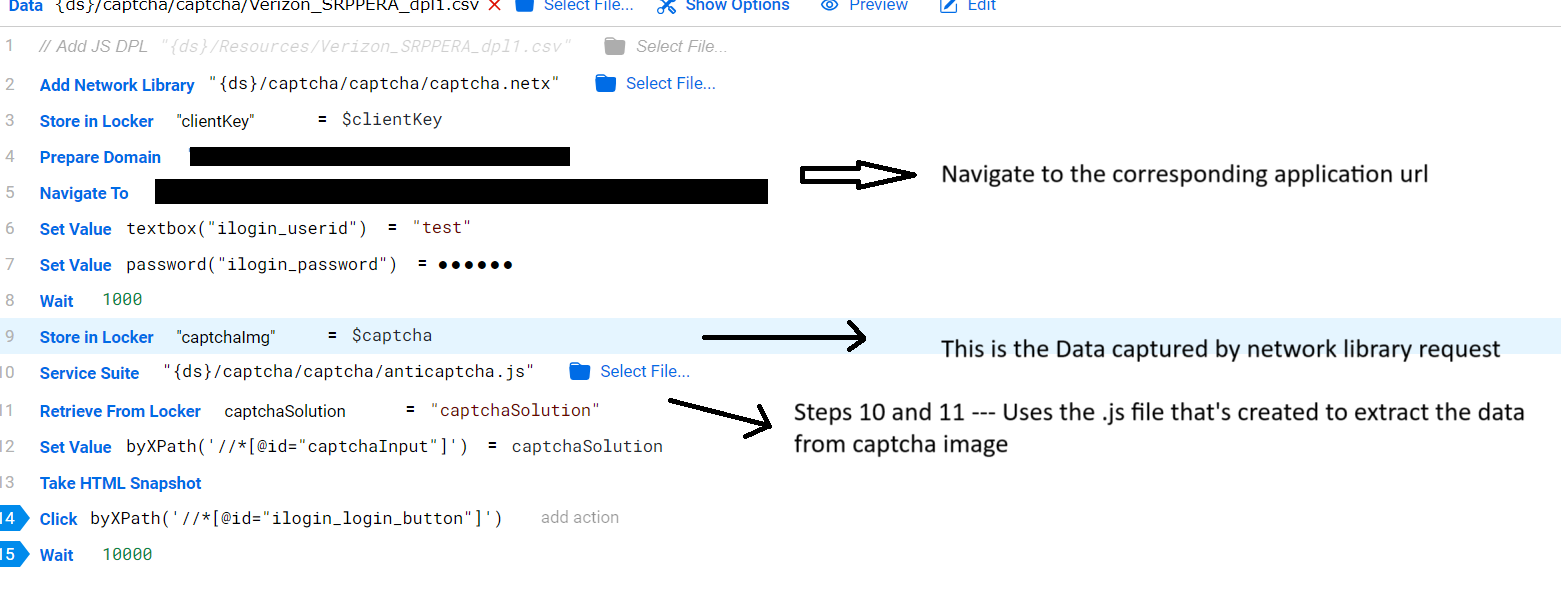
After recording the required steps for logging in Approvedto Testthe Environmentsapplication,
Useuse thisthe article.netx onlyfile forand approvedthe anticaptcha.js file created in the test environmentsscript where(show CAPTCHAin imagesthe areimage providedabove).
Then play back the test fixtures. Do not use AIQ automation to bypass CAPTCHA or defeat anti-bot protections on production systems.
Safe testing approach
Use a sandbox CAPTCHA, static fixture, or customer-approved test mode.Validate OCR or text-extraction behavior only when the CAPTCHA providerscript andapplication owner permit it.Keep expected values in test data, not in production user flows.Recordcheck whether thetestcorrect Captcha data isvalidatingenteredOCRandquality,youapplicationcanhandling,logorinasuccessfully.downstream
Sample ServiceFiles
captcha.netx
{
    "validations": [],
    "extractions": [
        {
            "name": "captcha",
            "disabled": false,
            "regex": ".*captcha.*",
            "hint": "",
            "method": "get",
            "variable": "captcha",
            "format": "http",
            "target": "content",
            "postprocessing": "/**You can add JavaScript code here.\n*\t\tUse standard functions to verifymanipulate the expected result without weakening real security controls.
Validation workflow
Confirm written approval or documented test-mode support for the CAPTCHA scenario.Run the test with a known fixture and expectedextracted value.Validate\n*\t\tThesuccessextractedand failure behavior separately.Review logs to ensure no real user credentials, session data, or sensitive images are captured.
Security note: CAPTCHAelement is ain securityvariable control.value.\n**/\nreturn Thisvalue;"
content}
must],
not"mutations": be[]
}
anticaptcha.js
anticaptcha=(byteImage, apiKey)=>{
  base64Capcha = encodeBase64(byteImage);
  antiCapchaMessage = {
      "clientKey":apiKey,
      "task":
          {
              "type":"ImageToTextTask",
              "body":base64Capcha,
              "phrase":false,
              "case":false,
              "numeric":0,
              "math":false,
              "minLength":0,
              "maxLength":0,
              "languagePool":"en"
          },
      "softId": 0
  }
  taskId = JSON.parse(post("https://api.anti-captcha.com/createTask",antiCapchaMessage).toStringContent()).taskId;
  taskResultMessage = {
      "clientKey":apiKey,
      "taskId":taskId
  }
    log(JSON.stringify(taskResultMessage));
  for bypassing(;;){
    CAPTCHAvar onresult live= systems.JSON.parse(post("https://api.anti-captcha.com/getTaskResult",taskResultMessage).toStringContent());
    log(result)
    if (result.status === "ready"){
      return result.solution.text;
    }
    wait(1000);
  }
}


var result = anticaptcha(locker.get("captchaImg"),locker.get("clientKey"))
locker.put("captchaSolution",result);
Last updated: October 8,02, 20262024
If you have any feedback on this topic, please contact us at documentation@appvance.ai