
Run a Scenario for Available CSV Entries
Run a Scenario for Available CSV Entries
BelowWhen area Scenario Editor test uses CSV-backed data, align the stepsexecution tocount be following in Scenario Editor.
Choose Scenario Type to be Performance Test
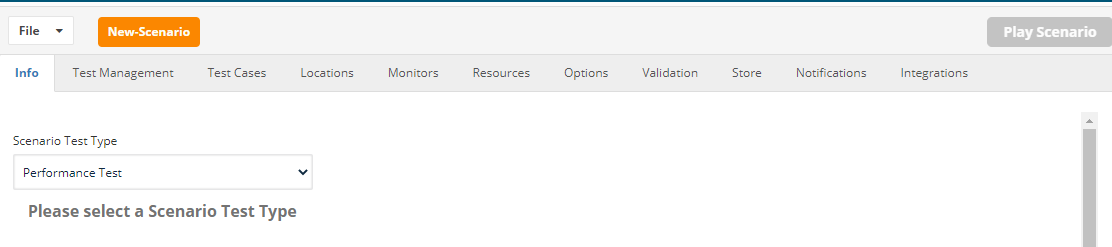
Choosewith the Resourcesavailable rows so the run does not reuse, skip, or exhaust data unexpectedly.
Recommended setup
- Confirm the CSV contains only valid rows intended for the execution.
- Document whether the header row is excluded from the
resourcesdata>count. - Decide
DPLwhether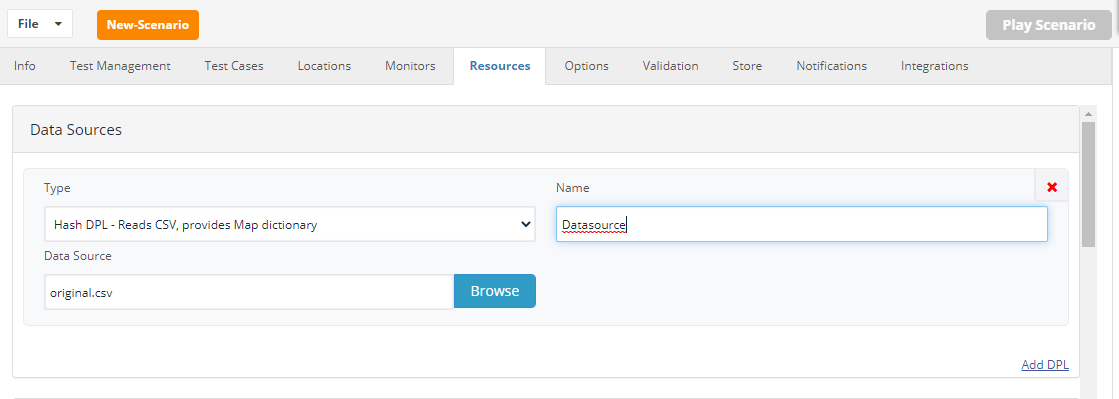
Definerowsyourshould be consumed once, reused, or reset between runs. - Keep sensitive data out of CSV files unless the storage and retention process is approved.
Validation workflow
- Run with a small CSV sample and confirm row consumption behavior.
- Review output to verify the expected row was used by each iteration.
- Set the scenario execution count to match the intended number of available data entries.
- Archive or reset test
casesdataandaccordingassignto thedefinedenvironment’sDPL.data policy.
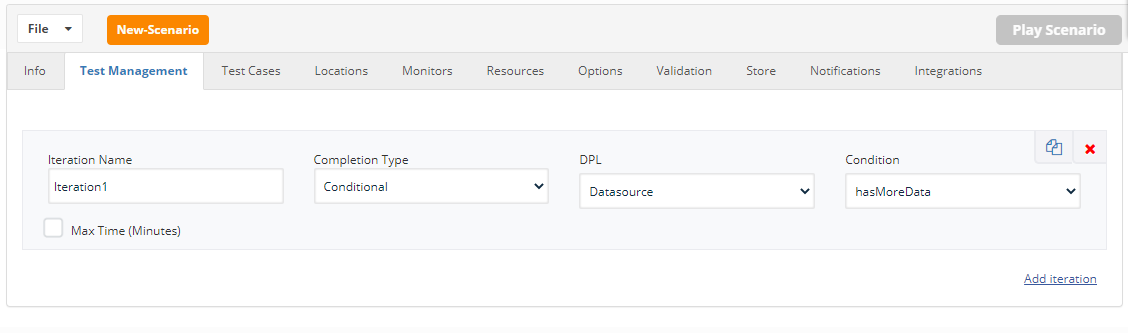
From Test Management, Choose Completion Type to be “Conditional”
Choose the defined DPL and Condition to be “hasMoreData”
Last updated: JuneSeptember 26,8, 20232026
If you have any feedback on this topic, please contact us at documentation@appvance.ai