
Run AIQ Tests Across Windows and Linux Machines
Preconditions:Last Bothreviewed: theSeptember 28, 2026
Use this article when planning Scenario Editor or execution-node coverage across mixed Windows and Linux machinesmachines.
What havechanged Appvancein IQthis installedarticle
- Corrected the title grammar and
itchangedshouldthebeanswerrunning.from aBelowone-offstepsFAQwouldintohavemixed-nodetoexecutionbeguidance. - Added
followedpracticaltocompatibilityexecutecheckstestsforwithbrowserWindowsversions, drivers, filesystem paths, node labels, environment variables, andLinuxOS-specificmachinesdependencies. - Clarified
UserthatwillmixedcreateOSa scenario according to the requirement and adds the scripts and gives the completion criteria.Now User will have to go to Location tab and mention the URL of the Linux machine in the given formatFormat : http://localhost:8080/TMServer/ws/TestNodeWhere localhostexecution isthevalidIPonlyof the machine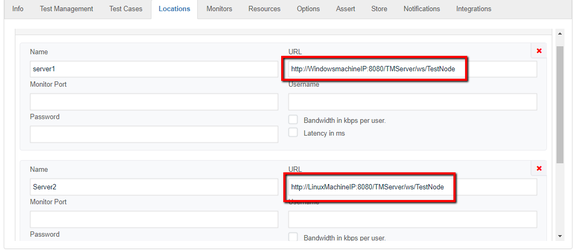
Same process would have to be followed for Windows machine as well by entering the IP of the windows machine.
data do not rely on OS-specific assumptions.Savewhen the scenario andclicktestPlay.
Validation workflow
- Identify which nodes are Windows and which are Linux, including browser and driver versions.
- Review the scenario for OS-specific paths, shell commands, downloads, or file permissions.
- Run a small node-targeted execution on each OS before scheduling a full mixed run.
Review
note: Added node-readiness validation so mixed Windows/Linux execution does not hide environment-specific failures.
Last updated: JulySeptember 28, 20232026
If you have any feedback on this topic, please contact us at documentation@appvance.ai.