
Run Functional Tests Concurrently in AIQ
Run Functional Tests Concurrently in AIQ
WithRun functional testing,tests usersconcurrently alsowhen havethe options to control how manyscenarios, test casesdata, runand concurrently:execution environment are ready for parallel execution. Concurrency can expose data collisions, environment limits, and locator or wait issues that do not appear in a single-user run.
Before increasing concurrency
- Validate each scenario with a small single-user execution.
Max concurrent users globally.
Max concurrent users globally
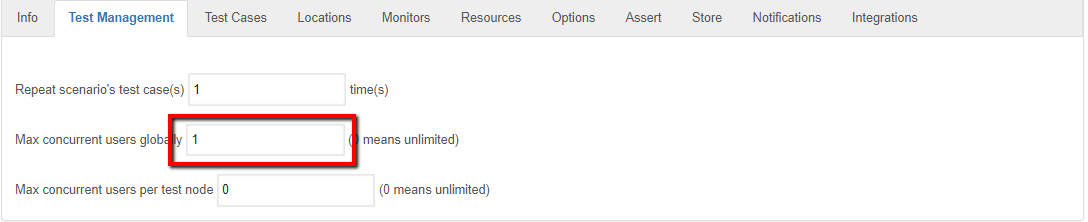
By setting this value to "1" usersdata is restrictingisolated or safely reusable.
Execution guidance
- Increase concurrency gradually.
- Monitor active users, errors, output, and environment health.
- Stop and triage if failures indicate invalid data or unstable infrastructure.
- Document the
systemconcurrencytolevellaunchusedonlywhenonereportinguser even if there are multiple test node. User can change this value depending on the requirement. If the value is "0" all the users will be launched concurrently.results.
Max concurrent users per test node
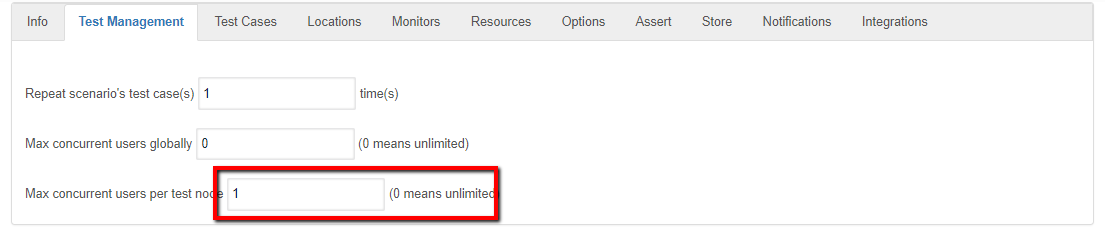
By setting this value to "1" user is informing the system to launch 1 user per testnode. if the value is set to 0 then all the user will be launched across test nodes.
Last updated: JuneSeptember 26,8, 20232026
If you have any feedback on this topic, please contact us at documentation@appvance.ai