
Run Java Code with an Array Generator DPL
Run Java Code with an Array Generator DPL
ArticleUse below tells howan Array Generator DPL is useful in running awith Java testcode typeonly scenario in scenario builder. Please referwhen the attachedtest samplerequires jargenerated or transformed data that cannot be handled by simpler DPL configuration. Keep Java logic focused on data preparation and scenarioavoid fileembedding tosecrets understandor howenvironment-specific arrayvalues.
Before DPLusing canthis bepattern
- Confirm
tothepassJavaarrayversionofsupportedarguments.
byTotherunAIQaexecutionjavaenvironment. - Validate the code with
arrayaargumentssmall, controlled data set. - Keep credentials, URLs, and tenant-specific values in
AppvanceapprovedusesecureArrayconfigurationgeneratorlocations. - Document
DPL.inputInshape,orderoutput shape, and expected failure behavior.
Validation workflow
- Run the DPL with a small sample.
- Confirm generated values map correctly into Scenario Editor steps.
- Review output for Java exceptions, empty arrays, and malformed values.
- Scale only after the DPL is repeatable and easy to
execute Java code with Main method in scenario builder you need to select a Array Generator DPL type and String[] from actions drop down. Add argument name and pass a value by clicking on Add Val link.troubleshoot.
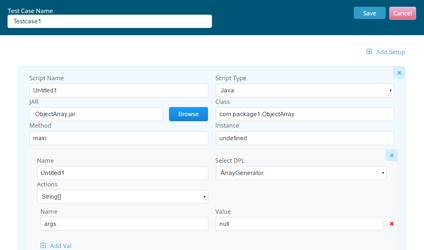
UsingArrayGenerator DPL you can send an array of values as a single parameter that has inside many entries String array: [ "string1", "string2", "string3" ].
So now you can provide a input parameter for a method that requires an array like
public void myMethod(String[]) {
}
You can also have Object arrays-Example:
[ { name: 'Honda', models: [ { name: 'Accord', features: ['2dr', '4dr'] },
{ name: 'CRV', features: ['2dr', 'Hatchback'] },
{ name: 'Pilot', features: ['base', Appvance_DPL_ArrayGenerator Page 2 'superDuper']},
{ name: 'Toyota', models: [ { name: 'Prius', features: ['green', 'superGreen'] },
{ name: 'Camry', features: ['sporty', 'square'] }, { name: 'Corolla', features: ['cheap', 'superFly'] }
Types for arrays available: Object, String, Integer, int, Byte, byte, Double, double, Short, short, Float, float, Character, Boolean, Boolean
Sample Java Code with int array[]:
package com.package1;
import java.util.Arrays;
public class Array {
 public static void main(String args[]) throws Exception {}
 public void printArray(String message, int array[])
 {
   Arrays.sort(array);
   System.out.println(message+ ": [length: " + array.length + "]");
   for (int i = 0; i<array.length; i++) {
    if(i != 0)
   {
    System.out.print(", ");
   }
     System.out.print(array[i]);
   }
 System.out.println();
 int index = Arrays.binarySearch(array, 2);
 System.out.println("Found 2 @ " + index);
}
}
Create a jar file for above java code. Goto Scenario builder and select a Functional test Test type.
Add a test case with Java Test type and browse the above created jar file.
Above java code consists of two arguments first with String argument and second with int array argument.
You need to pass the argument in same order in Appvance to run scenario successfully.
Please look at the below screen shot.
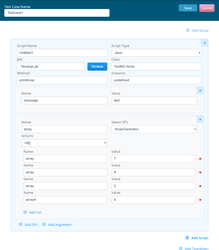
Enter 100% logs in Options panel. Save and play the scenario in a controller.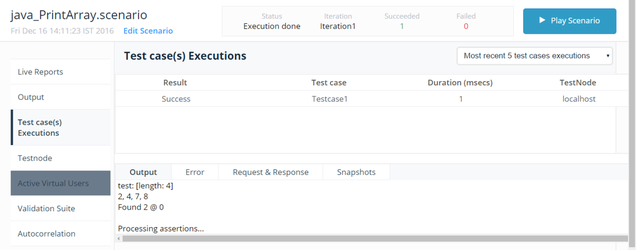
Last updated: JuneSeptember 26,8, 20232026
If you have any feedback on this topic, please contact us at documentation@appvance.ai