
Troubleshoot Node Localhost Init Errors
Troubleshoot Node Localhost Init Errors
IUse createdthis checklist when a sampleScenario scenarioEditor or Service Suite execution reports a Node localhost init error. The cause is usually environment setup, dependency resolution, port usage, or Test Node runtime configuration.
Check first
- The Test Node is online and assigned to the correct execution.
- The expected Node.js runtime or package dependency is available on the execution host.
- No other process is using the required localhost port.
- Security, proxy, or firewall settings are not blocking localhost communication required by the test.
Validation workflow
- Run a small validation execution on one Test Node.
- Review output, node logs, stdout, and stderr.
- Confirm package versions and working directory assumptions.
- Escalate with
testexecutiontypeID,asTestDesignerNodescriptname,with Testnode pointing to local hostlogs, andwhenreproductiontried to run the scenario, getting the error as shown in the attached screenshot.steps.
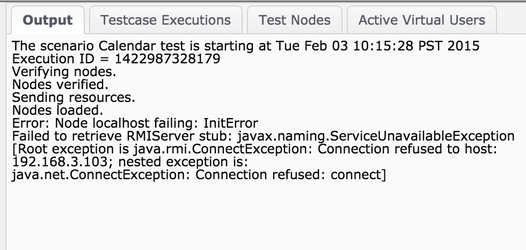
Solution: 1. You may be using Java x32 version instead of x64, x32 tend to be broken and it is good to use x64 one than the x32.
2. Update JDK to version 8.x and use the new updated path in JAVA_HOME in environment variables.
Last updated: JuneSeptember 26,8, 20232026
If you have any feedback on this topic, please contact us at documentation@appvance.ai