
Understand Interval Time and Sleep Time
Interval Time --- Pacing time of each iteration. This includes the execution time of the test case and the sleep time.
Sleep Time -- Pacing time between the execution. This is amount of time, the scenario waits from the end of one execution, to the beginning of next execution. Consider the following example to understand the
Understand Interval Time and Sleep Time
Interval Suppose the user defines a test scenario which has 2 Test-Cases, testcase1time and testcase2. Interval Time provided is 5 minutes and Sleep Time provided is 1 minute.
Example 1: Assume test case 1 takes 2 minute to complete execution. In the above case sleep time wouldboth affect execution pacing, but they should be 3(Timeused spancarefully. leftoverPrefer incondition-based intervalwaits time)+1(sleepwhen time)=4the minutes(totaltest sleepneeds time).
to Intervalwait Timefor providedapplication is 5 minutesstate, and Sleepuse Timetiming providedsettings is 1 minute.
Example 2: Assume test case 1 takes 3 minute to complete execution. In the above case sleep time would be 2(Time span leftover in interval time)+1(sleep time)=3 minute(total sleep time). Interval Time provided is 5 minutes and Sleep Time provided is 1 minute.
Example 3: Assume test case 1 takes 6 minute to complete execution. In the above case sleep time would be 1 minute since there is no time span left from the interval time. Interval Time and Sleep time are also available at the Global options (Options panel of the Scenario Builder), Think time and Sleep time at the Test-case level will be considered and taken into accountonly when user provides this option at both Test-Case and Global level. ================================================== Adding more details and example:
Example 2 1 user is taking 15 seconds to execute the script that was designed. Interval timepacing is the actual test objective.
Concepts
- Interval time controls spacing or pacing between
everyrepeatedexecution,activity,itdependingalsoontakesthe execution configuration. - Sleep time
intopausesconsideration.
executionSupposeforyouarunfixed duration. - Fixed waits can hide real application issues and make tests slower than needed.
Good practices
- Use Scenario Editor conditional waits for page readiness, element state, and asynchronous behavior.
- Use fixed sleep only when the
samedelaytestitselfcaseis required by the business or system workflow. - Keep wait values documented and review repeated timeout failures before increasing them.
- Validate timing changes with
1ausersmallforexecution5beforemins (300 seconds).Interval time provided is 100 seconds.scaling.
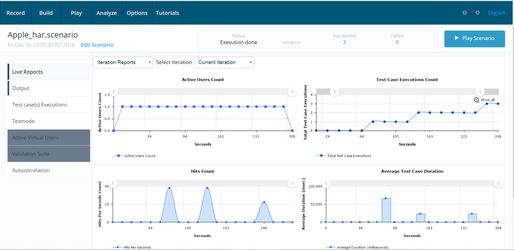
For every 100 seconds you should see one execution, so expected is 3 executions in total. Please find below screen-shot (IntervalTimeTest1).
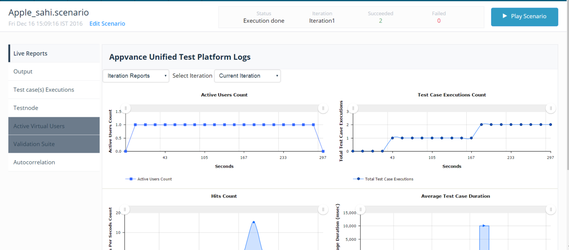
Sleep Time: As per definition it should be like the below 57 seconds + 100 seconds + 57 seconds + 100 seconds Expected is 2 executions. Attached is the screen-shot for reference (SleepTimeTest1).
Run-2
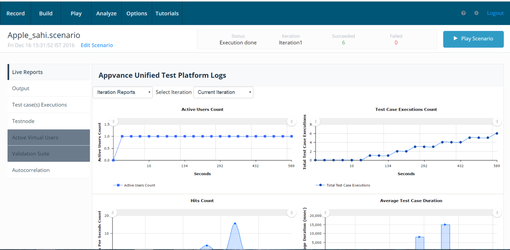
Interval time.Same test was run for 10 minutes and the expected executions was 6. Attached is the screen-shot for reference (IntervalTimeTest2).
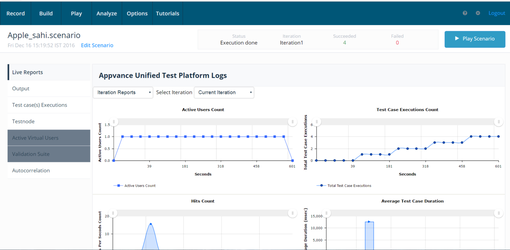
Sleep time.Same test was run for 10 minutes and the expected executions was 4. Attached is the screen-shot for reference (SleepTimeTest2).
Last updated: JuneSeptember 26,9, 20232026
If you have any feedback on this topic, please contact us at documentation@appvance.ai