
Add Snapshot Evidence in Scenario Editor
Add Snapshot Evidence in Scenario Editor
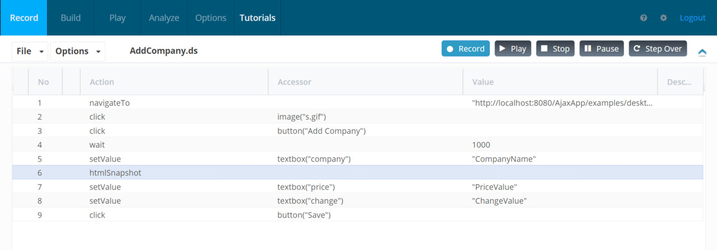
IfThis page replaces old Designer 2.0 wording with current Scenario Editor guidance. Add snapshot evidence when a screenshot or captured state will help diagnose a failure or prove an important business checkpoint.
When snapshots help
- Before and after a critical action.
- At the
userfirstwantsmeaningfultofailuresavepoint. - When validating layout, displayed data, or a
snapshotconfirmationforpage. - When
atroubleshootingspecificintermittentstep,behaviorthenacrossabrowsersmanualor Test Nodes.
Good practices
- Name the step
needsclearlyto be added right after the target step. Right click the step, for which you want to take a snapshot and select 'Add a new step below'
Last updated: JuneSeptember 26,9, 20232026
If you have any feedback on this topic, please contact us at documentation@appvance.ai