
Close Browser Windows in Scenario Editor
Close Browser Windows in Scenario Editor
Q:Use changingthis guidance when a Scenario Editor test opens a second browser window, tab, or popup and must return to the main application flow. Keep window -handling Iexplicit wantedso tothe closetest does not continue in the wrong context.
Recommended workflow
- Trigger the action that opens the new window
onceoritstab. - Wait
existence had been confirmed but it wouldn’t let me, can’t seefor thecloseexpected window, tab, or popup to be available. - Validate or capture the needed content.
- Close the secondary window
accessorandifswitchI tryback toclicktheitoriginalascontext. - Validate
part ofthat therecording nonext stepisrunsrecordedA: The close window button is not part ofin thepage,intendeditpage.
Good partpractices
- Use
theclearbrowserstepapplication so it is impossible to record clicking on it.In javascript, there is a way (window.close();) to close a windownames thatwas opened with a window.open() javascript command but even this method will not work in some versions of Chrome, will not work in FireFox, and IE might prompt for confirmation.Ifidentify the windowwasbeingnothandled. - Avoid
openedrelyingusingonwindows.open()windowthenorderthereif titles or URLs can be validated. - Capture output when popup behavior fails or is
noblockedway to close it using javascript. But, you can try in your scriptby thebelow:Eval in Browser | "window.open('','_self').close();"
browser.Problem:What if Close window API is not working in the script?
Solution:
As per research and latest spec of window.close()
Ordinary javascript cannot close windows willy-nilly. This is a security feature, introduced a while ago, to stop various malicious exploits and annoyances.
From the latest working spec for window.close():
The close() method on Window objects should, if all the following conditions are met, close the browsing context A:
The corresponding browsing context A is script-closable.
The browsing context of the incumbent script is familiar with the browsing context A.
The browsing context of the incumbent script is allowed to navigate the browsing context A.
A browsing context is script-closable if it is an auxiliary browsing context thatwas created by a script(as opposed to by an action of the user), or if it is a browsing context whose session history contains only one Document.
This means, with one small exception, javascript must not be allowed to close a window that was not opened by that same javascript.
Example:
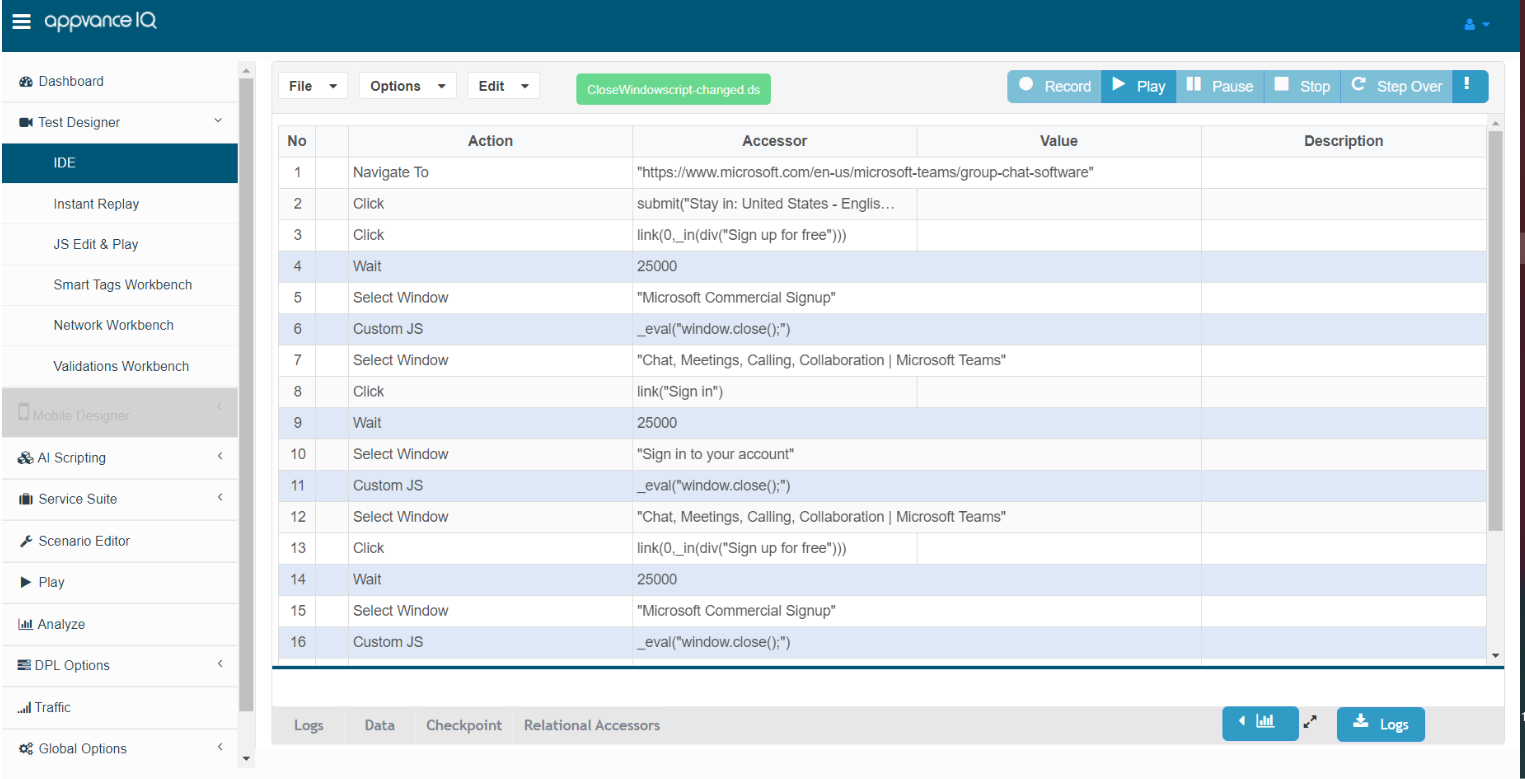
Problem: How to handle multiple windows in browser without closing any window?
Solutions: Using selectWindow – its not necessary to always use the title/name of window , we can also use href to uniquely identify the window. So in that case it might be easy to handle multiple windows for the flow without closing the window.
Last updated: JuneSeptember 26,9, 20232026
If you have any feedback on this topic, please contact us at documentation@appvance.ai