
Closing a window
Close
Q: Browserchanging Windowswindow in- ScenarioI Editor
Use this guidance when a Scenario Editor test opens a second browser window, tab, or popup and must returnwanted to the main application flow. Keep window handling explicit so the test does not continue in the wrong context.
Recommended workflow
Trigger the action that opensclose the new window once its existence had been confirmed but it wouldn’t let me, can’t see the close window accessor and if I try to click it as part of the recording no step is recorded
A: The close window button is not part of the page, it is part of the browser application so it is impossible to record clicking on it.
In javascript, there is a way (window.close();) to close a window that was opened with a window.open() javascript command but even this method will not work in some versions of Chrome, will not work in FireFox, and IE might prompt for confirmation.
If the window was not opened using windows.open() then there is no way to close it using javascript. But, you can try in your script the below:
Eval in Browser | "window.open('','_self').close();"
Problem: What if Close window API is not working in the script?
Solution:
As per research and latest spec of window.close()
Ordinary javascript cannot close windows willy-nilly. This is a security feature, introduced a while ago, to stop various malicious exploits and annoyances.
From the latest working spec for window.close():
The close() method on Window objects should, if all the following conditions are met, close the browsing context A:
The corresponding browsing context A is script-closable.
The browsing context of the incumbent script is familiar with the browsing context A.
The browsing context of the incumbent script is allowed to navigate the browsing context A.
A browsing context is script-closable if it is an auxiliary browsing context that was created by a script (as opposed to by an action of the user), or
tab.Waitif it is a browsing context whose session history contains only one Document.
This means, with one small exception, javascript must not be allowed to close a window that was not opened by that same javascript.
Example:
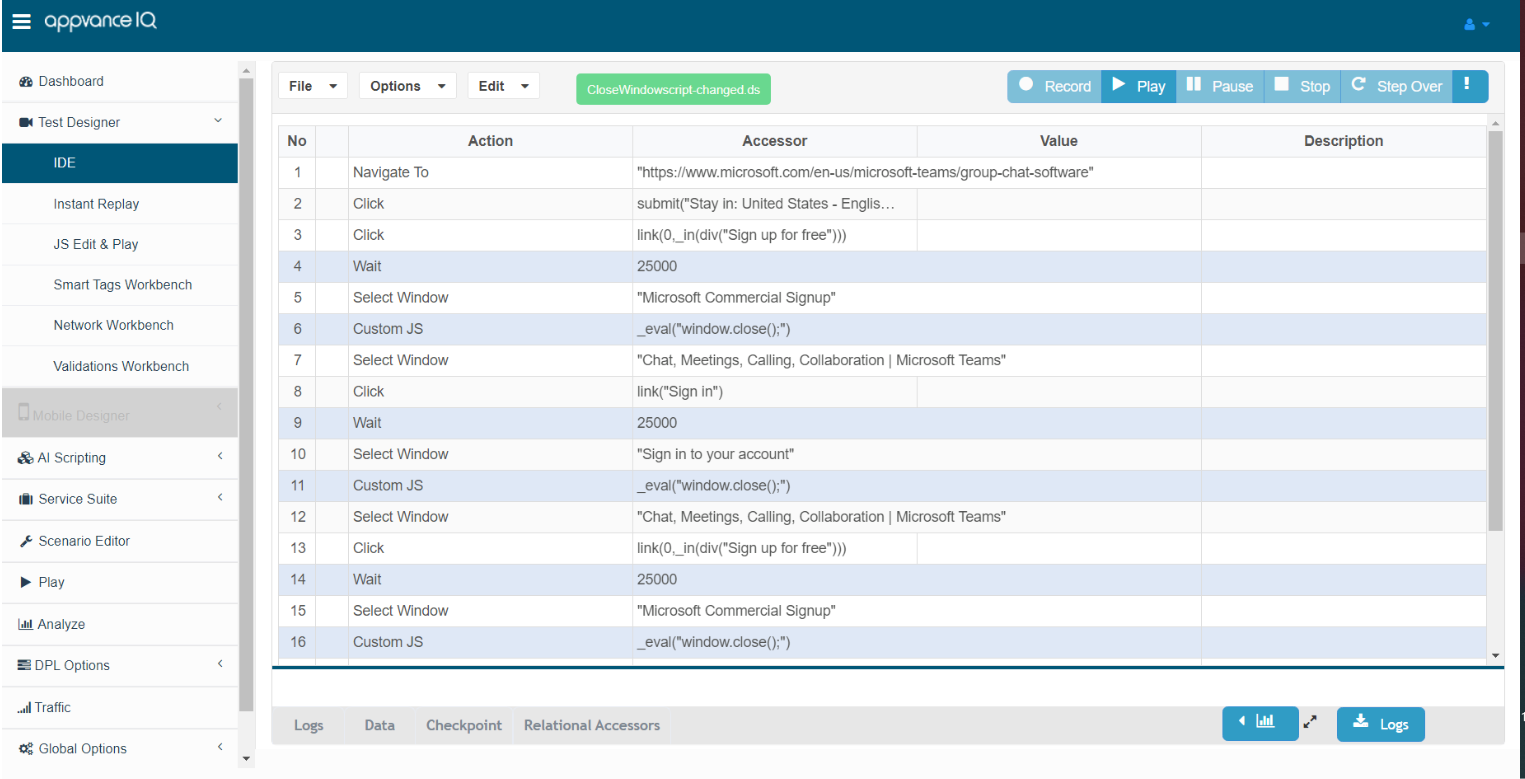
Problem: How to handle multiple windows in browser without closing any window?
Solutions: Using selectWindow – its not necessary to always use the title/name of window , we can also use href to uniquely identify the window. So in that case it might be easy to handle multiple windows for the expectedflow window,without tab, or popup to be available.Validate or captureclosing the neededwindow.
Last windowupdated: andJune switch26, back2023
If theyou originalhave context.
Good practices
Use clear step names that identify the window being handled.Avoid relyingfeedback onwindowthisordertopic,ifpleasetitlescontactorusURLsatcan be validated.Capture output when popup behavior fails or is blocked by the browser.
Last updated: September 9, 2026documentation@appvance.ai