
Solutions to common Test Designer IDE Challenges
Most of the times click and record can solve your testing needs. But also it is not rare that due to the “scripting” oriented description of the use cases to implement, the tester is faced with the challenge to approach the automation from a scripting angle.
This document provides some examples of scenarios where a little coding like steps are needed to speed up some automation requirements implementation using IDE.
If you are facing AI automation challenges please take a look at href="https://docs.appvance.net/Content/AIQ/General_KB_Articles/Useful_smartags_workbench_custom_actions_and_other_js_examples.htm"Useful smartags workbench custom actions and other js examples.
Solutions to Common Test Designer IDE Challenges
Numbers: convert parts of a string value to a floating number
// Suppose you have a span with the value $19.99 but you need validate the number is greated than 15.
Store                |  $stringValue    |  getText(span("carttotal"))     // "$19.99"Store                |  $floatingValue  |  parseFloat($stringValue.substring(1))   // removes the $ then convertes "19.99" to a floating number
Assert Greater Than  |  $floatingValue  |  15
Numbers: convert a string value to an integer number
// When needing to perform math operation so often you need to convert a number in string format to an actual integer
Store   |   $integerValue   |   parseInt(span("item-quantity"))
Tables: getting the number of rows in a table using ds$
// Assuming the table has an id myTable you can get the number of rows in the IDE using:
Store  |  $rowsQuantity  |  _eval("ds$('#myTable tbody > tr').length")
or
Store  |  $rowsQuantity  |  getLength("ds$('#myTable tbody > tr')")
An alternate way is to use the getLength function:
// Assuming the table has an id myTable you can get the number of rows in the IDE using:
Store  |  $rowsQuantity  |  getLength("#myTable tbody > tr")
Tables: getting the column index with a given header using ds$
// You can use the jQuery index() function to find the column index of a table that contains certain text "MyHeader". REF: https://api.jquery.com/index/
Store  |  $columnIndex  |  _eval("ds$('thead th:contains(MyHeader)').index()")+1
Tables: Iterate over a table to process all the cells values of a given column using ds$
// If you need to iterate over a table column to process the contents of a certain column you can use above functions to get the total number of
// rows in the table and the column that has the appropiate heade and then:
Store   |  $rowIndex                  | 1
While   |  $rowIndex < $rowsQuantity
  Store |  $cellValue                 |  _eval("ds$('tbody tr:nth-child("+$rowIndex+") td:nth-child("+$columnIndex+")').text()")
  [ do something with $cellValue ]
  Store |  $rowIndex                  |  $rowIndex + 1
End While
General: close browser window.
// If the application does not provide a button to close the window, need to insert
// the link and click it with following lines.
CustomJS  |  "ds$('body').append('<a id=\"aiq-close\" href=\"javascript:close_window();\">aiq-close</a>')"Click     |  link("aiq-close")
General: get an attribute value of an element
Store | $url | getAttribute(link("id"),"href")
General: confirm an element is disabled
Set FindOnlyEnabled  |  false      |
Store                |  submitdis  |  getAttribute(button("cancellation-submit"),"disabled")
Set FindOnlyEnabled  |  true       |
Assert Equal         |  submitdis  |  "disabled"

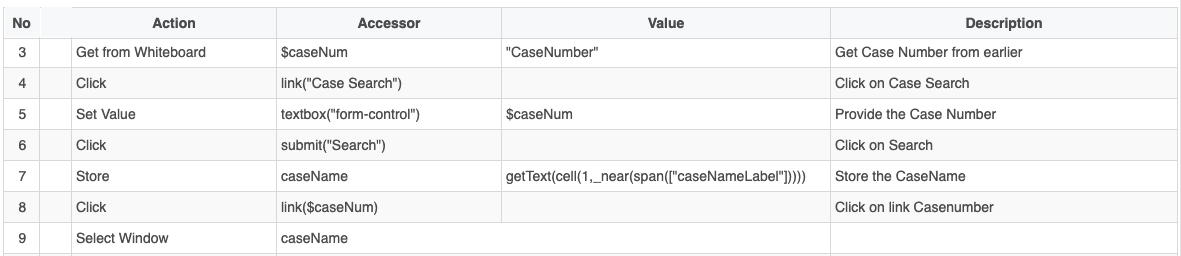
General: get a dynamic value and use it elsewhere
Get from Whiteboard |  $caseNum                 | "CaseNumber"Click               |  link("Case Search")      |
Set Value           |  textbox("form-control")  | $caseNum
Click               |  submit("Search")         |
Store               |  caseName                 | getText(cell(1,_near(span(["caseNameLabel"]))))
Click               |  link($caseNum)           |
Select Window       |  caseName                 |
Links to other common challenges:
-
href="/books/test-designer-20-test-designer-30/page/how-to-automate-the-scroll-bar"How to automate the Scroll bar? -
href="/books/test-designer-20-test-designer-30/page/pagination-how-to-search-items-in-a-page-with-multiple-paginations"Pagination - How to search items in a page with multiple paginations
Last updated: July 03, 2023
If you have any feedback on this topic, please contact us at documentation@appvance.ai