
Data-Drive Wait Values in Scenario Editor
Data-Drive Wait Values in Scenario Editor
HowUse todata-driven wait values only when different test data drivegenuinely arequires different timing. Prefer conditional waits based on application state whenever possible.
When data-driven waits make sense
- Different workflows have documented processing windows.
- External systems return at different approved polling intervals.
- The timing value is part of the test data model and needs traceability.
Good practices
- Store timing values in an approved DPL or test data source.
- Use clear field names such as waitTimeoutSeconds or pollingIntervalSeconds.
- Set maximum limits so bad data does not create excessive waits.
- Review repeated wait
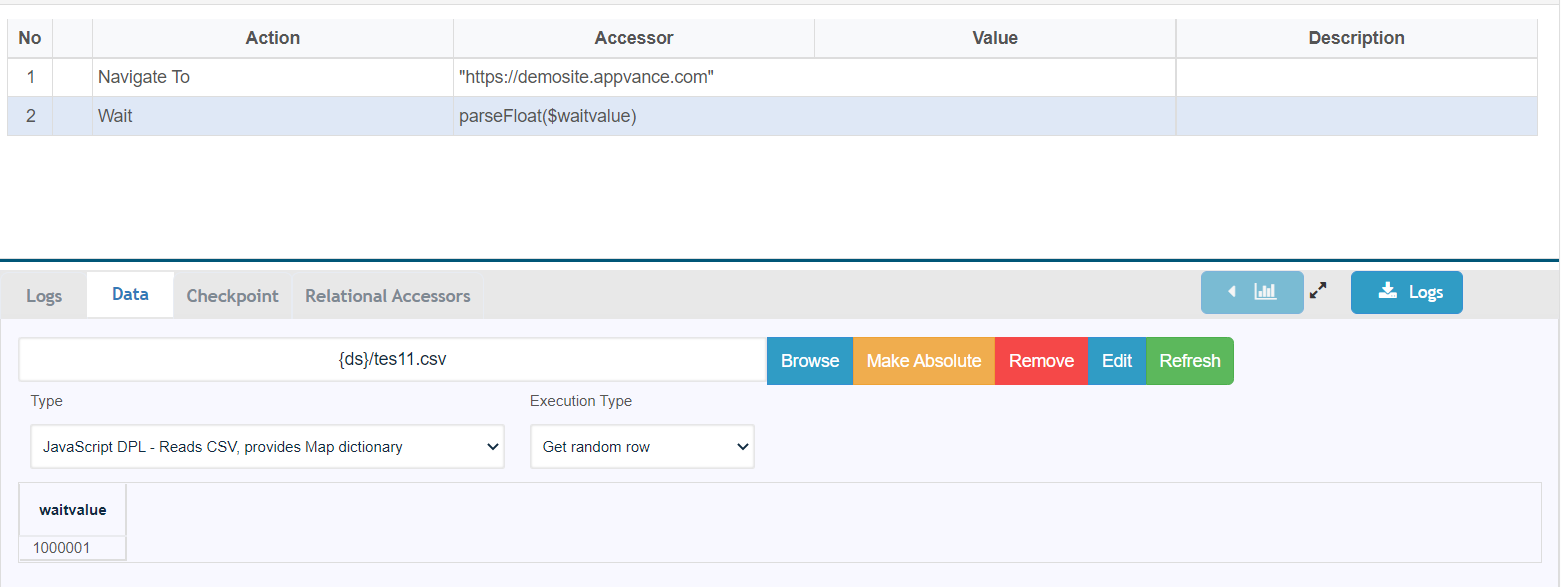
statement?failuresThebeforeideaincreasingisdata-driventotiminguse one single file so we can alter the wait statements from the CSV file and then change in scripts and in multiple places.values.
Solution:
By default, the value that the wait action would be taken as a string, so this should be changed to int by parsing the text that it receives [parseFloat($waitvalue)]
Last updated: JuneSeptember 26,9, 20232026
If you have any feedback on this topic, please contact us at documentation@appvance.ai