
Grant Microphone Permissions for Scenario Editor Tests
IfLast youreviewed: haveOctober 2, 2026
Use this article when a Scenario Editor test scenariomust interact with a browser workflow that requiresrequests usemicrophone ofaccess.
What microphone,changed youin needthis toarticle
- Replaced generic permission wording with Scenario Editor and browser permission setup guidance.
- Added checks for browser profile, test environment policy, HTTPS requirement, permission persistence, and evidence capture.
- Clarified that production user microphone prompts should not be
ablehandledtowithgrantpersonalpermissionaccountsforor real user data.
Validation workflow
- Confirm the
microphonetestto be used.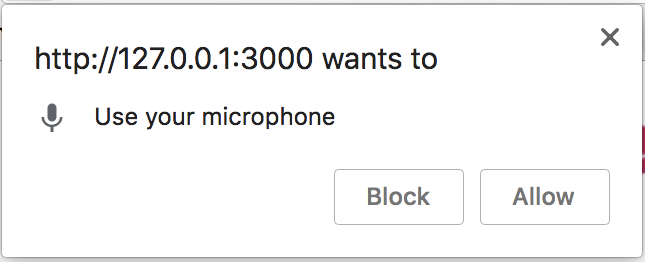
ResolutionIncognito / Privatemode must be set to off in the script options.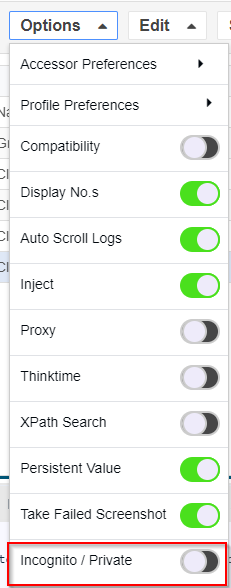
Add theGrant Permisionfield in your to script itenvironment ispossibleapproved to use microphone access and does not capture sensitive audio. - Preconfigure the
micbrowserforprofilerecordingor test policy so the permission behavior is deterministic. - Run the scenario and verify the permission state, browser prompt behavior, and resulting evidence.
Review 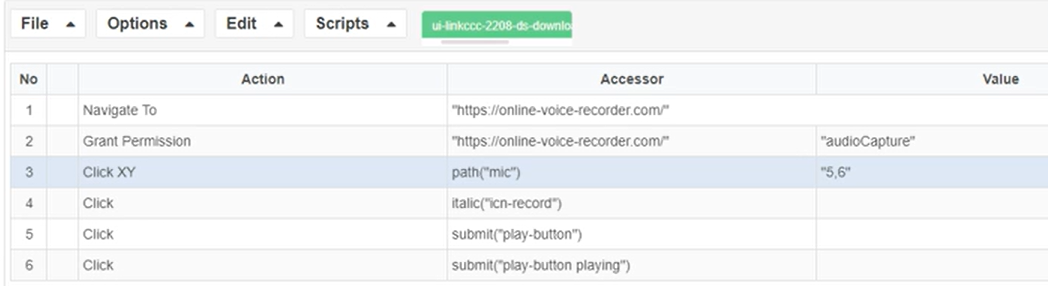
Last updated: October 02,2, 20232026
If you have any feedback on this topic, please contact us at documentation@appvance.ai.