
Group Step Statistics at a Higher Summary Level
ProblemLast statementreviewed: -September Consider28, 2026
Use this article when execution results need grouped step statistics for easier analysis and reporting.
What changed in this article
- Rewrote the title for clarity and made the purpose about grouped result analysis.
- Added guidance on grouping related steps by business transaction, flow, or validation section.
- Added a
singlewarningtestthatingroupingAIQ.shouldWenothavehideacritical*group*step-leveloffailures or timing outliers.
Validation workflow
- Identify which steps
that we would likebelong totreattheassameabusinesssingleactionentityorintransaction. - Apply
reports.grouping/namingI’llconsistentlyusebeforeloginrunningastheascenario. - Review
simplebothexamplegroupedforstatisticsthis conversation.
execution.Instead of getting performance information for eachand individual steplikedetailsthisafterin a report:
//startReview login
EnterThe Username-page 1ms
Enterbalances asummary-level password-reporting 1ms
Clickthe submit -500 ms
//create new residence
More steps for more testing that a residence was created
//delete residence
More steps for more testing that a residence was deleted
We would likeneed to generatepreserve adetailed morefailure “management friendly” report that has numbers that are grouped and summed by section/entity.evidence.
Login – 502ms
Create residence – 1203ms
Delete residence – 3212ms
Most readers don’t view actions as mouse clicks and field interactions. They think in notions like the second report.
Resolution:
The steps can be grouped by making use of the below
com.appvance.enterprise.tool.APCStepListener.startSummaryStep("Start Login")
com.appvance.enterprise.tool.APCStepListener.endSummaryStep()
Below is the code snippet from test designer IDE
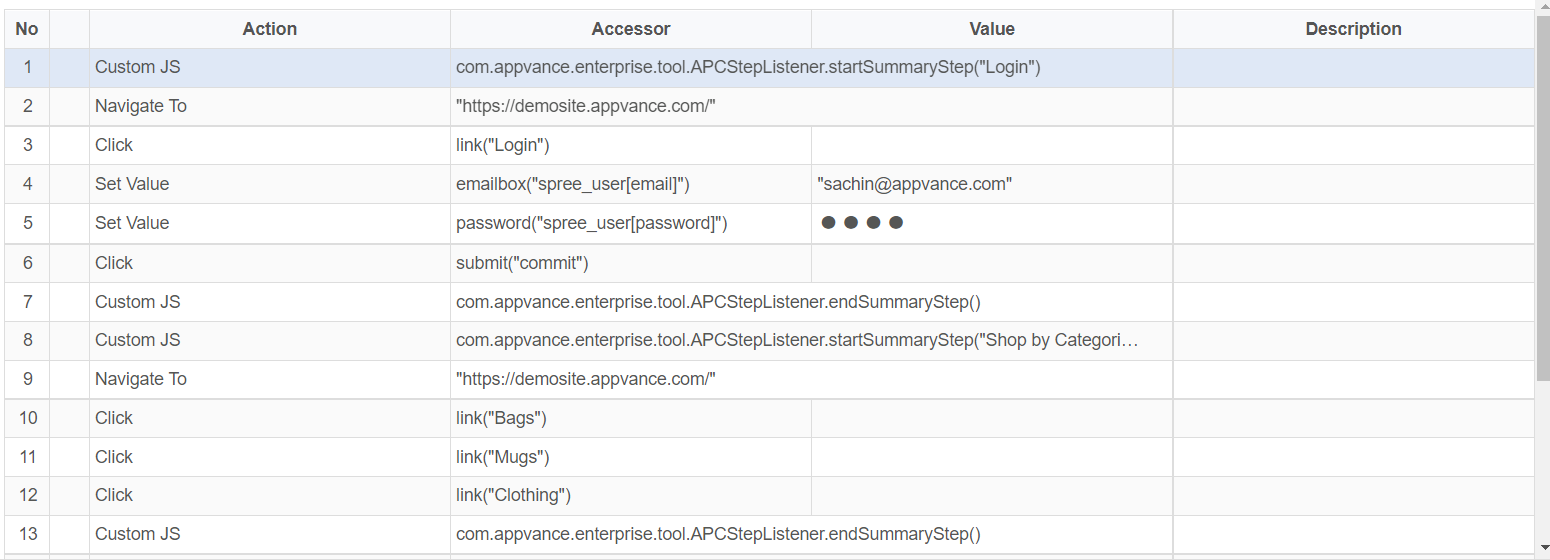
Equivalent JS script:
com.appvance.enterprise.tool.APCStepListener.startSummaryStep("Login");
navigateTo("https://demosite.appvance.com/");click(link("Login"));
setValue(emailbox("spree_user[email]"),"user@company.com");
setValue(password("spree_user[password]"),"Password");
click(submit("commit"));
com.appvance.enterprise.tool.APCStepListener.endSummaryStep();
com.appvance.enterprise.tool.APCStepListener.startSummaryStep("Shop by Categories");
navigateTo("https://demosite.appvance.com/");click(link("Bags"));
click(link("Mugs"));
click(link("Clothing"));
com.appvance.enterprise.tool.APCStepListener.endSummaryStep();
com.appvance.enterprise.tool.APCStepListener.startSummaryStep("Shop by Brands");
click(link("Ruby"));
click(link("Apache[1]"));
click(link("Spree"));
click(link("Rails"));
com.appvance.enterprise.tool.APCStepListener.endSummaryStep();
Reports can be filtered this way to get to those steps that are required.

Last updated: JulySeptember 28, 20232026
If you have any feedback on this topic, please contact us at documentation@appvance.ai.