
Extract Table Content in Scenario Editor
BelowLast isreviewed: exampleSeptember script21, using2026
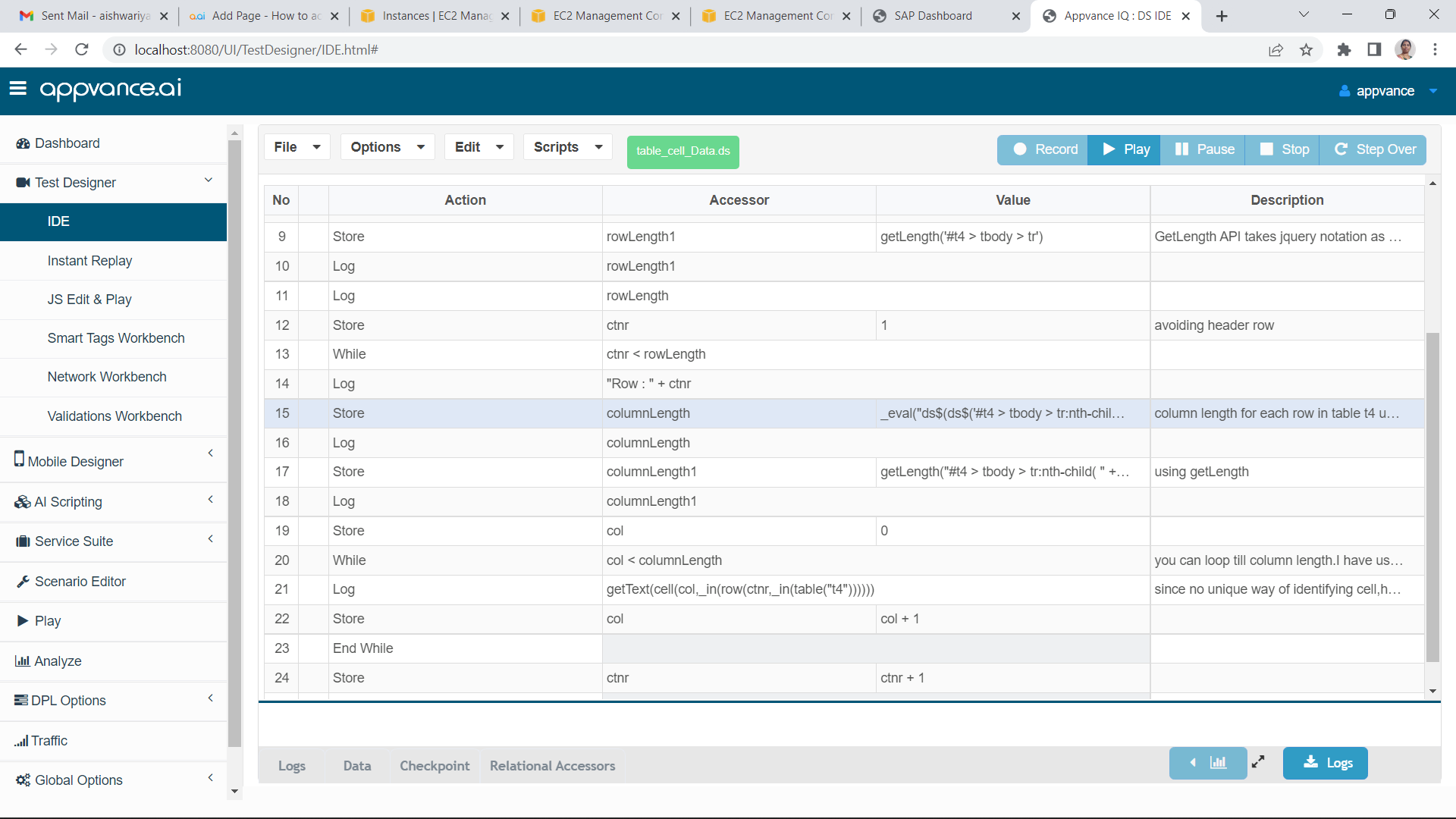
Use tothis getarticle when a Scenario Editor test must read table rows, columns, or specific cell values from a web application.
Recommended guidance
- Prefer stable table selectors and accessible labels when available.
- Decide whether the test needs one cell, one row, or the full table.
- Account for pagination, sorting, filters, and lazy-loaded rows.
Validation workflow
- Identify the table and the row/column
lengthcriteria before extracting values. - Use stable locators for headers and
getcells rather than visual position alone. - Normalize whitespace and formatting before comparing values.
- Validate pagination or scrolling if the
textexpectedofrowcell.Thisisexamplenotdoesntinitiallyhavevisible. - Store
anyextracteduniquevaluesaccessoronlysowhengoingthey are needed byrow/celllatercounterstepsalongorwithassertions.
Note: accessor.InIf casethe ifapplication there’sexposes anythe unique identifier is available to access row/cell,same candata bethrough usedan directlyAPI, asuse well.that source for setup or cross-checking when appropriate.
Last updated: JulySeptember 03,21, 20232026
If you have any feedback on this topic, please contact us at documentation@appvance.ai.