
Extract Numbers from a String in Scenario Editor
Extract Numbers from a String in Scenario Editor
Use this pattern when a Scenario Editor test needs to capture numeric values from application text, such as prices, IDs, quantities, or decimal values.
Recommended guidance
- Extract only the value required by the validation or downstream step.
- Preserve decimal points only when the business value requires them.
- Normalize currency symbols, commas, spaces, and labels before comparison.
- Store extracted values with clear names when they are reused later.
Validation workflow
- Capture the source text from the page, response, or stored value.
- Apply the extraction rule to isolate the numeric value.
- Validate the extracted value against expected test data or business rules.
- Record the source text and extracted value when troubleshooting failures.
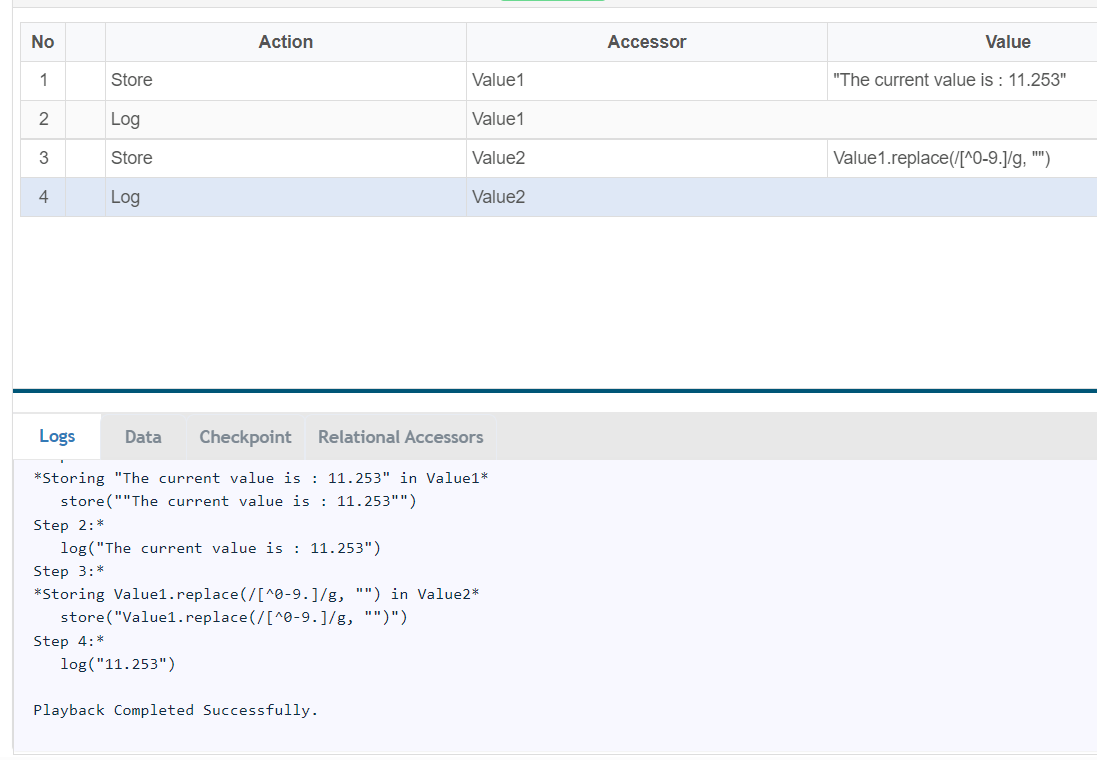
string.replace(/[^0-9.]/g, "") / string.replace(/[^a-zA-Z0-9.]/g, '')
Last updated: JuneSeptember 26,20, 20232026
If you have any feedback on this topic, please contact us at documentation@appvance.ai