
How to get all values of dropdown
LastBelow reviewed:is Septemberexample 21,script 2026
Useshows this page when a Scenario Editor test needshow to captureget all text and validateoption thevalues available options in aof dropdown or select control.
Recommended guidance
Confirm whether the control is a native select element or a custom dropdown.Open custom dropdowns before collecting visible options.Normalize labels before comparing expected and actual values.
Validation workflow
Locate the dropdown using a stable label or selector.Expand the dropdown if options are rendered only after interaction.Collect the option labels and values.Compare the set against expected data, allowing for intentional ordering rules.Close the dropdown and continue the workflow only after validation passes.
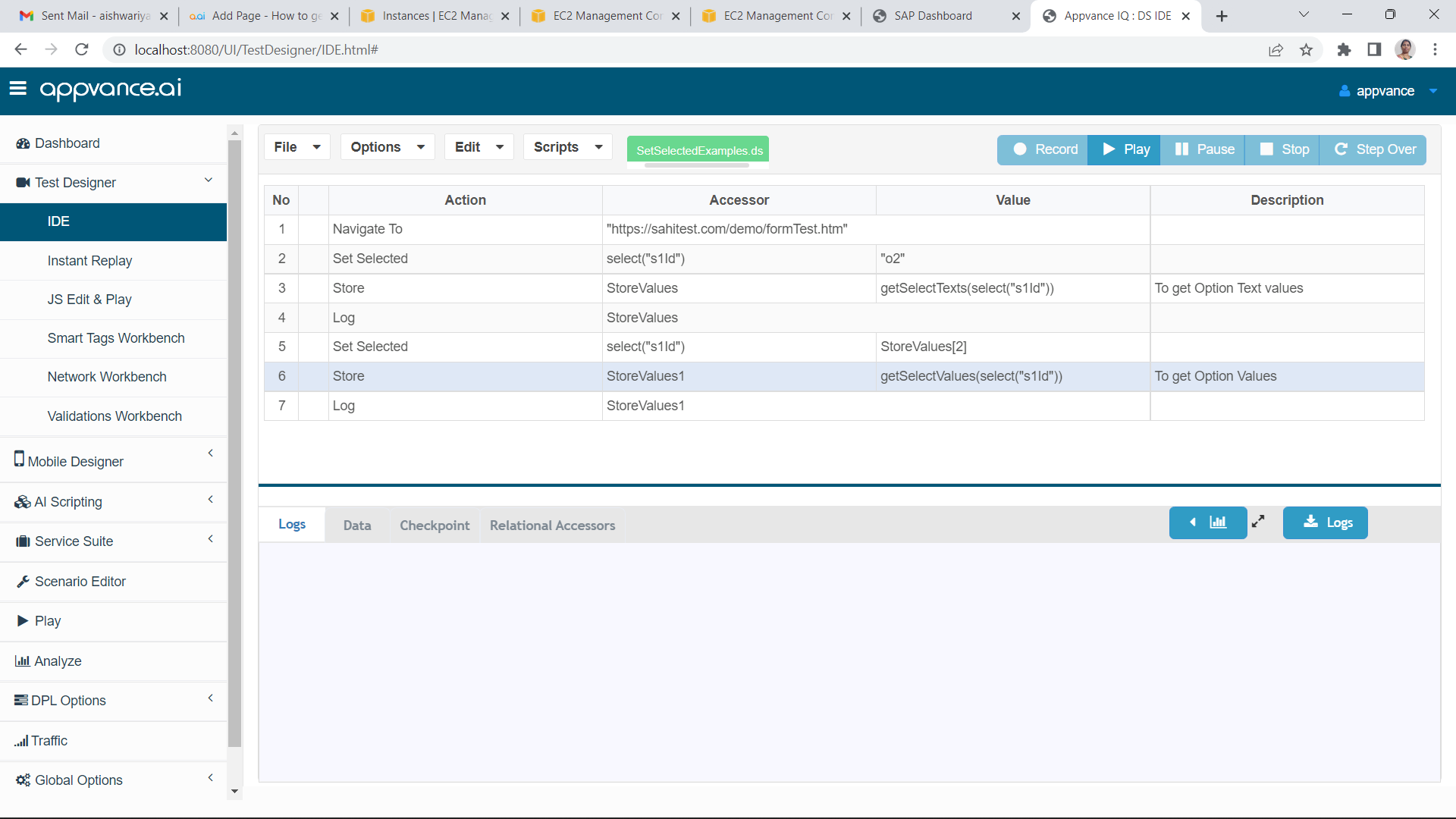
Note:SetSelectedExamples.ds
Dynamic
Last updated: SeptemberJuly 21,03, 20262023
If you have any feedback on this topic, please contact us at documentation@appvance.ai.