
Validate Toast Messages in Scenario Editor
Validate Toast Messages in Scenario Editor
ToToast holdmessages are often temporary, so Scenario Editor tests should wait for them intentionally and capture their text before they disappear.
Recommended guidance
- Use a conditional wait for the toast to appear.
- Capture only the message
_eval("hold_toasterneeded=forsetInterval(function()the{validation. - Avoid
$('.toast-message').mouseenter()fixed})")sleepsTounlessfreetiming itself is the test objective. - Handle success, warning, and error toasts as distinct outcomes.
Validation workflow
- Trigger the application action that produces the toast.
- Wait for the toast container or message
_eval("clearInterval(hold_toaster);$('.toast-message').mouseleave()")textNote:to“toast-message“appear. - Validate
istheaexpectedclassmessagename.orIfstatus. - Capture output if the toast
messagedoesisnotgettingappeardisappearedorafterdisappearsclicktoosome element of toast message then no need to use a step to free toast message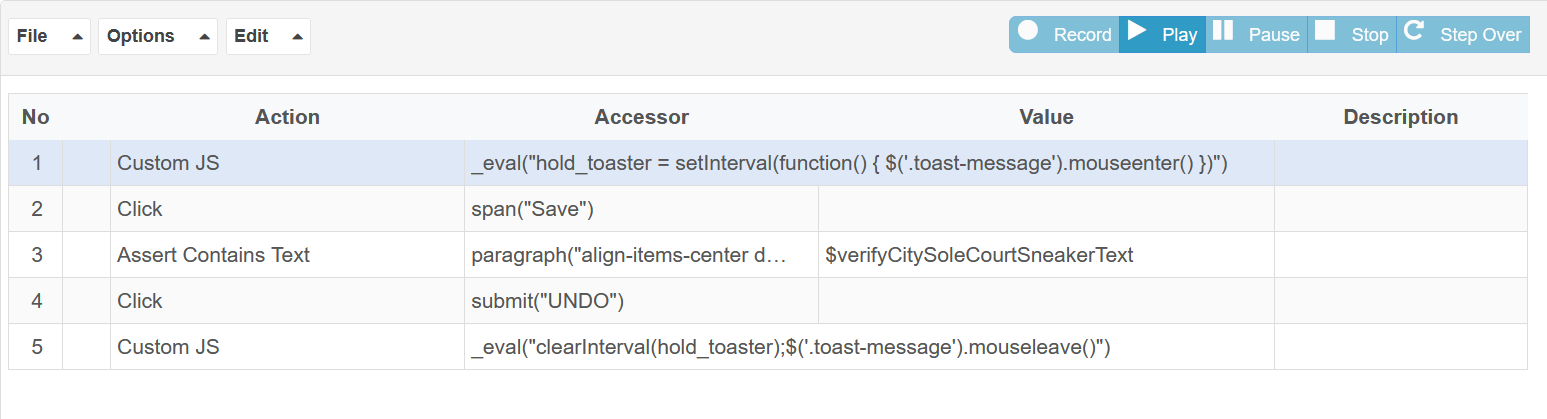
quickly.Last updated:
JuneSeptember26,20,20232026If you have any feedback on this topic, please contact us atdocumentation@appvance.ai