
How to hold and free toast message
Validate
To Toasthold Messagestoast inmessage Scenario_eval("hold_toaster Editor= setInterval(function() { $('.toast-message').mouseenter() })")
ToastTo messagesfree aretoast oftenmessage temporary, so Scenario Editor tests should wait for them intentionally and capture their text before they disappear._eval("clearInterval(hold_toaster);$('.toast-message').mouseleave()")
Recommended
Note: guidance“toast-message“
Useis aconditionalclasswaitname.for theIf toasttomessageappear.Captureisonlygettingthedisappeared after click some element of toast messageneededthenfornotheneedvalidation.Avoidtofixedusesleepsaunlesssteptimingtoitself is the test objective.Handle success, warning, and error toasts as distinct outcomes.
Validation workflow
Trigger the application action that produces the toast.Wait for thefree toastcontainermessageor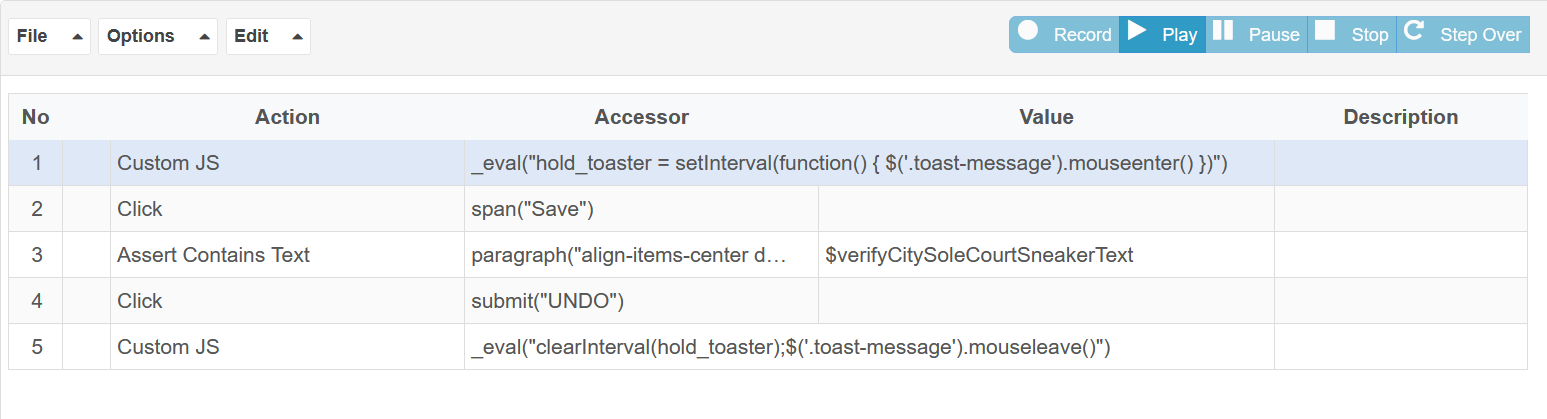
messagetext to appear.Validate the expected message or status.Capture output if the toast does not appear or disappears too quickly.
Last updated: SeptemberJune 20,26, 20262023
If you have any feedback on this topic, please contact us at documentation@appvance.ai