
Parameterize File Uploads in Scenario Editor
Question:
Parameterize File Uploads in Scenario Editor
HowUse parameterized file uploads when a scenario needs to parameterizeupload different approved test files foracross executions or data rows.
Recommended guidance
- Store upload files in an approved location available to the execution host.
- Use DPLs or test data fields to choose the file
uploadpathfeature?or(Likefilewename. - Avoid
haveusingapersonal,randomproduction,setorofsensitive files as testdatadata. - Validate
for upload)Attached isthat theTestapplicationdesigneracceptedscriptthe uploaded file.
Validation workflow
- Prepare approved files and
associatedfile-pathfiles that can be used for testing which was created on a public-facing site.This example has files (5 different files) that are followed by numbers like filename1, 2, and so on.By making use of Math.floor, we can generate random numbers as needed and can be passed to grab the files on the run, this way every time it runs, it will generate a random number, and based on the generated number, it will pick updata. - Map the file
fromreference into theresources.Scenario EditorBelowuploadisstep. - Run
anaexamplesmallscreenshotvalidation execution. - Review output and application evidence for
testuploaddesignersuccesssteps.or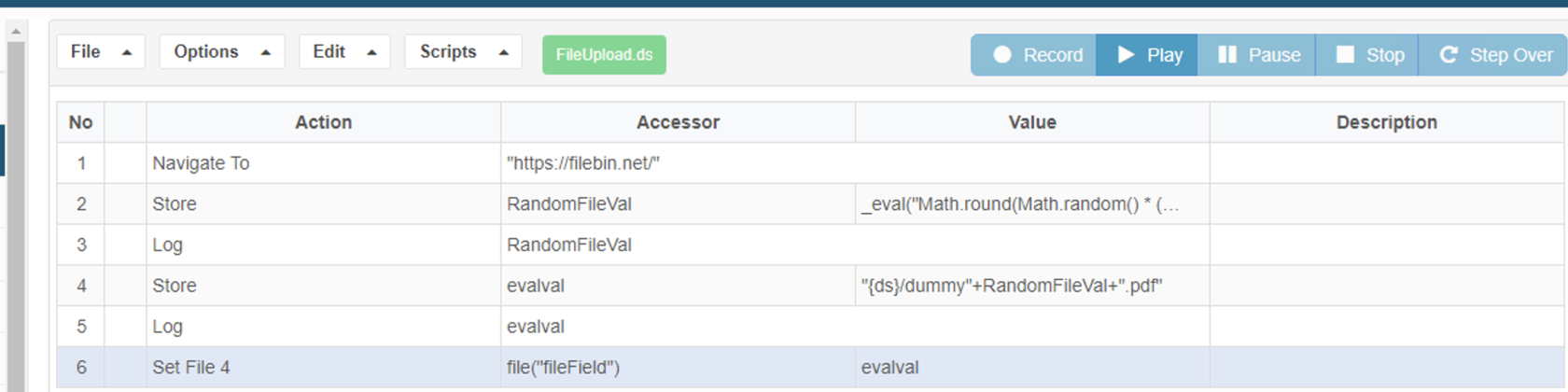
This file contains a sample script: FileUpload.zip
Last updated: JuneSeptember 26,20, 20232026
If you have any feedback on this topic, please contact us at documentation@appvance.ai