
How to parameterize files for the file upload feature?
Parameterize File Uploads in Scenario Editor
Question:
Use parameterized file uploads when a scenario needsHow to upload different approved testparameterize files across executions or data rows.
Recommended guidance
Store upload files in an approved location available to the execution host.Use DPLs or test data fields to choosefor the filepathuploadorfeature?file(Likename.Avoidweusinghavepersonal,aproduction,randomorsetsensitiveof files as testdata.Validatedata for upload)Attached is the Test designer script and associated files that
thecanapplicationbeacceptedused for testing which was created on a public-facing site.This example has files (5 different files) that are followed by numbers like filename1, 2, and so on.
By making use of Math.floor, we can generate random numbers as needed and can be passed to grab the
uploadedfilesfile.
Validationthe workflow
run, Preparethisapprovedwayfilesevery time it runs, it will generate a random number, andfile-pathbaseddata.Mapon the generated number, it will pick up the filereference intofrom theScenarioresources.EditoruploadBelow
step.Runis an example screenshot for test designer steps.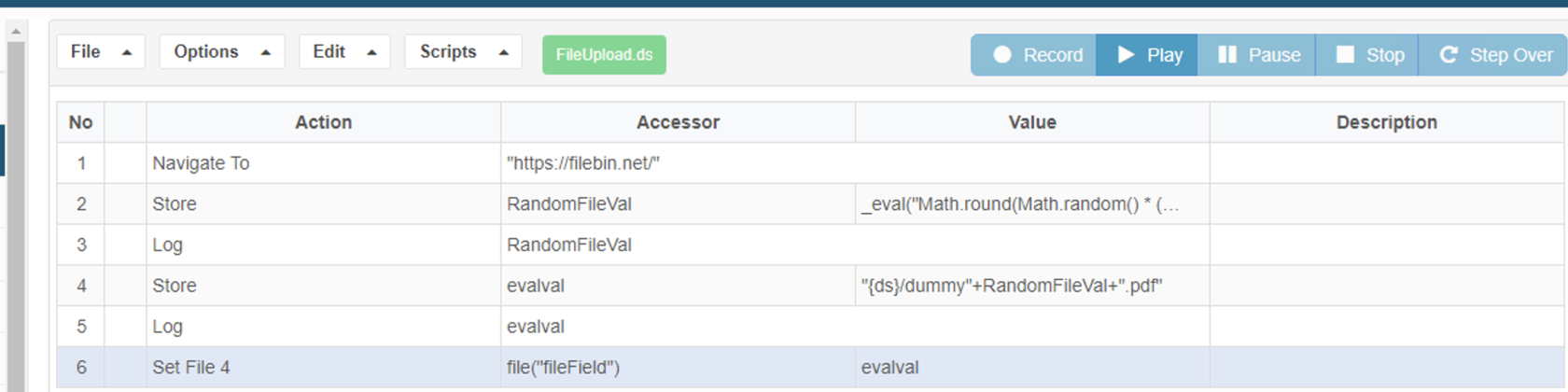
This file contains a
smallsamplevalidationscript:execution.ReviewFileUpload.zipoutputand application evidence for upload success or failure.
Last updated:
SeptemberJune20,26,20262023If you have any feedback on this topic, please contact us at documentation@appvance.ai