
Legacy Sahi Logging Guidance
Legacy Sahi Logging Guidance
While I am running sahi/designer Sahi-based vuserslogging inis Appvancelegacy IQ,content. sahiKeep this article only as a migration reference for older assets; current Scenario Editor tests should use AIQ output, logs, and execution evidence instead.
Recommended guidance
- Do not use Sahi logging guidance for new Scenario Editor tests.
- Retain old logging details only when maintaining a legacy test that cannot yet be migrated.
- Use current AIQ output and Test Node logs
arefortakingsupporteduptroubleshooting. - Mark
lotlegacyofSahidiskdependenciesspacefor(sometimesmigration100orGBremoval.
Validation 3workflow
- Identify whether the failing asset still depends on Sahi.
- Collect current AIQ execution output first.
- Use legacy Sahi notes only if required to
4 days).How can we disablesupport thetrafficoldlogsasset. - Document
thatthearemigrationwrittenpath tothissupportedfolder?
Scenario/AIQ/sahi/userdata/logs/traffic
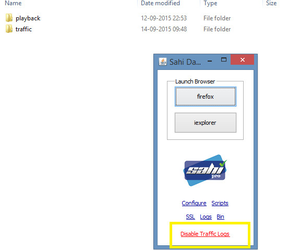
EditorSolution:Kill all java process, Start sahi dashboard alone in the below given path.Please try disabling the traffic logs by launching sahi dashboard(/AIQ/sahi/userdata/bin/start_dashboard.bat).Restart Appvance IQ.behavior.
Last updated: JuneSeptember 26,20, 20232026
If you have any feedback on this topic, please contact us at documentation@appvance.ai