
How to stop the Sahi logging feature in Appvance IQ.
Legacy
While SahiI Loggingam Guidancerunning
Sahi-sahi/designer based loggingvusers isin legacyAppvance content.IQ, Keepsahi logs are taking up lot of disk space (sometimes 100 GB in 3 to 4 days).
How can we disable the traffic logs that are written to this articlefolder?
only/AIQ/sahi/userdata/logs/traffic
asSolution:
aKill migrationall referencejava forprocess, olderStart assets;sahi currentdashboard Scenarioalone Editorin teststhe shouldbelow usegiven AIQpath.
output,Please logs,try anddisabling executionthe evidence instead.
Recommended guidance
Do not use Sahi logging guidance for new Scenario Editor tests.Retain old logging details only when maintaining a legacy test that cannot yet be migrated.Use current AIQ output and Test Nodetraffic logsforbysupportedlaunchingtroubleshooting.Marksahilegacydashboard(/AIQ/sahi/userdata/bin/start_dashboard.bat).
SahiRestartdependenciesAppvanceforIQ.migrationor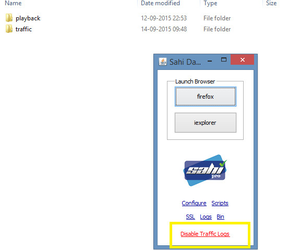
removal.
Validation
workflow
Identifywhether
theLast
failingupdated:assetJunestill26,depends2023If you have any feedback on
Sahi.Collectthiscurrenttopic,AIQpleaseexecutioncontactoutputusfirst.Useatlegacy Sahi notes only if required to support the old asset.Document the migration path to supported Scenario Editor behavior.
Last updated: September 20, 2026documentation@appvance.ai