
Trim Text Values in Scenario Editor
Trim Text Values in Scenario Editor
ForTrim example:text Needvalues when leading or trailing whitespace would make a validation or data mapping unreliable.
Recommended guidance
- Trim only
"whitespace14393430"thatfromis not meaningful to thestringbusiness"Cartvalue. - Normalize
savedvaluesasconsistentlyQuotebefore: 14393430" usecomparison. - Keep the
beloworiginalfunction:value visible in output when troubleshooting. - Avoid trimming IDs, codes, or fixed-width values unless approved.
Validation workflow
- Capture the source text.
- Apply trim or normalization logic.
- Compare the cleaned value with expected data.
- Store the cleaned value if downstream steps need it.
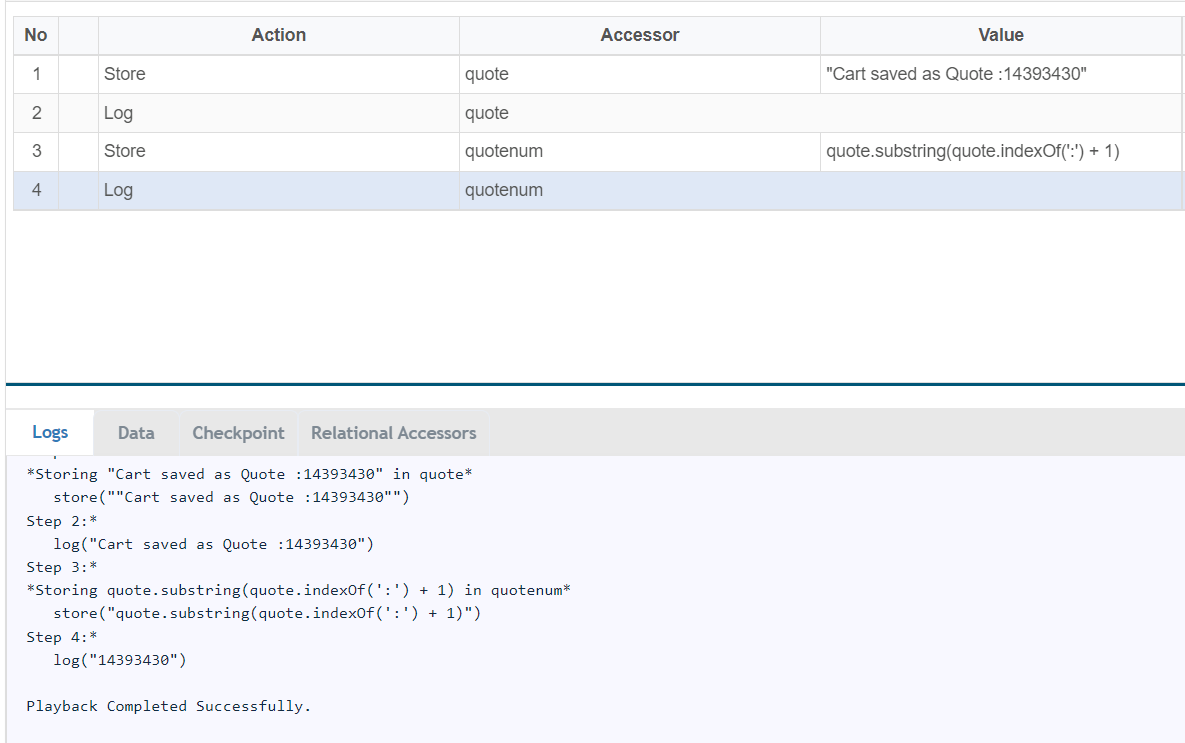
var quote = "Cart saved as Quote : 14393430"
var quotenum=quote.substring(quote.indexOf(':') + 1)
Last updated: JuneSeptember 26,20, 20232026
If you have any feedback on this topic, please contact us at documentation@appvance.ai