
Reuse Shared Logic in Scenario Editor
ToLast reusereviewed: September 21, 2026
Use this article when multiple Scenario Editor tests need to share helper logic, common setup, or reusable validation patterns.
Recommended guidance
- Avoid copying the same helper code into many scenarios.
- Keep shared logic versioned and reviewed.
- Document inputs, outputs, and side effects for every shared helper.
Validation workflow
- Identify the repeated logic and decide whether it belongs in a
functionsharedfromhelper,oneDPL,scriptserviceincall,another,orwetestincludetemplate. - Store
thesharedrelevant script using theincludeAction from Appvance Designer.Usage:include relative:-<filename>This will be helpful in shortening your designer scripts.Call other scripts as functions. This will let users to include other designer script at any given step as shown in below screenshot.In the example below, note: The prefix :relative:-just before the login.ds filename on the Value column.
instead 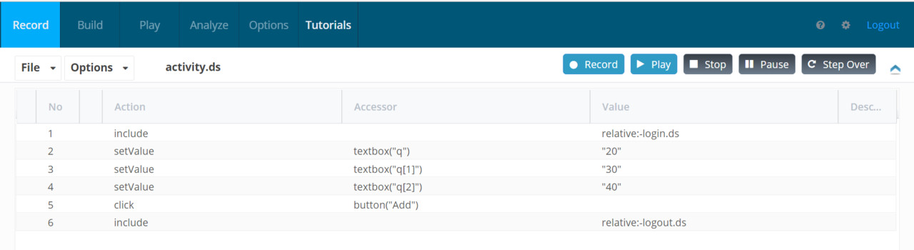
Inenvironment-specific values.
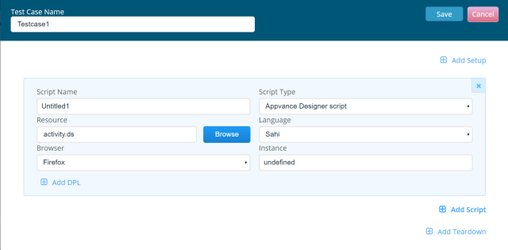
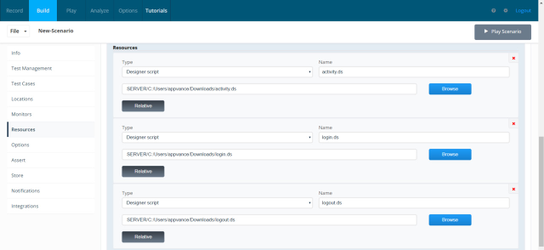
The other dependent designer scripts can be added in resources section.
An Example Designer script is attached is this article as well for reference.
Last updated: JulySeptember 03,21, 20232026
If you have any feedback on this topic, please contact us at documentation@appvance.ai.