
Read and Write Data from a Downloaded XLSX File
Read
Attaching andthe Writescript Dataalong fromwith athe Downloaded XLSX File in Scenario Editor
Use this article when a Scenario Editor test needsScreenshot to validate,follow read,the or write data from an XLSX file downloaded during execution. Keep file handling deterministic so repeated runs do not accidentally use stale files.steps
Recommended
We guidanceneed 3 different Service suite scripts
A intocommon aJS knownscript
Filename possible.
Write JS: Here as well, we need to define the repository name and modifiedfile timepath beforeafter readingmaking it.
and Password
Test Script
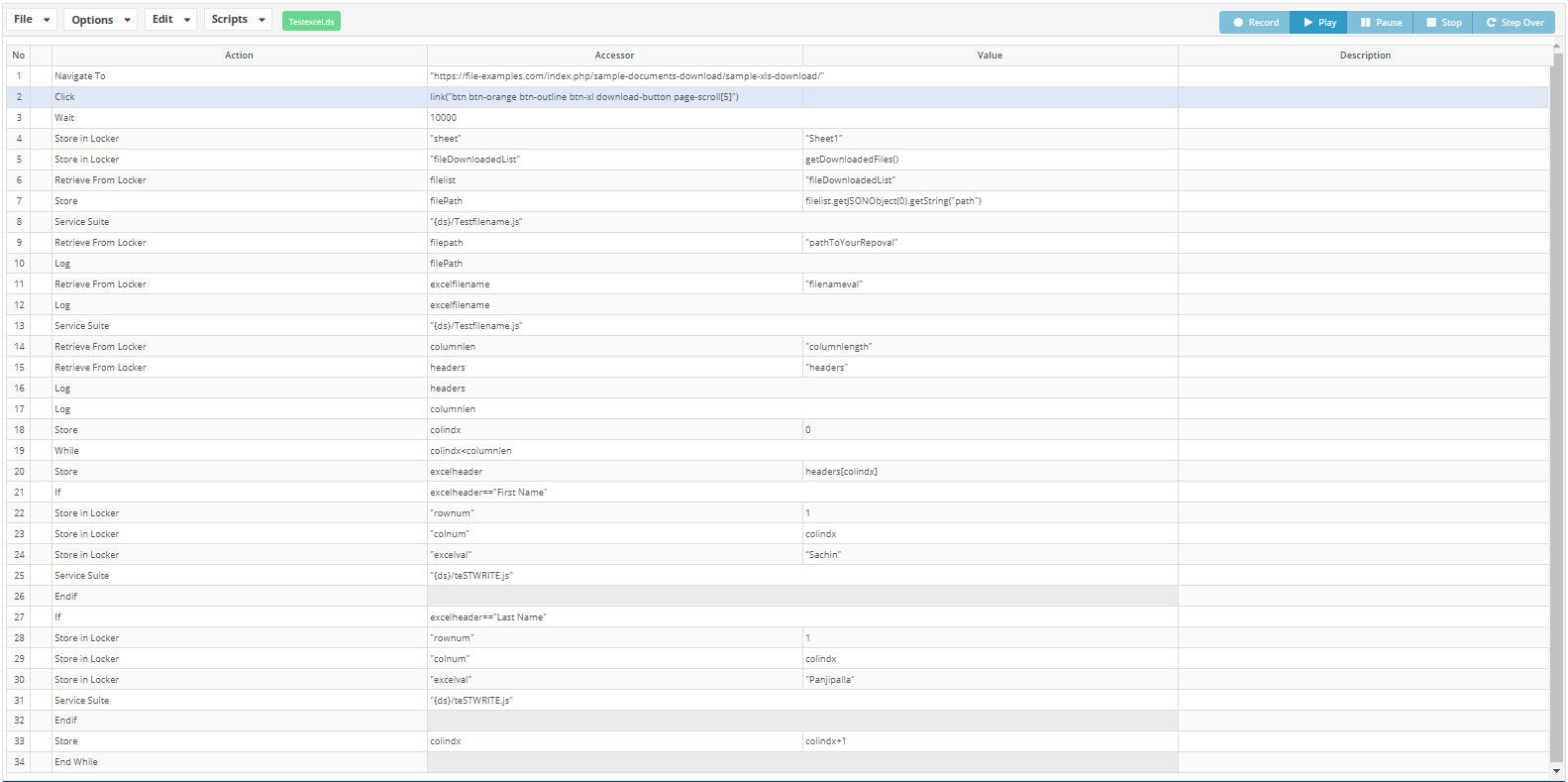
Sample Script: WriteExcel.ds
Testfile name: At step number 45, make sure to add the repository path and the repository name which the user cloned in the AIQ
After clicking on download, add a previousstep run.
Validation workflow
Triggerthe downloadinfileScenario
In Ds script at step 55 and 61, make sure to give the exact header name for the filetargetted column header
Write JS
Write JS: Here as well, we need to existdefine the repository name and confirmfile itpath isafter complete.
and
1values2only3after4validating5 6 7 8 9 10 11 12 13 14 15 16 17 18 19 20 21 22 23 24 25 26 27 28 29 30 31 32 33 34 35 36function writeexcel(row, col, value)
{
var $excel= readExcel(filepathval);
var $sheetname = locker.get("sheet");
log($sheetname);
//var $sheetname="Sheet1";
var $sheet = $excel.getWorkbook().getSheet($sheetname); // Get sheet as an object HSSFSheet
$excel.getWorkbook().setActiveSheet($excel.getWorkbook().getSheetIndex($sheetname));//Change active sheet to theworkbookonestructure.specified
var $headers = $sheet.getRow(0);
var $lastExistingColumn = $headers.getLastCellNum(); // Get number of colum
locker.put("columnlength",$lastExistingColumn);
log($excel);
$excel.setValueAt(row, col, value);
writeExcel($excel, filepathval);
}
var filepathval=locker.get("filenameval");
var rowval=locker.get("rownum");
var colval=locker.get("colnum");
var actualval=locker.get("excelval");
log("servicesuite "+filepathval);
writeexcel(rowval,colval,actualval);
var $boundary = "--AIQ-DS-BOUNDARY";
var $repositoryName = "Appvance"; // CHANGE FOR YOUR REPO NAME, THIS CONF MUST BE IN THE USER ACCOUNT USED TO LOGIN
var $CONTROLLER = "http://localhost:8080"; // Controller URL
var $username = "appvance"; // username used to login to aiq
var $password = "appvance"; // password used to login to aiq
var $uploadPath = "Customer/VWR/ReadWriteXLS/"; // CHANGE FOR folder in repo where the modified file should be uploaded
include("{ds}/commonFunctions.js");
if (login($CONTROLLER)) {
uploadFile(fileName, fileName);
var $resp= get($CONTROLLER+"/AppvanceServer/rest/admin/logout");
log("logout: "+$resp.getDataString());
};
Write JS. At step 26 and 30, make sure to add the repository name and the repository path, respectively, which the user cloned in the AIQ
Filename JS
Filename JS:
1
2
3
4
5
6
7
8
9
10
11
12
13
14
15
16
17
18
19
20
21
22
23
24
25
26
27
28
29
30
31
32
33
34
35
36
37
38
39
40
41
42
43
44
45
46
47
48
49
50
51
52
53
54
55
function columnlen(filepathvalcol)
{
  //var filepathvalcol=locker.get("filenameval");
  var $sheetname = locker.get("sheet");
  log($sheetname);
  log("reading excel from "+filepathvalcol);
  var $excel= readExcel(filepathvalcol);
  //var $sheetname="Sheet1";
  var $sheet = $excel.getWorkbook().getSheet($sheetname); // Get sheet as an object HSSFSheet
  $excel.getWorkbook().setActiveSheet($excel.getWorkbook().getSheetIndex($sheetname));//Change active sheet to the one specified
  var $headers = $sheet.getRow(0);

  var $lastExistingColumn = $headers.getLastCellNum(); // Get number of colum
  locker.put("columnlength",$lastExistingColumn);
  var headersArray = []
  for (var col = 0; col < $lastExistingColumn; col++) {
    var cell = $headers.getCell(col);
     switch (cell.getCellType().toString()) {
        case "STRING":
           headersArray.push(cell.getStringCellValue());
           break;
        case "NUMERIC":
           headersArray.push(cell.getNumericCellValue());
           break;
        default:
           headersArray.push(cell.toString());
           break;
     }
  }
  locker.put("headers", headersArray);
}


var json = locker.get("fileDownloadedList");

// [{"path":"C:\Users\Administrator\TestDesigner\NetworkProxy\execution\Chrome10383680D\EnrollmentSearch_2024022217255349.xls","name":"EnrollmentSearch_2024022217255349.xls","length":4702}]

var filePath = ""+json.getJSONObject(0).getString("path");
var fileName1 = ""+json.getJSONObject(0).getString("name");
var fileName = fileName1.replace(/\s+/g, '_')
locker.put("repofilename",fileName);
locker.put("filenameval",fileName);
filePath = filePath.replace(/\\/g,"/");
// path to your repo
var pathToYourRepo = "REPOSITORY/Appvance/Customer/VWR/ReadWriteXLS/" + fileName; // Give the path pointing to the folder that has the script
log("servicefilename val "+pathToYourRepo);
locker.put("pathToYourRepoval",pathToYourRepo);
log("file saved at: " + pathToYourRepo);
var fileContentAsBytes = java.nio.file.Files.readAllBytes(java.nio.file.Paths.get(filePath));

writeBytes(fileName, fileContentAsBytes);

log(" | downloaded file size: "+fileContentAsBytes.length);

columnlen(fileName);
HEADING
1
2
3
4
5
6
7
8
9
10
11
12
13
14
15
16
17
18
19
20
21
22
23
24
25
26
27
28
29
30
31
32
33
34
35
36
37
38
39
40
41
42
43
44
45
46
47
48
49
50
51
52
53
54
55
56
57
58
function uploadFile(fileName, filePath) {
        var data = createMultipartPayload(fileName, filePath);
    var call = createPost($CONTROLLER + "/AppvanceServer/rest/file/uploadFile?&commitMessage=Appvance+skip+commit&path=REPOSITORY/" + $repositoryName + "/" + $uploadPath + fileName, data, "multipart/form-data", " boundary=" + $boundary);
    var resp = process(call);
    log(resp.getDataString())
}


function getSessionCookie() {
    var $jsession = getCookieValue($CONTROLLER, "JSESSIONID");
    var cookie = "JSESSION=" + $jsession;
    locker.put("aiq-cookie", cookie);
    addGlobalHeader("cookie", "JSESSION=" + $jsession);
}

function login() {
    var $loginForm = formData();
    $loginForm.put("username", $username);
    $loginForm.put("password", $password);
    var $resp = get($CONTROLLER+"/AppvanceServer/rest/admin/isLogged");
    if ($resp.getDataString().indexOf("false")) {
        var $call = createPost($CONTROLLER + "/AppvanceServer/rest/admin/logginForServices", $loginForm);
        var $resp = process($call).getDataString();
        if ($resp.indexOf("true") != -1) {
            getSessionCookie();
            log("Login successful");
            return true;
        } else {
            log("Login was NOT successful: " + $resp)
            return false;
        }
    } else {
        getSessionCookie();
    }

}

function createMultipartPayload(filename, path) {
    var header = '--' + $boundary + '\n' +
        'Content-Disposition: form-data; name="file"; filename="' + filename + '"\r\n' +
        'Content-Type: application/octet-stream\r\n\r\n';
    var headerBytes = new Array(header.length);
    for (var i = 0; i < header.length; ++i) {
        headerBytes[i] = header.charCodeAt(i);
    }
    var $data = readBytes(path);
    var footer = '\r\n--' + $boundary + "--\r\n";
    var footerBytes = new Array(footer.length);
    for (var i = 0; i < footer.length; ++i) {
        footerBytes[i] = footer.charCodeAt(i);
    }
    return headerBytes.concat($data).concat(footerBytes);
}

function getLastDownloadedFile(json) {
    json.sort((a, b) => b.modifiedTime - a.modifiedTime);
    return json[0];
}
Last updated: OctoberDecember 8,20, 20262024
If you have any feedback on this topic, please contact us at documentation@appvance.ai