
SmartTags: Using a custom getName Method
Problem
As a user, I want to customize how AIQ finds and interacts with a specific element type in my application
Resolution
Teach AIQ how to best identify and interact with your specific element type using SmartTag Rules and Actions.
Related Topics
Knowledge Base Articles
-
href="https://docs.appvance.net/Content/AIQ/TestDesigner/TestDesigner2_3_KB/Understanding_your_Application___with_SmartTags__.htm"Understanding your Application with SmartTags
-
href="https://docs.appvance.net/Content/AIQ/General_KB_Articles/Useful_smartags_workbench_custom_actions_and_other_js_examples.htm"Useful smartags workbench custom actions and other js examples
Documentation
-
href="https://docs.appvance.net/Content/AIQ/TechRef/TestDesignerAPIRef/API_References_New/API Reference.htm"Test Designer API Reference
Using a custom getName Method
getBestName (option a)
This Action contains a prioritized list of attributes listed within the arr array variable. The first match is returned, or UNKNOWN is returned if no valid attribute value is found.
var theElement = ds$(element);
// attributes to try and in a given order
let arr = ["name", "placeholder"];
for (let i = 0; i < arr.length; i++) {
	try {
    var accessorValue = theElement.attr(arr[i]);
    if (typeof accessorValue !== 'undefined') {
      accessorValue = accessorValue.trim().replace(/(\r\n|\n|\r|\t)/g,"");
      break;
    }
  } catch(e) {
   // maybe the element doesn't contain the attribute
  }
}
if (typeof name === 'undefined') {
     accessorValue = "UNKNOWN";
}
return accessorValue;
getBestName (option b)
This Action contains a prioritized list of attributes, which returns the first attribute containing a valid value as the method for locating the object.
var htmlElement = ds$(element);
var name = htmlElement.attr('id');
if (typeof name === 'undefined') {
  name = "";
}
if (name === "") {
  name = htmlElement.attr("text");
}
if (typeof name === 'undefined') {
  name = "";
}
if (name === "") {
  name = htmlElement.attr("name");
}
if (typeof name === 'undefined') {
  name = "";
}
if (name === "") {
 name = "UNDEFINED"; // if nothing works, clearly denote as UNDEFINED
}
return name.replace(/(\r\n|\n|\r|\t)/g, "").trim();
How can I use this?
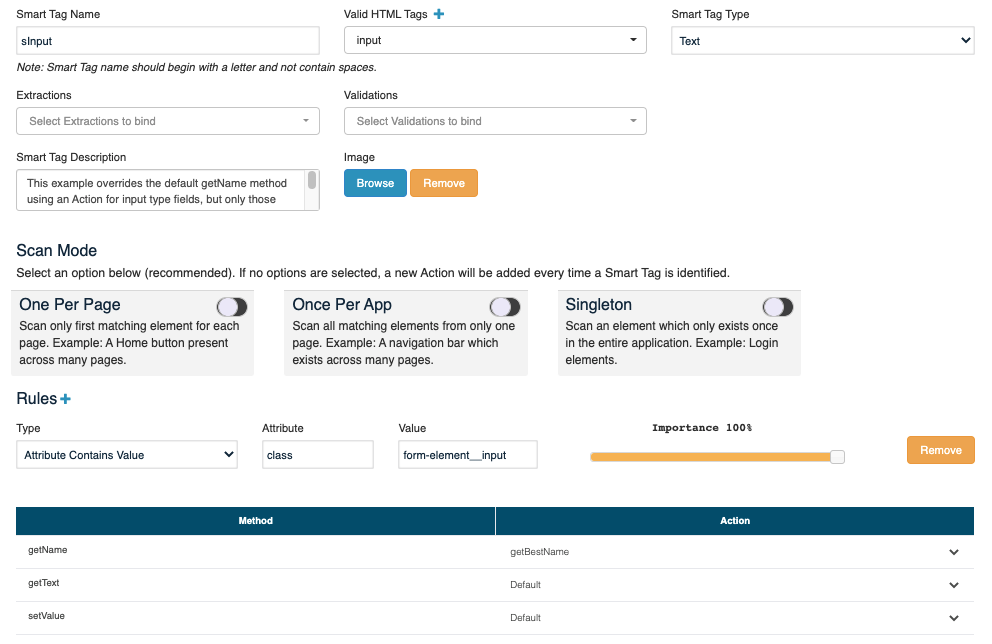
Create a SmartTag to use the getBestName action: When combined with a SmartTag, this example overrides the default getName method using an Action for input type fields, but only those matching the Rule, which specifies a specific class. The Action defines a specific approach to locating and naming the Input object separate from the default Accessor Preferences.
Last updated: July 03, 2023
If you have any feedback on this topic, please contact us at documentation@appvance.ai