
Use Relative File Paths for Scenario Editor Uploads
Use Relative File Paths for Scenario Editor Uploads
setFileUse actionrelative infile designerpaths isonly when the execution environment has a controlled project structure and the files are deployed consistently to the Test Node or execution host.
Recommended guidance
- Prefer approved test-data locations over ad hoc local paths.
- Document the base directory used to
setresolve relative paths. - Keep upload files versioned with the test assets when appropriate.
- Avoid paths that depend on a specific user profile or workstation.
Validation workflow
- Place the file in the approved project or execution data location.
- Reference the file
inputusingfield.theFormdocumentedelementsrelativeofpath. - Run
typea"file"small validation execution on the target Test Node. - Review output if the file cannot be
populated using javascript on the browser.Appvance designer has a workaround for handling file uploads,designer intercepts the request in the proxy, reads the file off the file system and inserts it into the multi-part request.The file has to be present on that path on the machine running Appvance AIQ.By using relative paths, the files can be sent to all the test node machines running Appvance AIQ so the files need not be moved to all the testnode instances.Below designer script example shows the same:Scenario: Image need to be uploaded to my web application and need to run performance test on several test nodes without moving the files manually to all the test node machines.
uploaded.Imagesfound orany folder was created in the same place as the designer script, in my case 'FileUpload.ds' script is located in /Appvance AIQ/MyScripts folder and a folder by name 'Images' was created inside MyScripts folder.
Designer:

Scenario Builder:
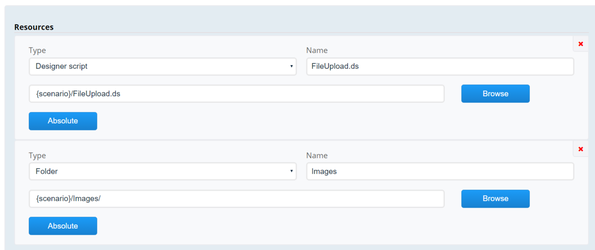
Note: In the locations panel, user can provide any location to run this particular scenario or can use the cloud files to initialise any cloud machine and run the scenario, all the resource files will be copied over to the test node machines!
Last updated: JuneSeptember 26,20, 20232026
If you have any feedback on this topic, please contact us at documentation@appvance.ai