
Validate the Color of an Object in Scenario Editor
This
Validate isthe Color of an exampleObject ofin Scenario Editor
Use this article when a scriptScenario thatEditor detectstest needs to confirm the visual color of a specificpage object. Prefer stable CSS or DOM-based validation when available, and use image-based validation only when the rendered appearance is the actual requirement.
Recommended guidance
- Identify whether the requirement is CSS value, computed style, image color, or visual state.
- Use stable locators and validate the object is visible before checking color.
- Account for themes, hover/focus states, browser differences, and anti-aliasing.
- Use tolerances for image or screenshot-based color checks when exact pixels may vary.
- Capture evidence when a color mismatch indicates a UI regression.
Validation workflow
- Locate the target object and
then uses conditional statements to compare it to a reference color.Web Designer ScriptThis isconfirm theAIQexpecteddesigner test script to accomplish this validation. The script usesstate. - Read the
GetCssValuefunction.value or
visualSeegetCssValue for more information aboutcapture thefunction.Thesample,exampledependingscript useson theAppvancerequirement. - Compare
demo site. The object thatagainst thescriptexpectediscolor or accepted range. - Log the
comparingactualcolorvalueofwhenisvalidationa footer which contains the price of an item.fails.
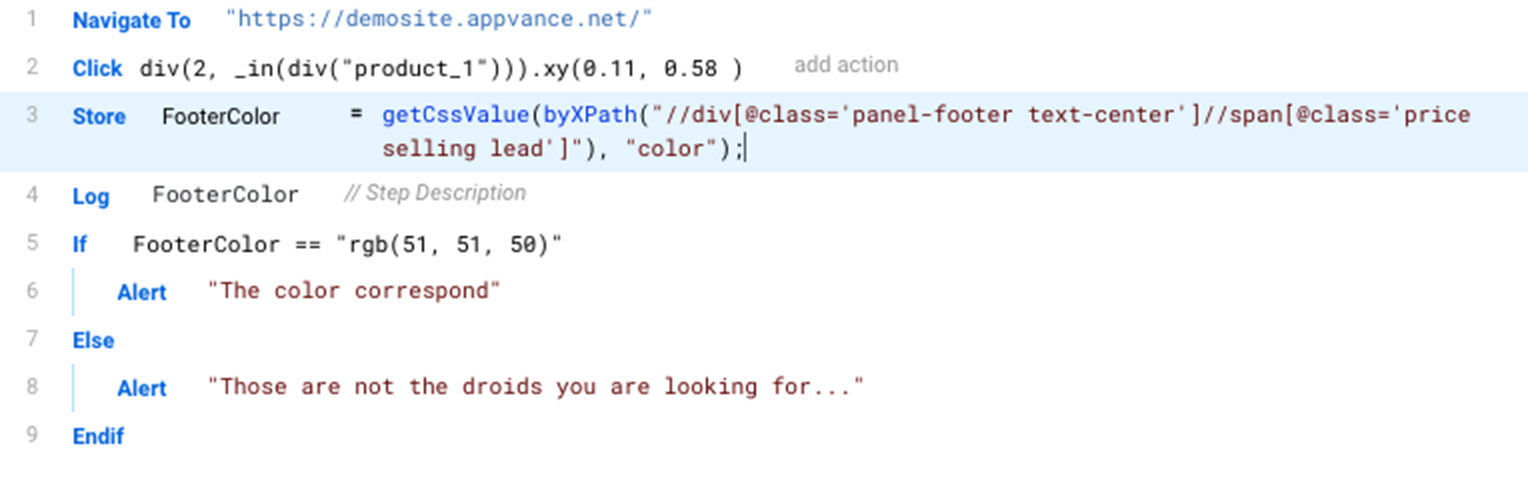
Download a copy of this script from: ColorCheckExample.ds
JS Code
For reference, this is the corresponding java script code for the ColorCheckExample test script.
/**
 * @aiq.webdesigner
 * This script requires AIQ Web Designer
*/
setShadowDOM(true);
navigateTo("https://demosite.appvance.net/");
click(fallback(`div(2, _in(div("product_1"))).xy(0.11, 0.58 )`,
   `div(2, _in(div({'id':'product_1'}))).xy(0.11, 0.58 )`,
   `div("panel-footer text-center").xy(0.11, 0.58 )`,
   `div("$15.99").xy(0.11, 0.58 )`,
   `byXPath("//div[@id='product_1']/div/div[2]").xy(0.11, 0.58 )`,
   `byXPath('//*[@class="panel-footer text-center"]').xy(0.11, 0.58 )`,
   `byXPath('/html/body/div[2]/div/div/div/div[2]/div/div/div[2]').xy(0.11, 0.58 )`,
   `byXPath("id('product_1')/div[@class='panel panel-default']/div[@class='panel-footer text-center']").xy(0.11, 0.58 )`,
   `byJQuery('div[class="row"] > div[class="col-md-3 col-sm-6 col-xs-6 product-list-item"] > div[class="panel panel-default"] > div[class="panel-footer text-center"]').xy(0.11, 0.58 )`,
   `byJQuery('#product_1 > .panel.panel-default > .panel-footer.text-center').xy(0.11, 0.58 )`));
var FooterColor=getCssValue(byXPath("//div[@class='panel-footer text-center']//span[@class='price selling lead']"), "color");
log(FooterColor);
if (FooterColor == "rgb(51, 51, 50)"){
   alert("The color correspond");
}
else {
   alert(“Those are not the droids you are looking for");
}
Last updated: FebruaryOctober 25,9, 20252026
If you have any feedback on this topic, please contact us at documentation@appvance.ai