
Validate Color of an Object
Validate
This theis Coloran example of an Object in Scenario Editor
Use this article when a Scenarioscript Editorthat test needs to confirmdetects the visual color of a pagespecific object. Prefer stable CSS or DOM-based validation when available,object and usethen image-baseduses validationconditional onlystatements whento thecompare renderedit appearanceto a reference color.
Web Designer Script
This is the actualAIQ requirement.
Recommendedtest guidance
script Identifytowhetheraccomplish this validation. The script uses therequirementGetCssValuefunction.See getCssValue for more information about the function.
The example script uses the Appvance demo site. The object that the script is
CSSthevalue,comparingcomputedcolorstyle,ofimageiscolor,aorfootervisualwhichstate.Use stable locators and validatecontains theobjectprice of an item.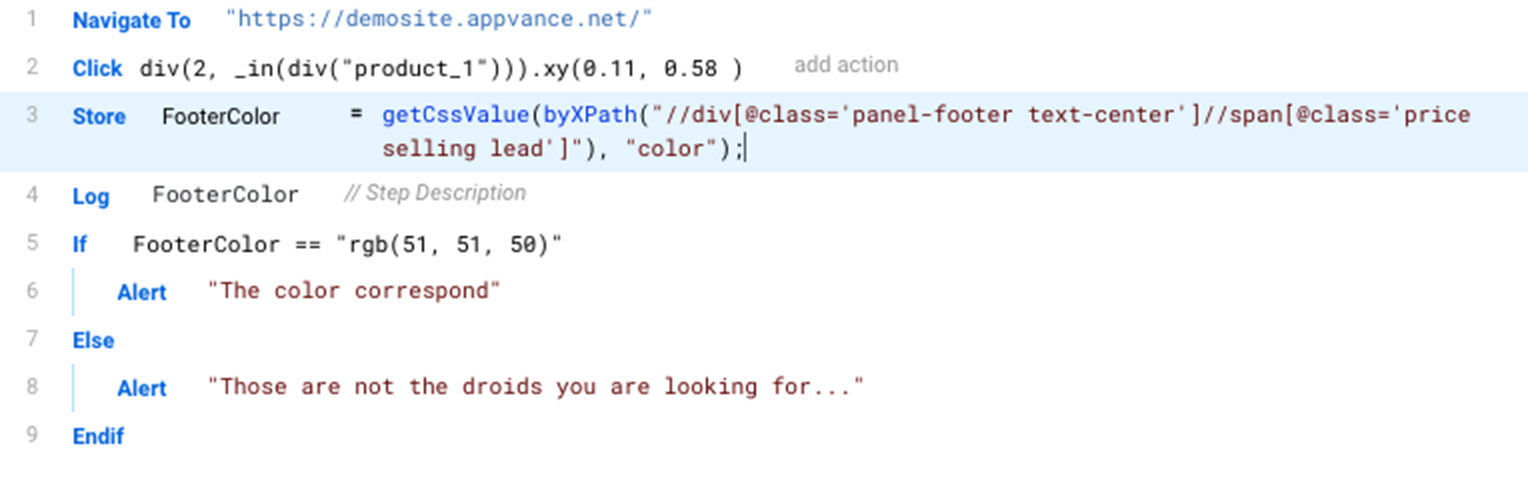
Download a copy of this script from: ColorCheckExample.ds
JS Code
For reference, this is
visiblethebeforecorrespondingcheckingjavacolor.Accountscript code forthemes,thehover/focusColorCheckExamplestates,testbrowserscript.differences,and/**
anti-aliasing.Use*tolerances@aiq.webdesigner
for*imageThisorscriptscreenshot-basedrequires AIQ Web Designer
*/
setShadowDOM(true);
navigateTo("https://demosite.appvance.net/");
click(fallback(`div(2, _in(div("product_1"))).xy(0.11, 0.58 )`,
`div(2, _in(div({'id':'product_1'}))).xy(0.11, 0.58 )`,
`div("panel-footer text-center").xy(0.11, 0.58 )`,
`div("$15.99").xy(0.11, 0.58 )`,
`byXPath("//div[@id='product_1']/div/div[2]").xy(0.11, 0.58 )`,
`byXPath('//*[@class="panel-footer text-center"]').xy(0.11, 0.58 )`,
`byXPath('/html/body/div[2]/div/div/div/div[2]/div/div/div[2]').xy(0.11, 0.58 )`,
`byXPath("id('product_1')/div[@class='panel panel-default']/div[@class='panel-footer text-center']").xy(0.11, 0.58 )`,
`byJQuery('div[class="row"] > div[class="col-md-3 col-sm-6 col-xs-6 product-list-item"] > div[class="panel panel-default"] > div[class="panel-footer text-center"]').xy(0.11, 0.58 )`,
`byJQuery('#product_1 > .panel.panel-default > .panel-footer.text-center').xy(0.11, 0.58 )`));
var FooterColor=getCssValue(byXPath("//div[@class='panel-footer text-center']//span[@class='price selling lead']"), "color");
log(FooterColor);
if (FooterColor == "rgb(51, 51, 50)"){
alert("The colorcheckscorrespond");
}
elsewhen{
exactalert(“Thosepixelsaremay vary.Capture evidence when a color mismatch indicates a UI regression.
Validation workflow
Locatenot thetargetdroidsobjectyouandareconfirmlookingthefor");
}
Last updated: OctoberFebruary 9,25, 20262025
If you have any feedback on this topic, please contact us at documentation@appvance.ai