
How to check Browser Scrollbar is reached to the bottom
function browserScroll()
{
     scrolltop= _eval("ds$(window).scrollTop()");
   //log("scrolltop: "+scrolltop);
   innerheight = _eval("window.innerHeight");
   height = _eval("ds$(document).height()");
  log("scrolltop + innerheight :" + Math.round(scrolltop + innerheight));
  log("height:" + height);
  while(Math.round(scrolltop + innerheight)  != height)
     {
        if(scrolltop + innerheight ==height) {
           log("bottom!");
        }
       else{
            _eval("window.scroll(0,40000)");
        }
       scrolltop= _eval("ds$(window).scrollTop()");
      //log("scrolltop : "+scrolltop);
      innerheight= _eval("window.innerHeight");
      height = _eval("ds$(document).height()");
      log("scrolltop + innerheight :" + Math.round(scrolltop + innerheight));
  		log("height:" + height);
    }
}
Have used Math.round to check for whole number as some might be in decimal so the loop will go on if the numbers not equal.
Eg: scrolltop + innerheight :11960.7939 Vs height:11691 --- This case wont match and while loop will go on and on.
So to avoid this we can do Math.round to get nearest whole number and then we can stop scrolling.
Also remember to call this function ' browserScroll' outside either in js or in DS IDE as new step using customJS as action- just following the normal javascript execution.
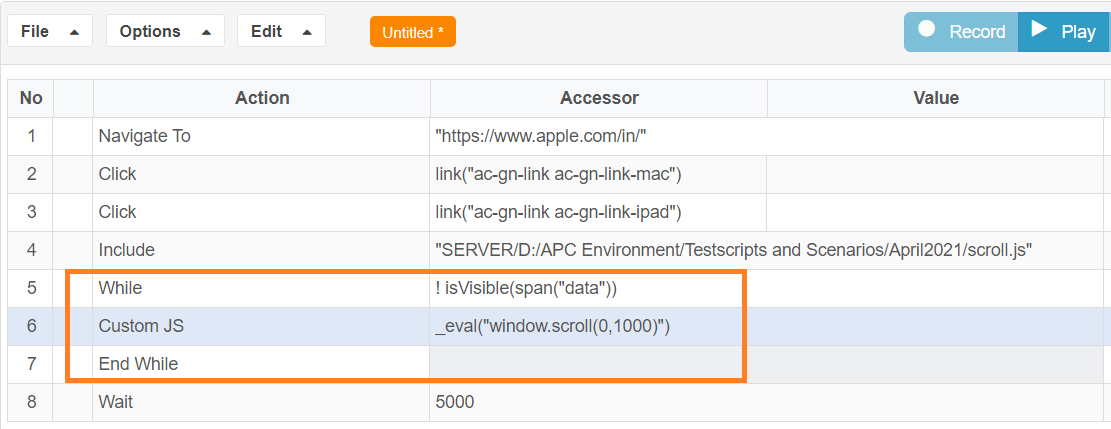
Another Alternate for scrolling would be to check if element is visible or not and then based on that scroll can be done until that element is visible.isVisible condition takes some time to check for visibility of element as there are lot of checks inside.So once can also use Element.wasNotFound() method to check for element’s found or not directly.
Eg: span(“data”).wasNotFound()
Last updated: June 26, 2023
If you have any feedback on this topic, please contact us at documentation@appvance.ai