
Validate Scrolling Reaches the Bottom of a Page
Validate
functionScrollingbrowserScroll()Reaches{thescrolltop=Bottom_eval("ds$(window).scrollTop()");of//log("scrolltop:a"+scrolltop); innerheight = _eval("window.innerHeight"); height = _eval("ds$(document).height()"); log("scrolltop + innerheight :" + Math.round(scrolltop + innerheight)); log("height:" + height); while(Math.round(scrolltop + innerheight) != height) { if(scrolltop + innerheight ==height) { log("bottom!"); } else{ _eval("window.scroll(0,40000)"); } scrolltop= _eval("ds$(window).scrollTop()"); //log("scrolltop : "+scrolltop); innerheight= _eval("window.innerHeight"); height = _eval("ds$(document).height()"); log("scrolltop + innerheight :" + Math.round(scrolltop + innerheight)); log("height:" + height); } }
HaveUse usedthis Math.roundpattern towhen checka Scenario Editor test must confirm that the browser reached the bottom of a page, list, or scrollable container. This is common for wholelazy-loaded numbercontent, asterms somepages, mightinfinite bescroll, inor decimallong soresult lists.
Recommended checks
- Validate a stable element that appears only near the
loopbottom. - Check
willthatgolazy-loadedoncontent has finished loading before continuing. - Use a container-specific check if the
numberspagenothasequal.multipleEg:scrollablescrolltopareas. - Avoid
+assuminginnerheightthat:11960.7939oneVsscrollheight:11691action---alwaysThisreachescasethewont match and while loop will gobottom onandeveryon.viewport.
So
Validation toworkflow
- Scroll
thistowardwethecantargetdoarea. - Wait
Math.roundfortothegetexpectednearestbottomwholemarker,number and then we can stop scrolling.Also remember to call this function 'browserScroll' outside either in jsfooter, orinfinalDSitem. - Assert
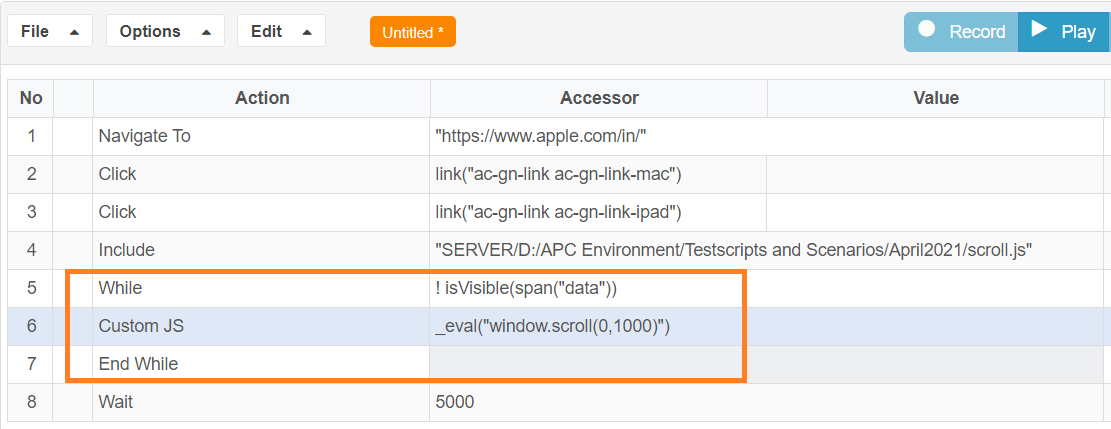
IDE as new step using customJS as action- just followingthat thenormal javascript execution.Another Alternate for scrolling would be to check ifexpected elementis visibleornot and then based on that scroll can be done until that elementcontent is visible.isVisible - Capture
conditionoutputtakesifsomethetimepagetocontinuescheck for visibility of element as there are lot of checks inside.So once can also use Element.wasNotFound() method to check for element’s foundloading ornotthedirectly.target never appears.
Eg: span(“data”).wasNotFound()
Last updated: JuneSeptember 26,9, 20232026
If you have any feedback on this topic, please contact us at documentation@appvance.ai