
How to verify checkbox is checked/unchecked ?
Use if statement to verify if checkbox is selected or not. Based on condition specified in if statement user can select or unselect checkbox.
Below is code snippet:
Select: (!(isChecked(checkbox(0,_near(label("Under $10.00")))))) returns true and click checkbox to select
Unselect: (isChecked(checkbox("order_use_billing"))) returns true and clicks on checkbox again to unselect
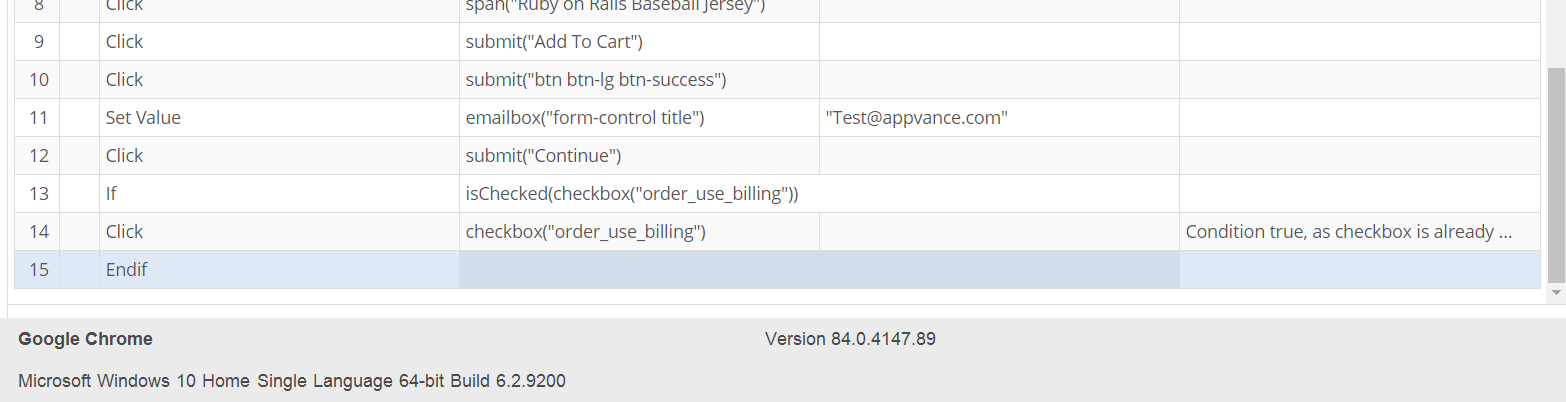
To verify checkbox is select and donnot unselect:
! (isChecked(checkbox("order_use_billing"))) returns false and verify checkbox is checked.
Last updated: July 28, 2023
If you have any feedback on this topic, please contact us at documentation@appvance.ai