
Data-Enable HAR Scripts in AIQ
Data-Enable HAR Scripts in AIQ
Data EnabingData-enable HAR scripts foronly Web:
Appvance IQ implementswhen a Datamaintained ProductionHAR Libraryworkflow (DPL)needs controlled runtime values such as anURLs, extensibleusers, frameworktokens, toor providerequest operationalparameters.
Recommended guidance
- Use approved test data
tosourcestestandscriptnon-productionrunnersvalues. - Parameterize
atonlytestvaluesruntime.thatThemustDPLvaryframeworkbetweenisruns. - Avoid
generallogging secrets, cookies, or tokens inthatshareddataoutput. - Prefer
maycurrentbeServiceinputSuitefrompatternsawhenvarietytheyofprovidesources,betterincludingmaintainability.
Validation relationalworkflow
- Identify
comma-separated-valuedynamicfile, and data generating objects. A DPL also provides a safe way to store data between test steps. Appvance IQ comes with pre-built DPLs and makes it easy for software developers to add their own custom DPLs.In our case we will be using "CSV" data sheet to data enable in HAR script.The steps that needs to be followed while data enabling HAR scripts are as below:1) Record the script with username and password on chrome browser and save the script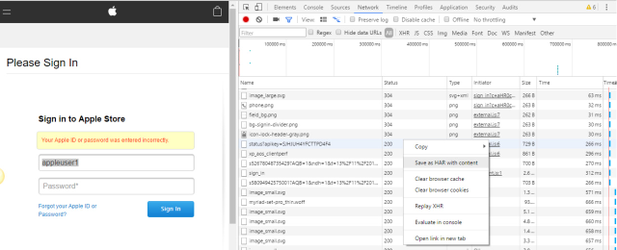
2) Open the saved script and search for the username/password you have enteredvalues in theurlHAR. - Map them to approved test data or DPL fields.
- Run a small validation execution.
- Review requests, responses, and
createoutputabefore.CSV sheet with the entered username and password as header in CSV sheet and give desired number of usernames and password below the headers.For Ex:If I have used appleuser1 as the Username and appleuser@123 as the password. Then we need to replace the appleuser1 and appleuser%40123(please see below instruction for any special character used in the password) in the HAR script which will be used as Header in the CSV sheet.scaling.
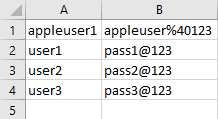
Also make sure if there are any special characters in the password we need to replace it with corresponding value with respect to HAR script
For ex:1) ! = %212) @= %40NOTE:If the Password is appleuser@123 the entry in the csv sheet should be appleuser%40123For more information on the special characters and the corresponding value to be used in the script, see Special Character value to be replaced in HAR script.
3) We can upload the .HAR script and .csv sheet in Appvance Scenario Builder.
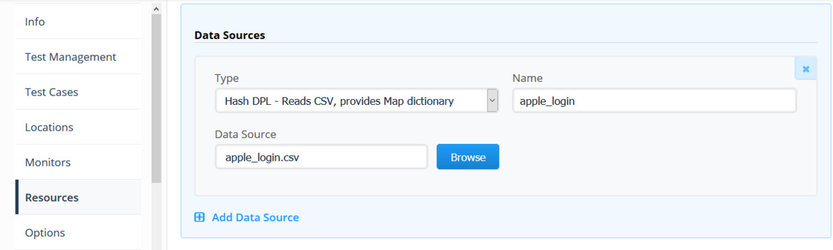
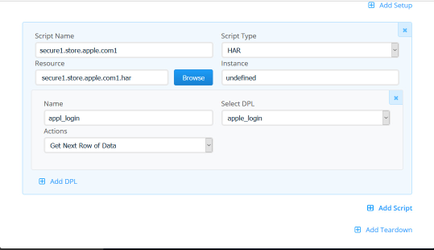
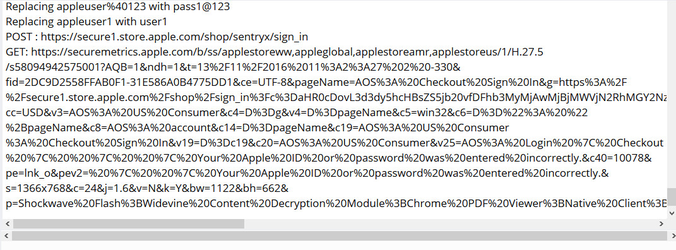
Choose the Script type as HAR and name the testChoose the HAR script and selectUpload the CSV sheet in Resources Tab and choose the Action as "Next row of Data" by clicking Add DPL in Test Cases tabSave and play the scenario4) Check the script execution in IQ controlleryou can also monitor if the script is replacing the appropriate values through the Appvance IQ controller by Clicking on Test case(s) Executions and select the result and click Output.
Last updated: JuneSeptember 26,20, 20232026
If you have any feedback on this topic, please contact us at documentation@appvance.ai