
Appvance IQ Jenkins plugin configuration example
ConfigureAbout Jenkins Integrationplugin configuration example
Information within illustrates how to configure and run scenarios from Jenkins
Applicable forUseboth Jenkins integrationinstalled locally as well as in the cloud, such as using Cloudbees-Jenkins
Local Jenkins Install Prerequisites
For example: -Xrs -Xmx256m -Dhudson.lifecycle=hudson.lifecycle.WindowsServiceLifecycle -jar "%BASE%\jenkins.war" --httpPort=8081
Restart Jenkins
From a Windows Server machine, go to trigger,Server orchestrate,Configuration and select Restart Jenkins Service
 Click Save (Changes)
Configure Project to Point to Plugin
- If hosted by Appvance, select Git and enter https://gitlab.com/Appvance-Public/Jenkins-Plugin.git in the Repository URL box
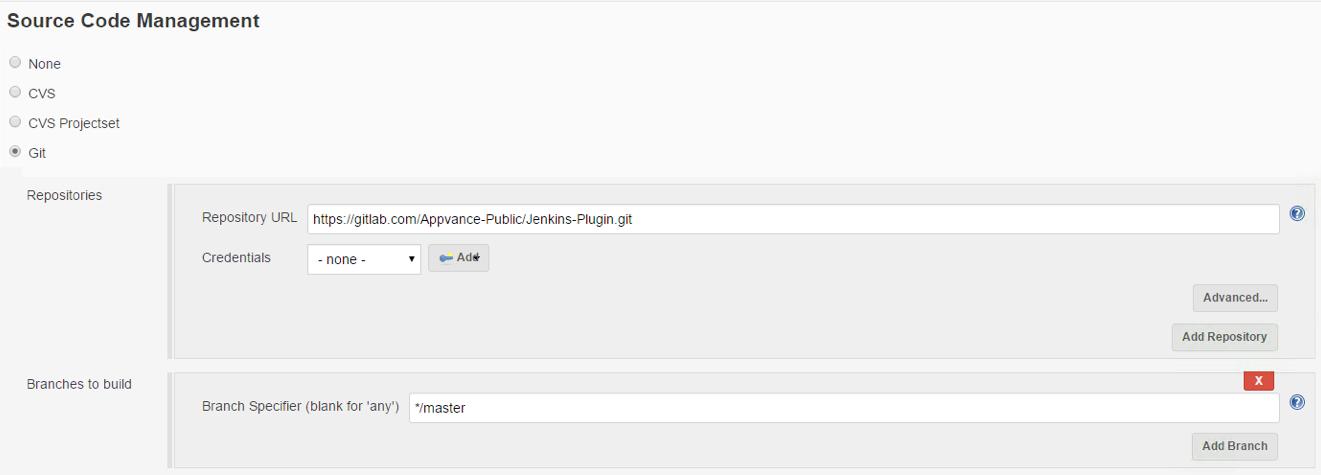
NOTE: Please make sure to install git on the machine where Jenkins is installed, once installed please restart Jenkins service.
Download git from https://git-scm.com/downloads based on your operation system.
- If self-hosted
- Select your source code management provider and enter the URL to your hosted plugin in the Repository URL box
Configure Scenario to Run
ServerURL=<urlToAppvanceUTPServerIncludingPort>
Path=REPOSITORY/<pathToScenarioFileIncludingScenarioNameAndFileExtension>
Username=<appvanceUserName>
Password=<appvancePassword>
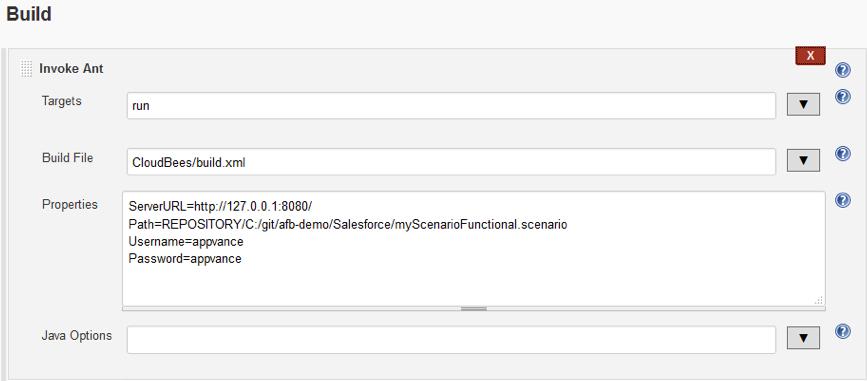
Notice the Path value contains REPOSITORY. Using the cloud version of Jenkins, users should specify scenarios available from a
Recommended guidance
Use approved credentialsSVN ortokenGIT)
Tomanagement.run scenarios using local files, Jenkins must be installed on a local machine, after which local paths can be specified in place of REPOSITORY paths using SERVER.
Running a Scenario
Appvance IQ logging, and executiona profileURL values.
Validation workflow
Configure the Jenkins job with approved parameters.Run a non-production validation build.Confirm AIQ execution or integration output.Document failures with Jenkins build URL, AIQ execution ID, andlogs.
Last updated: SeptemberJune 20,26, 20262023
If you have any feedback on this topic, please contact us at documentation@appvance.ai