
Formulas for Total Hits
Formulas
This calculatingarticle explains how Total Hits, Total Throughput, Average HitsHits, and Average ThroughputsThroughput are calculated in the Iteration summarySummary reportsreport.
ThisThese articlemetrics talksprovide information about calculationthe number of Totalrequests Hits,generated during a test and the amount of data transferred.
1. Total Throughput,Hits
Total Hits represents the total number of requests generated during the test.
Formula:
Total Hits = Total RequestsFor example, if the test generates 125 requests, the Iteration Summary report shows:
Total Hits = 125Note: A single user action can generate multiple HTTP requests. Therefore, Total Hits does not necessarily represent the number of test steps or user actions.
2. Total Throughput
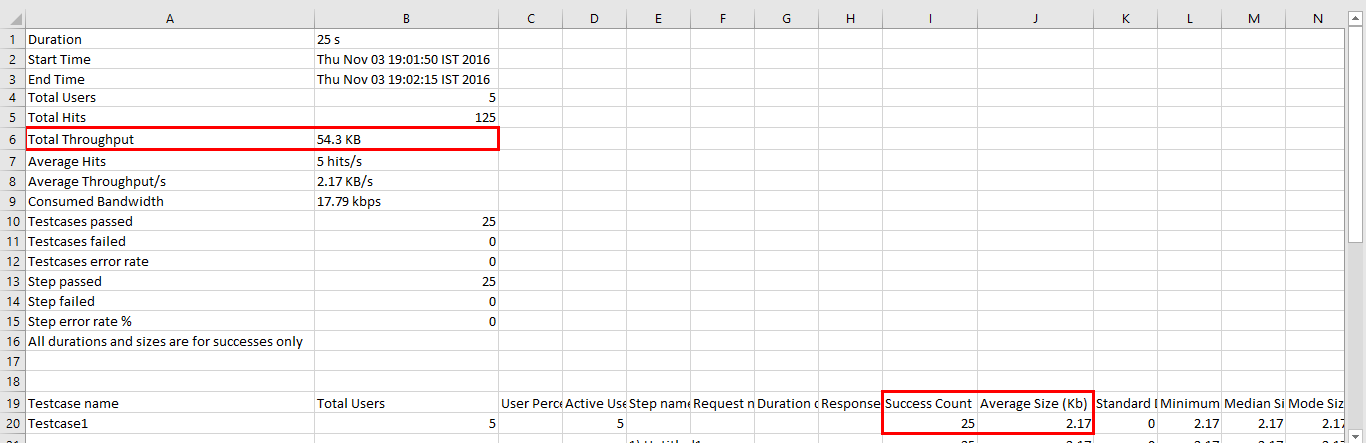
Total Throughput represents the total amount of data transferred by successful requests during the test.
Formula:
Total Throughput = avgSize × successWhere:
- avgSize = Average size of the response/request data, in KB.
- success = Number of successful requests.
Example
Assume the following values:
Average Size = 2.17 KB
Successful Requests = 25
The Total Throughput is calculated as:
2.17 KB × 25 = 54.25 KBTherefore:
Total Throughput ≈ 54.3 KBThe result represents the total volume of data calculated from the average size and the number of successful requests.
3. Average Hits
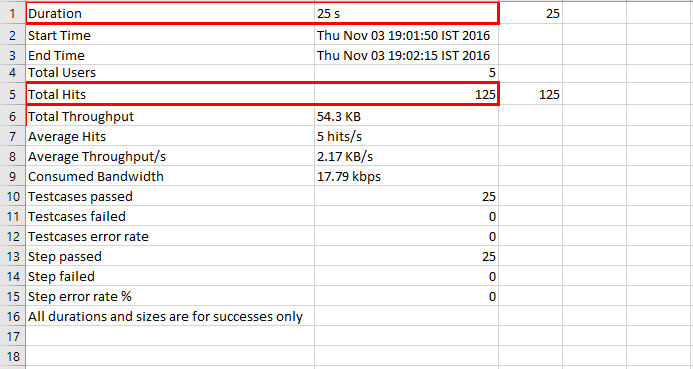
Average Hits represents the average number of requests generated per second during the test.
Formula:
Average Hits = Total Hits / Test Duration in secondsExample
Assume:
Total Hits = 125
Test Duration = 25 seconds
The Average Hits and Average Throughput/s in the Iteration summary reports.is:
125 / 25 = 5 hits/s1.Therefore:
Average Hits == Total5 request.hits/sThis 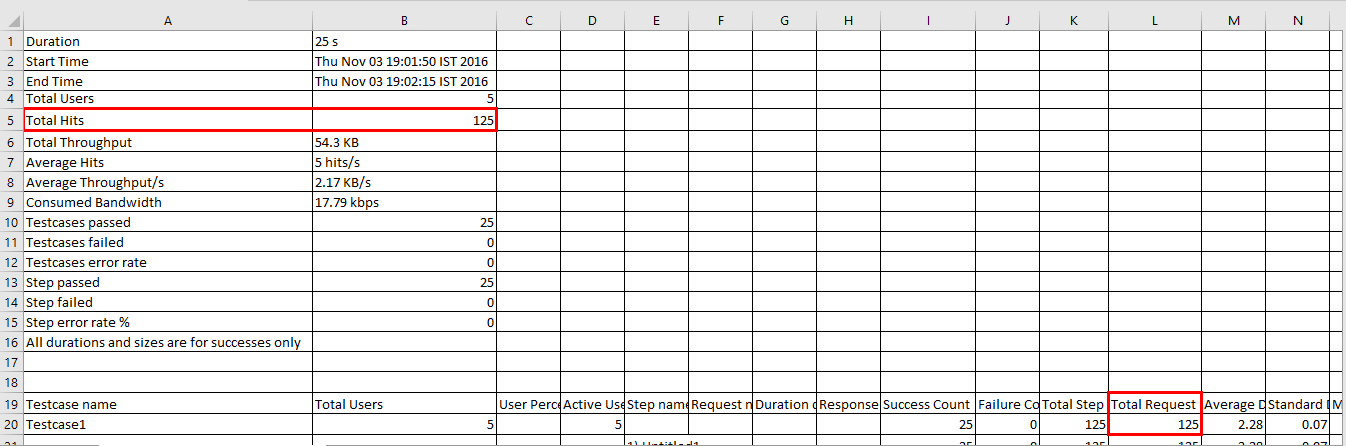
2.the Totaltest Throughput:
Formulas: TotalThroughput = (stepSummary.avgSize * stepSummary.success)
Ex: ifan average sizeof is5 2.17requests andper successsecond count is 25 thenduring the Totaltest Throughput =2.17*25= 54.3 KBduration.
3.Average Hits:
Formula: Average hits = total hits (requests) / Duration of test in secs
Ex: If total request is 125 and Duration of test in sec in 25 sec thenNote: Average Hits=125/25is=5anhits/s.average value. It does not mean that exactly the same number of requests was generated every second.
4. Average Throughput:Throughput
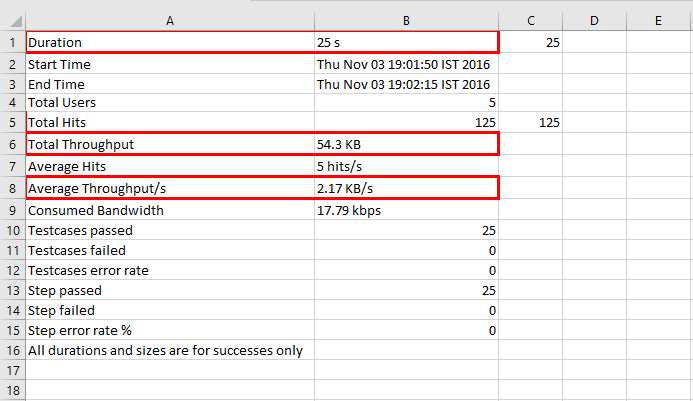
Average Throughput represents the average amount of data transferred per second during the test.
Formula:
Average Throughput = Total throughputThroughput / Test Duration in kbsecondsExample
Assume:
Ex:
Total throughputThroughput in kb is= 54.3 KB
andTest Duration of= 25 seconds
The Average Throughput is:
54.3 KB / 25 seconds = 2.172 KB/sTherefore:
Average Throughput ≈ 2.17 KB/sThis means that the test intransferred secan inaverage 25secof thenapproximately 2.17 KB of data per second.
Summary
The following table summarizes the metrics and their formulas:
Metric | Description | Formula | Unit |
|---|---|---|---|
Total Hits | Total number of requests generated |
| Hits/requests |
Total Throughput | Total data volume calculated from successful requests |
| KB |
Average Hits | Average number of requests generated per second |
| Hits/s |
Average Throughput | Average amount of data transferred per second |
| KB/s |
Complete Example
For a test with the following results:
Total Requests = 125
Successful Requests = 25
Average Size = 2.17 KB
Test Duration = 25 seconds
The metrics are calculated as follows:
Total Hits
= 125 requests
Total Throughput
= 2.17 KB × 25
= 54.3 KBAverage Hits
= 125 / 25
= 5 hits/sAverage Throughput
= 54.3 / 25
= 2.17 KB/sTherefore, the Iteration Summary metrics would be:
Total Hits           = 125
Total Throughput     = 54.3 KB
Average Hits         = 5 hits/s
Average Throughput   =54.3/25 =2.17 KB/s.
Last updated: MarchSeptember 13,1, 20232026
If you have any feedback on this topic, please contact us at documentation@appvance.ai.