
Link Jenkins Jobs for AIQ Workflows
Link Jenkins Jobs for AIQ Workflows
HowLink toJenkins createjobs linkingwhen an AIQ workflow requires a controlled sequence, such as build, deploy, test execution, and report collection.
Recommended guidance
- Use explicit parameters between
differentjobsjobsinstead of hidden environment assumptions. - Fail fast when an upstream job fails or
projectsproduces invalid artifacts. - Record build URLs and AIQ execution IDs for traceability.
- Avoid passing secrets through plain-text parameters or logs.
Validation workflow
- Define the upstream and downstream job responsibilities.
- Pass only required parameters or artifacts.
- Run a validation chain in
Jenkins.aFornon-productionourenvironment. - Review
learning purposes, we have created two small jobs named ‘Job 01’logs and‘JobAIQ02’outputinbeforeJenkins server: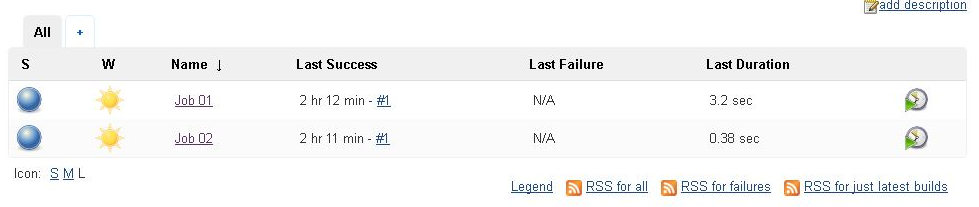
In order to this, let’s go to job 02 and select configure from dropdown: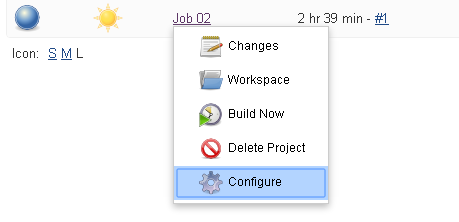
Now go to ‘Build triggers’ and select ‘Build after other projects are built’. Under ‘Projects to Watch’ to select ‘job 01’: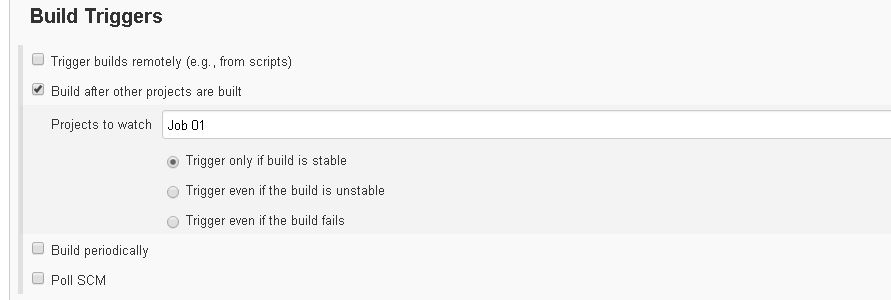
Let’s select ‘Trigger only if build is stable’ so that ‘Job 02’ is executed only when ‘Job 01’ is successfully completed. After this, select save and apply. Now when you build ‘Job 01’ and seeusing thelogchainoutput,foritscheduledshould be something like this: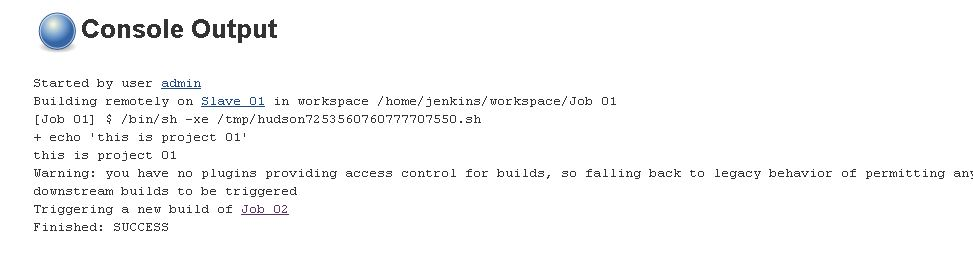
runs.Last updated:
JuneSeptember26,20,20232026If you have any feedback on this topic, please contact us atdocumentation@appvance.ai