
How to link 2 jobs in Jenkins
Link
How to create linking between different jobs or projects in Jenkins. For our learning purposes, we have created two small jobs named ‘Job 01’ and ‘Job 02’ in Jenkins Jobsserver:
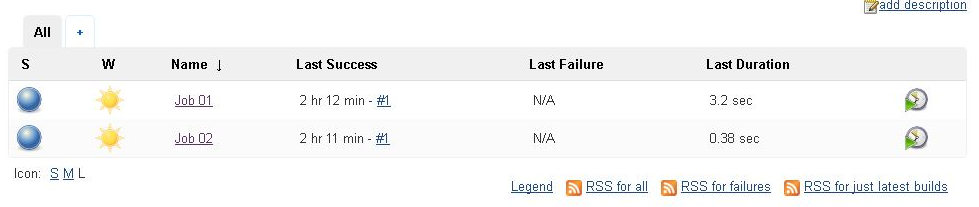
LinkIn Jenkinsorder jobsto this, let’s go to job 02 and select configure from dropdown:
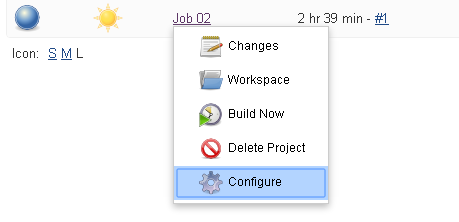
Now go to ‘Build triggers’ and select ‘Build after other projects are built’. Under ‘Projects to Watch’ to select ‘job 01’:
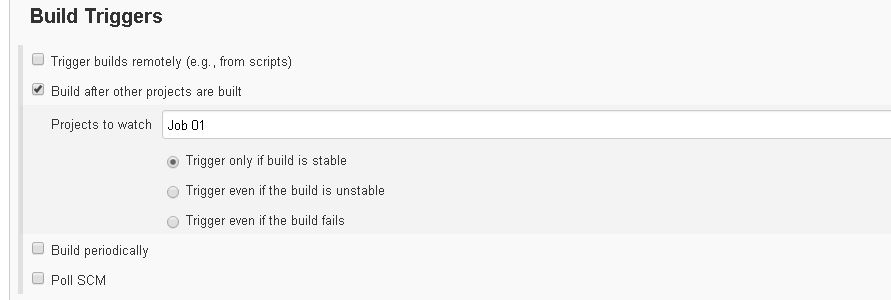
Let’s select ‘Trigger only if build is stable’ so that ‘Job 02’ is executed only when an‘Job AIQ01’ workflowis requiressuccessfully acompleted. controlledAfter sequence,this, suchselect as build, deploy, test execution,save and reportapply. collection.
Recommended guidance
Use explicit parameters between jobs instead of hidden environment assumptions.Fail fastNow whenan upstream job fails or produces invalid artifacts.Recordyou buildURLs‘Job 01’ andAIQ execution IDs for traceability.Avoid passing secrets through plain-text parameters or logs.
Validation workflow
Definesee theupstreamlogandoutput,downstreamitjobshouldresponsibilities.Passbeonlysomethingrequiredlikeparametersthis:or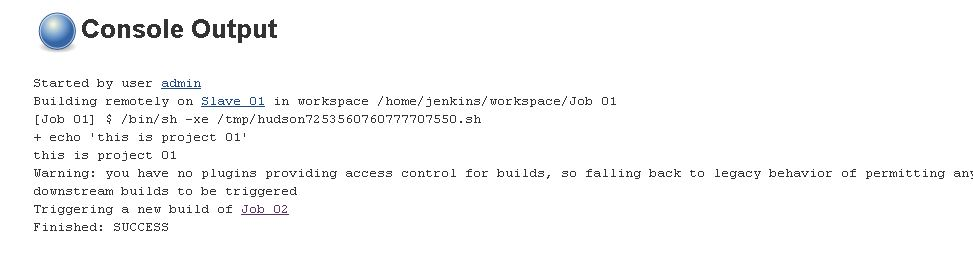
artifacts.Runa validation chain in a non-production environment.Review logs and AIQ output before using the chain for scheduled runs.
Last updated: SeptemberJune 20,26, 20262023
If you have any feedback on this topic, please contact us at documentation@appvance.ai